


Participant
July 25, 2026
Question

How do i get cycle layers to let me cycle between layers without hiding anything?

  • July 25, 2026
  • 4 replies
  • 28 views

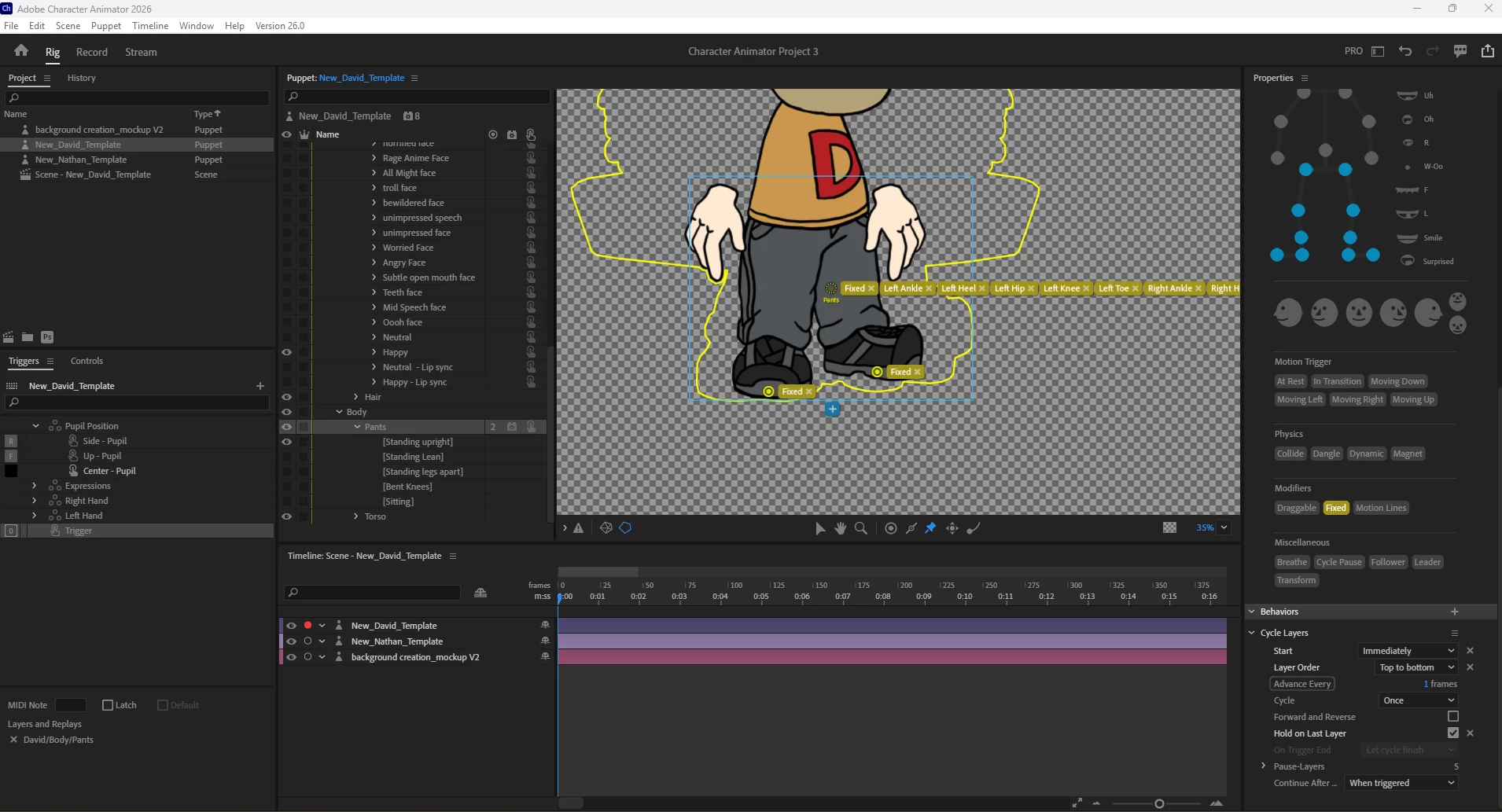
I have a body group with 2 subgroups titled "torso" and "pants" with pants at the top. Inside the pants group, i have 5 sibling art layers. (top)Standing upright → Legs apart → Lean → Sitting → Bent Knees(bottom)

I want to be able to press a single key so that the program will cycle through each version and only do so when I click that single key.

I almost have this down, but it’s not quite right. Here’s what I have:

  • I have the “pants” group set with a cycle layers behavior
  • I think took that pants group, and create a single trigger so that when I click “0” on my keyboard, it activates the trigger.
  • Then on each of the 5 art layers, I have “cycle pause” set up.


This makes it so that when I click “0” the puppet automatically toggles/switches from “Standing upright” being visible to “Legs apart” being visible. And if I Click 0 again then “Legs apart” being visible toggles/switches to  “Legs Leaning” being visible. So on and so forth.

The problem is that this setup is causing the legs to be invisible by default, and only by pressing 0 do the legs appear. So my character ends up with a floating torso by default which we don’t want. If we press 0 and get to the end of the layers list, it goes back to the legs being invisible. If we check the box for “forward and reverse” it still goes back to the legs being invisible once we get to the beginning of the layer order. And last but not least, checking the box for “hold on last layer” breaks it entirely because it causes it to only toggle on/off the very last layer whenever I press 0. 


 In theory this should be a simple continuous cycle layer loop. Press 0 to go from Standing upright → Legs apart → Lean → Sitting → Bent Knees and then right back to Standing upright → Legs apart → Lean → Sitting → Bent Knees and never letting the images jump to an invisible/hidden version. To anyone out there, please help! Be the Obi-wan to my Leia, for you are my only hope!


Image attached should show my current configuration
 

4 replies

Tips4LovingLife
Participant
August 5, 2026

I am new here, and I see I have two answers for the same question, which was not what I intended. Sorry!

So hopefully this answer will clarify things.

In a swap set, the default layer should have everything you want to see before a trigger is clicked. That might mean you have a selected set of legs in it, which might be a duplicate of an image you have in your trigger layer.

When you press your trigger, everything will show up as you planned (torso and legs together). When you press your trigger a second time, the image in the default layer shows up. If there are no legs in the default layer, they will not show up.


Tips4LovingLife
Participant
August 4, 2026

First, set up a cycle layer (call it “all legs”) on your group of legs. After you test it, set the cycle layer to “when triggered”

Next, make a swap set that contains two layers.

The top layer of the swap set will be the default layer. This is what you want seen all the time, unless you invoke the trigger to remove it.

The second layer (“all legs”) is the layer that contains the cycles. Assign a trigger character and set the layer to “latch.”

Now, when you run your animation, press the trigger character and your legs will run the cycle. Press it again, the cycle stops and the default returns.


NOTE: Sometimes you need to turn  Character Animanitor off, then on again to clear your computer’s memory.


Tips4LovingLife
Participant
August 3, 2026

Hi - I actually haven’t read through your request closely. Instead, I’m sharing a few work arounds.

The first is about setting a trigger. You need a swap set with at least two states, an on (the default) and an off (a different action). The on would be whatever you want seen without calling a for a trigger. The second is what you want seen after you invoke the trigger.

You’d put your cycle layers in the second. In the cycle layers setting, you’d select to only “show when triggered.”

As for on top or below, you do this by putting the top layer above the middle layer and the below, under the middle layer, resulting in 3 different layers.

Last, you can get very very creative using triggers, but I’m not going to go into that now. I hope what I posted helps a bit . . . tip: When setting up your swap set, the first thing (the default) should be what you want to see, the second, what you want to change it to. Set the second (and third and forth) to “latch.”
 

TheOriginalGC
Community Expert
Community Expert
July 27, 2026

If I understand correctly, you are using cycle layers sort of like a swap set, but with a trigger that allows you to determine the rate at which the poses transition from one to another? I’m having difficulty visualizing exactly what you are trying to do, especially seeing that you appear to have most of the tags for the lower body on a single node. If you are not relying on the rigging for manipulating the legs, perhaps you don’t need those tags at all? Like I said, I’m having a bit of trouble understanding what you are trying to do.