


How to attach masked mustache / beard to face parallax?
Hi, I've got a character where i've set up face parallax following this video - The Head and the Left Ear have their own head behaviours applied.
All of it works just how I want, but my character has a beard I want to move along with the mouth parallax, but I also want it to be masked to the face so when my character turns, more or less of the beard is revealed. I've tried...
- Grouping the beard and applying the mouth tag. It seems like Ch recognises only one instance of the mouth tag, whichever comes first in the layer hiearchy, which I need for the actual mouth.
- Putting the beard group inside the mouth group like this
+Mouth
>Beard group
>Neutral
>Surprised (then all the other mouth shapes etc etc)
This doesnt work because i think Ch assumes the beard is another mouth shape that it should switch between for the lip sync so it doesn't appear by default.
- Then I tried this:
+Mouth
>Beard group
>Mouth
>all sublayers containing mouth shape layers
This worked the best, putting my mouth group as another sublayer in the main mouth group, and then a beard group on top of that, but when I tried using the clipping mask on the beard, the mask would also move along with the parallax- i need the mask not to be affected by the parallax, but the beard should be affected by parallax.
Is there any way to do this? Unfortunately I can't share the project file as this is client work however i can send screenshots via dm if I need to.
The beard looks a bit like my crude drawing here:
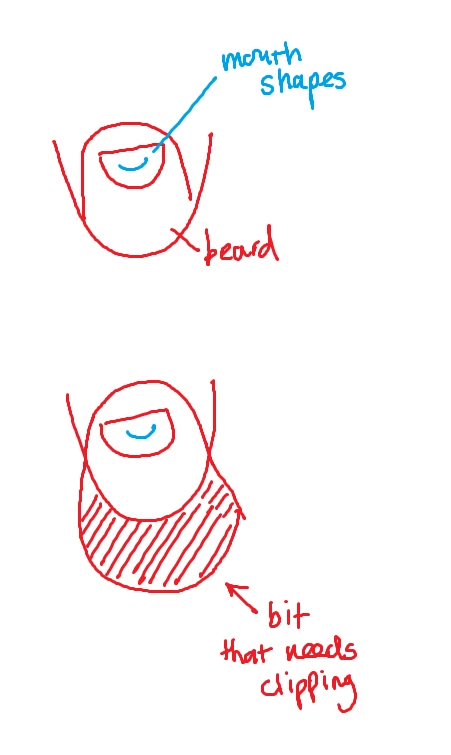
Thanks for any help!
 AdChoices