You have it 99% correct. The problem is your pupil is the same size as the eye white, and the eye white is marked with the "pupil range" tag. There are two steps I think you will need to do.
1. Add an additional layer with an elipse bigger than the eye white. Call this layer "Left Pupil Range". I have included the layer below to make it clear (with 50% opacity), but normally you would hide it so its not visible. This layer is then how you can control how far the pupil can move.

2. If you look at the image above however you will see that if the pupil can move further than the eye white (err, I should have said the easiest approach is just to shrink the pupil, but then the puppet would look different!). There is another feature in CH called "clipping" in the menus (select a layer and select "Create clipping mask" from the puppet menu). It is common to clip the pupil using the eye white - just make sure the eye white is below the pupil (which you already do).
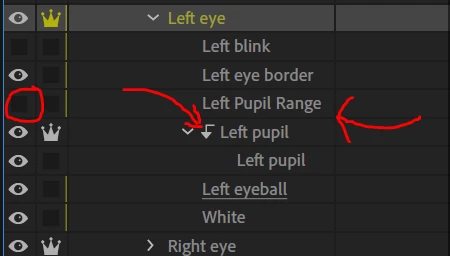
So, add a Left Pupil Range, hide it, then add a "clipping mask" to the pupil layer - then it works fine for me.




 AdChoices