

callhimkia
Participant
Apr 26, 2022 7:30 PM UTC
Answered

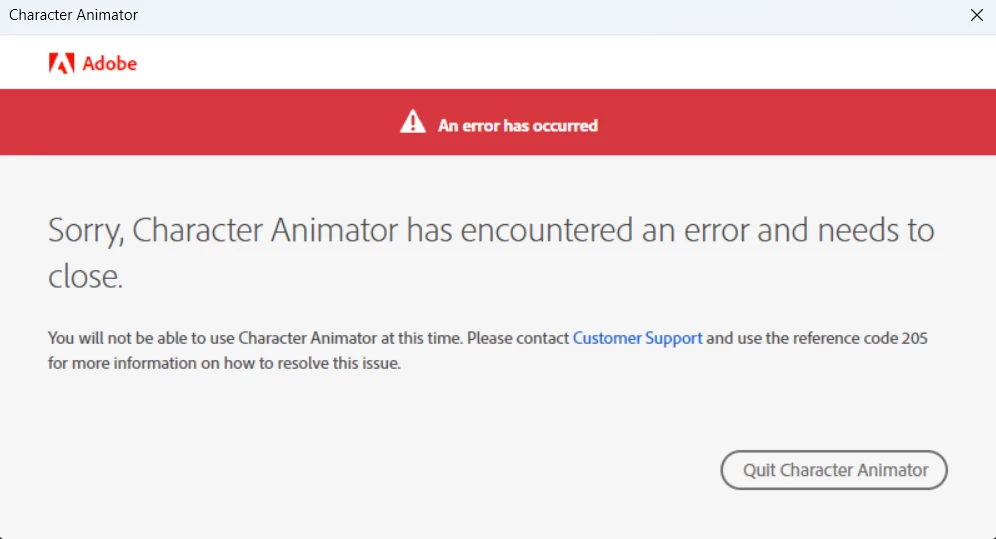
I keep getting error code 205 when launching Character Animator on Windows 11. How can I fix this?

A screenshot is here.

callhimkia
callhimkiaCorrect answer
Participant
Apr 26, 2022 7:31 PM UTC

UPDATE: App is unlicensed. I literally paid for Creative Cloud All Apps. I will try re-logging in to CC.

9 replies

Participant
Nov 2, 2025 12:05 AM UTC

I'm having this problem. I don't care I want it off my computer, but of course there's another error prevetning my from signing in to remove the programs. for such a premium you'd think the software would work. Oh,. and you need a premium subscription to get support. disgraceful. 

Translate
iGeeky
Participant
Aug 13, 2022 3:41 AM UTC

I've been having the same problem on Windows 11 with error code 205 for the last 6 months, it's definitely not a licensing issue as all my other apps work perfectly. Adobe, please can you fix this issue ASAP...

Translate
CoSA_DaveS
Participating Frequently
Oct 7, 2022 12:41 AM UTC

Sorry, I was away from work for a long time; just catching up now. Was your problem resolved back in August? I hope so! If so, please share exactly how, so others can benefit. If not, let’s figure it out.


I’ve seen others solve error 205 by signing out of Creative Cloud desktop app, rebooting, and signing back in again.

Translate
Frank Asciutto
Participant
Aug 5, 2022 7:49 PM UTC

I'm getting the same error today. Win 11.  I'm fully licensed and all of the other CC apps work.

I'm sure it's an Adobe problem.

Translate
Participant
Jul 17, 2022 9:11 PM UTC

Translate
Participant
Jul 17, 2022 9:12 PM UTC

i paid for all app the same problem in windows 11 adobe fix our problem Pls

Translate
callhimkia
callhimkiaAuthorCorrect answer
Participant
Apr 26, 2022 7:31 PM UTC

UPDATE: App is unlicensed. I literally paid for Creative Cloud All Apps. I will try re-logging in to CC.

Translate
CoSA_DaveS
Participating Frequently
Jul 19, 2022 12:44 AM UTC

Did that work? If not, check to see if any other app that’s part of All Apps is working. That will help narrow down the problem. Contacting customer support is the best way to resolve these types of account issues.

Translate
callhimkia
Participant
Nov 6, 2022 5:15 PM UTC

It worked.

Translate