



Incorporating External Edits shuffles folder contents
I've got a workflow wherein I edit really large puppet files in PhotoShop, Save As, scale down and then import the smaller, more processor-friendly file into Character Animator. That works fine except when I want to make revisions, I'd like to make them to the large Ps file then save it with the exact same name as the smaller file (saving over the previous version) and then have Ch incorporate those changes as if it's the same file it has been working with.
I've been able to make revisions to the smaller file in PhotoShop and see those happily incorporate. But when I try the large file to small file and then incorporate path, Character Animator shuffles the grouping folders wreaking all sorts of havoc.
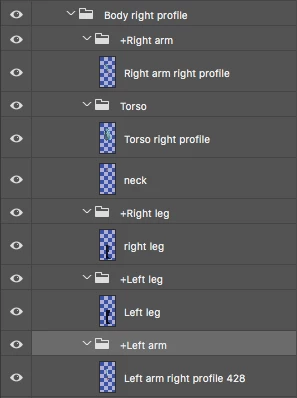
So, to illustrate, here is a partial layer structure in PhotoShop:
Here's how it translates in Character Animator:
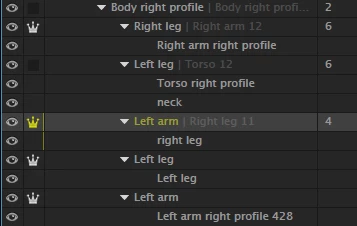
Note that the Right leg folder has moved to the top, but still contains the Right arm layer. This is not a renaming of the folder—the tags for Right leg are still applied, only now they are acting on the right arm:
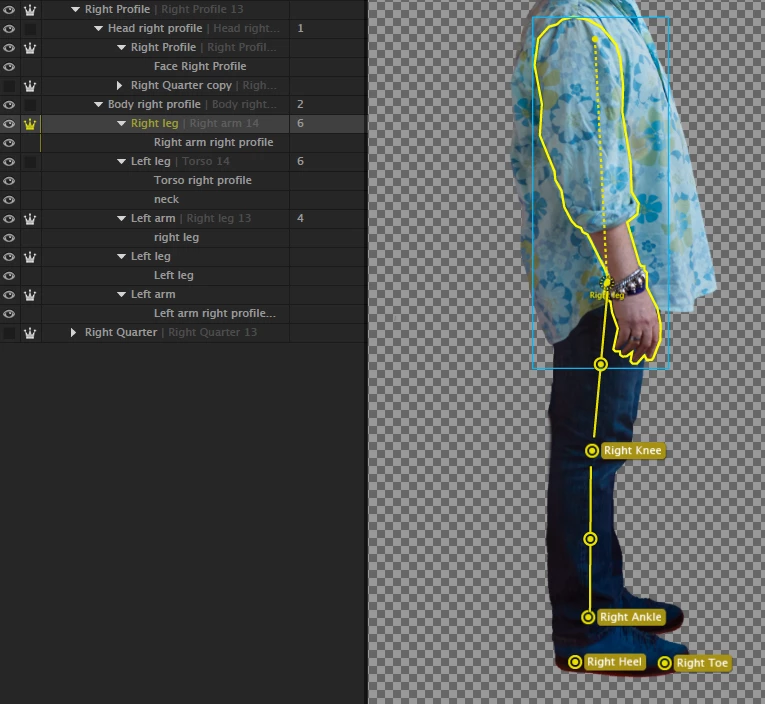
The left leg folder with its accompanying tags now holds the torso and a left leg folder that has no tags now contains the left leg. All the folders are now wrong, but, hopefully, you get the idea.
As you can imagine, this all adds up to some pretty amusing (though frustrating) walk behavior.
Is this a bug, a user error or am I expecting too much out of this still new—and terribly impressive—piece of software?
Martin
 AdChoices