
Participant
May 9, 2022
Answered

Installation works fine, opening all good - but cannot load any figures

  • May 9, 2022
  • 1 reply
  • 419 views

Hi there !


I use the creative suite, and wanted to try the cool Character Animator masterpiece.

It opens up normal , loads the screen with all the models and even the custom set

for an avatar seems to work. I come as far as the rendering window.

It will create many pictures but not open anything afterwards; only showing:

Error in Ch-Version 22.3x65  , and for example "Thorne.ai" could not be accessed.
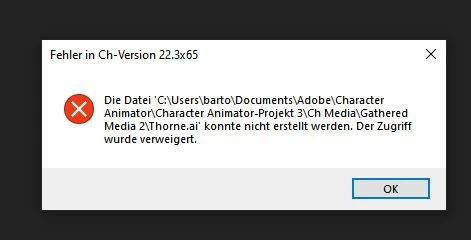
I reinstalled everything like 5 time by now - restarting the computer,

updating the graphics card driver and cleaned all the junk with AntiMalwareBytes.


What is going on? Why does the program not let me in and try?


Thanks my friends all over the world. I am very good at photography; so if anyone has any questions- always welcome. But Adobe support, I am helpless 😞

This topic has been closed for replies.
Correct answer alank99101739

Is your documents folder in OneDrive or anything like that? Try creating your project somewhere new, like C:\Adobe (create a new directory) just to see if it helps. Cloud backup software can conflict with Character Animator as they both can fight over access to files. CH frequently wants exclusive access or it throws a tantrum. But cloud backup software, if running, might see a file change then go try and grab exclusive access so it can make changes - then complain because the cloud software grabbed an exclusive lock request as well.

1 reply

Participant
May 9, 2022

sadly I don't get beyond this point here.  :-((((

alank99101739
alank99101739Correct answer
Legend
May 10, 2022

Is your documents folder in OneDrive or anything like that? Try creating your project somewhere new, like C:\Adobe (create a new directory) just to see if it helps. Cloud backup software can conflict with Character Animator as they both can fight over access to files. CH frequently wants exclusive access or it throws a tantrum. But cloud backup software, if running, might see a file change then go try and grab exclusive access so it can make changes - then complain because the cloud software grabbed an exclusive lock request as well.

Participant
May 10, 2022

fun fact first: i don't use any form of remote storage


but: I upgrade your rank from legend to genius.


your input helped and saved my day - or let's put it this way: you allowed me to get creative 🙂


big big thanks !!!