


IanD101
Inspiring
December 2, 2018
Answered

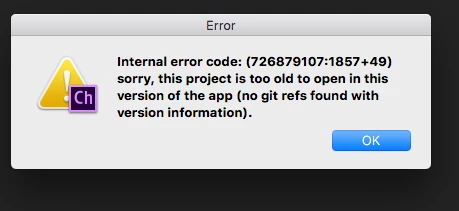
Internal code error: Project too old

  • December 2, 2018
  • 1 reply
  • 1376 views

After a 1 week break from CH, I went to open my project that I've been working on all year and my .proj file will not open.

I get the message 'Internal code error: Project too old to open this version of the app'. My previous files from Time Machine have the same error.

When I try opening my backup files I manually created on my disc, they simply act like they open like a ghost file. No error but no files showing. This happens on all of my back ups. I even created a new project from a few puppets I saved but the project doesn't save at all even though it looks like it did. This project will reopen in CH until I try opening my original project, and then its gone and nowhere to find the file.

The only thing weird that happened this week is that my Mac forced me to update on restart and it didn't look like a normal update. The computer had a loud long beeping sound and the update screen went enlarged. I am now on OS 10.13.6

I have tried opening in both the original 1.5v and 2.0v

Has anyone have this happen before and is there a fix out there? All of my files are in iCloud

Thanks,

Ian
This topic has been closed for replies.
Correct answer IanD101

Hi Ian --

This sounds like something got damaged in the Ch Data/refs/heads folder of the project. A few of the cases where I've seen this are ones were the computer crashed, lost power, or rebooted abruptly. I also saw one that seemed to be a file sync collision.

If you can send me a link where I can download the project (or if it is prohibitively large or has content you don't want to share, I really just need the Ch Data/repo.noindex folder), I bet I can get it fixed up. It'll also probably give me ideas for an automatic recovery mode feature.

Thanks,

DT

P.S. Thanks as always for throwing up a signal flare, Alan.


Thanks Dan for getting back to me so quickly.

Last night I reinstalled MacOS and everything seems to be working again. I think it had something to do with the last MacOS update that was loaded strangely. Although I haven't tested everything yet but I'm sure its all there.

I'm happy to send you any files if you want to look through them.

Appreciate your help.

Cheers,

Ian

1 reply

alank99101739
Legend
December 2, 2018

Hi DanTull​!

IanD101
IanD101Author
Inspiring
December 2, 2018

Hey Alank,

It’s Ian, not DanTull if that’s what you mean?

IanD101
IanD101Author
Inspiring
December 2, 2018

Got it! you're looking for some more help.

Thanks alank99101739