


jonnymackjackson
Known Participant
December 19, 2017
Answered

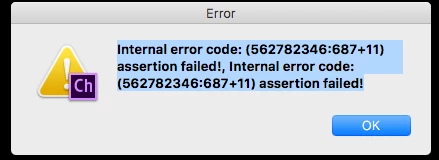
Internal error code: (562782346:687+11) assertion failed!

  • December 19, 2017
  • 3 replies
  • 1887 views

Duplicated a scene with nine puppets twice so I could separate them into different scenes. When I went to delete some of the puppets from the timeline, all the puppets disappeared from the timeline, but the recordings I made remained. And all nine puppets were still in the scene...couldn't delete them. I tried opening up the original scene, then opened one of the duplicate scenes--that's when I got this message

This topic is closed to new replies. Start a new post to keep the conversation going.
Correct answer oksamurai

Yikes yeah, seems like a bug. If you go back in your history panel to before the duplication and restart the app, does it work again?

3 replies

oksamurai
oksamuraiCorrect answer
Legend
December 20, 2017

Yikes yeah, seems like a bug. If you go back in your history panel to before the duplication and restart the app, does it work again?

jonnymackjackson
Known Participant
December 20, 2017

That worked, but I ended up starting over, so I'm abandoning that scene.

I realized after I'd already put all nine puppets into the one scene that I wouldn't have enough control over how the scene could be edited in Premiere. I thought I could duplicate it and delete some of the puppets in each scene--leaving three per scene. Another thing that could have triggered the error was that I duplicated the original scene once, deleted three puppets, changed the name of the scene and then duplicated the duplicate (rather than making two duplicates of the original).

oksamurai
Legend
December 20, 2017

Ah good to know - thanks for the steps. Yeah, personally I almost always do 1 puppet per scene and composite them later in AE or PR.