

mre8
Inspiring
October 13, 2017
Answered

Is scaling puppet a vector based process?

  • October 13, 2017
  • 1 reply
  • 758 views

When I scale a puppet (bigger), is this a vector based process? I can't tell visually if this is the case. When I scale up - for instance, to have the puppet's face fill the scene - the lines still look pretty good, but I'd like to know for sure.

I also wonder this because if I decide to make the dimensions of my scene 4K instead of 1920x1080, the scene gets bigger, but the puppet size does not adjust relative to that change. It is smaller in the scene, so I have to scale the puppet up.

Or, should I be increasing the size of the puppet in AI and relinking?

thx
This topic has been closed for replies.
Correct answer oksamurai

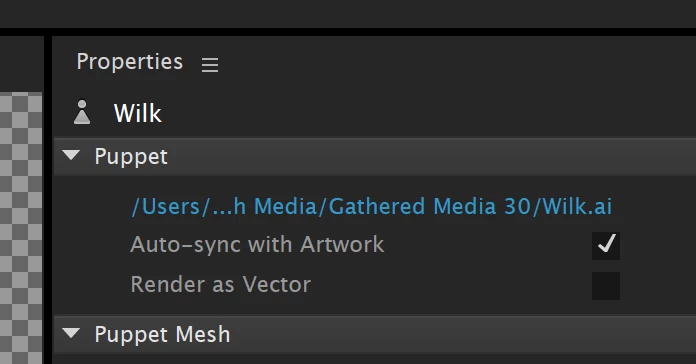
CH will render everything as raster unless "render as vector" on the right is checked. As long as that's checked, scaling will be fine with no pixelation. Once you dynamic link to AE or PR, however, it becomes rasterized at whatever size you have in your scene.

1 reply

oksamurai
oksamuraiCorrect answer
Legend
October 13, 2017

CH will render everything as raster unless "render as vector" on the right is checked. As long as that's checked, scaling will be fine with no pixelation. Once you dynamic link to AE or PR, however, it becomes rasterized at whatever size you have in your scene.

mre8
mre8Author
Inspiring
October 13, 2017

Great. What I plan to do is send to Adobe Encoder and export as quicktime png so i can retain alpha.

I will be importing that quicktime to Toonboom...where of course no dynamic link. I will create scenes in character creator at a much higher scale than the toonboom scene so that I can have the ability to zoom in on character with toonboom camera and not lose quality... (I'll just use toonboom to scale puppet down as needed...)

This being the case, "render as vector" only matters so that the puppet does not degrade when converted to the quicktime movie? OR does it not matter in my scenario? (I'm aware that after I convert to quicktime, I lose vector abilities... )

Thanks!

oksamurai
Legend
October 13, 2017

Right. For recorded or live, "render as vector" just means that things will still look good at 101%+ scale, regardless of how they're exported. I think it should be fine for your workflow.