

Participant
November 20, 2025
Question

Issue importing character artwork
  • November 20, 2025
  • 3 replies
  • 135 views

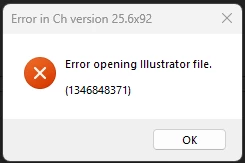
Help! I am working on a project and I am unabe to import any new artwork! I keep receiving this error popup when importing an illustrator file.

3 replies

Participating Frequently
March 7, 2026

I am having the same issue in two separate ways.

the first way: A student sent me a “.puppet” file, and I had walked her through how to fix up her rig. After that, I sent her a copy of the file I had edited. She could not import the new “.puppet” file and received this same error message.

The second way: I had a student send me an illustrator file, and I was walking him through cleaning up his layering. came time to import the artwork to ACA, and I received the same message.

What’s going on with Character Animator? I’ve never had this issue before, and now it’s constant.

I tried importing one of my own, older, Illustrator files that I never got around to rigging, and it worked just fine. Something about the files my clients and students are sending me is broken in a fundamental way that is making work very difficult. 

Participating Frequently
March 7, 2026

Playing around I may have discovered the issue. It may have something to do with imported artwork. When importing make sure the image is embedded and not linked.

Mrdust
Participant
February 12, 2026

I have the same problem. It is a normal .ai file. It worked before, but suddenly i got an error message when i made a adjustment in the .ai file. Nothing works.

TheOriginalGC
Community Expert
Community Expert
February 12, 2026

Don’t be too sure about having a “normal” .ai file. As I have mentioned before, there are some Illustrator effects that cause Character Animator to balk. Check to see if there are any clipping masks or layer effects that the program might have difficulty with.

TheOriginalGC
Community Expert
Community Expert
November 20, 2025

Could you provide a little more information? Is this a specific file, all Illustrator files or any file at all? When does the error message appear? If the problem is with a specific file, was the file created in Illustrator or a compatible program?

David25727707wpd6
Inspiring
January 29, 2026

I have been having the same problem recently. I get this message on almost ALL of my files when Importing. They all worked previously in earlier projects.

The file opens and works normally in Illustrator, but Character Animator fails to load it at all.

I think the problem is art that needs to be Rasterized before it can import. I have tried several troubleshooting methods. Isolating the art, using the Raster function (Object → Rasterize), then Save, and the Import works!

TheOriginalGC
Community Expert
Community Expert
February 2, 2026

I know that Character Animator has some difficulty interpreting certain Illustrator layer effects, which would definitely no longer be a problem when the layer gets rasterized.