


Participating Frequently
August 20, 2017
Answered

Joints "slip and slide" after posing and between transitions

  • August 20, 2017
  • 5 replies
  • 803 views

I am having a strange issue after rigging characters and posing them. Probably best to just post the puppet so people can dig in. Here's a google drive link that's shared.

CHA_Muldy_Profiles.puppet - Google Drive

Basically, I rig the character and work with posing and when I press play, his wrist joints slowly rotate into their natural position, like dangle, but no dangle. Here is a video of the issue (low res)

When I move his arms to a different position using dragger, his wrists seam to slowly find their position and rotate to a rest. The return time set to zero and Hold in Place option selected. I record a two frame take and arrange/expand it accordingly. Then I use the slider on the take to smooth its transition. Now whether I use the slider, or not, the wrist still behaves the same, both hands. Any suggestions on how to stop this from happening? I'd be happy with single poses, no movement between but the problem persists even then which seams strange, like I've got something tweaked wrong.

Also, When I start to mess with the parenting after completing his head movement performance, the warp independent gets tricky. It looks great to have his body slightly change with head movements, but I can't get certain parts to plant themselves where they should be, especially when adding motions from the head or body. For this puppet, his feet keep moving when the head moves, and when I staple them, they get wild. If I fix the bone in the foot, he loses the pose. So then if I turn off warp independent, his legs get paired on a mesh which makes them look unnatural when posed in a sitting position. Any thoughts?

This is all pretty new to me (Illustrator, photoshop and animation) and I started down the path with DUIK tools in AE. I found it great, but the options and tools Character Animator has are so much faster when done properly, and often adding helpful features (shout out to the walk behavior!) I am trying to keep it simple but extensive to expand the limitations of what I can do.

Thank you very much for your time. What you guys are doing with Ch is very cool, game changing in many ways. All of your videos and training are so very helpful. Thank you.

This topic is closed to new replies. Start a new post to keep the conversation going.
Correct answer oksamurai

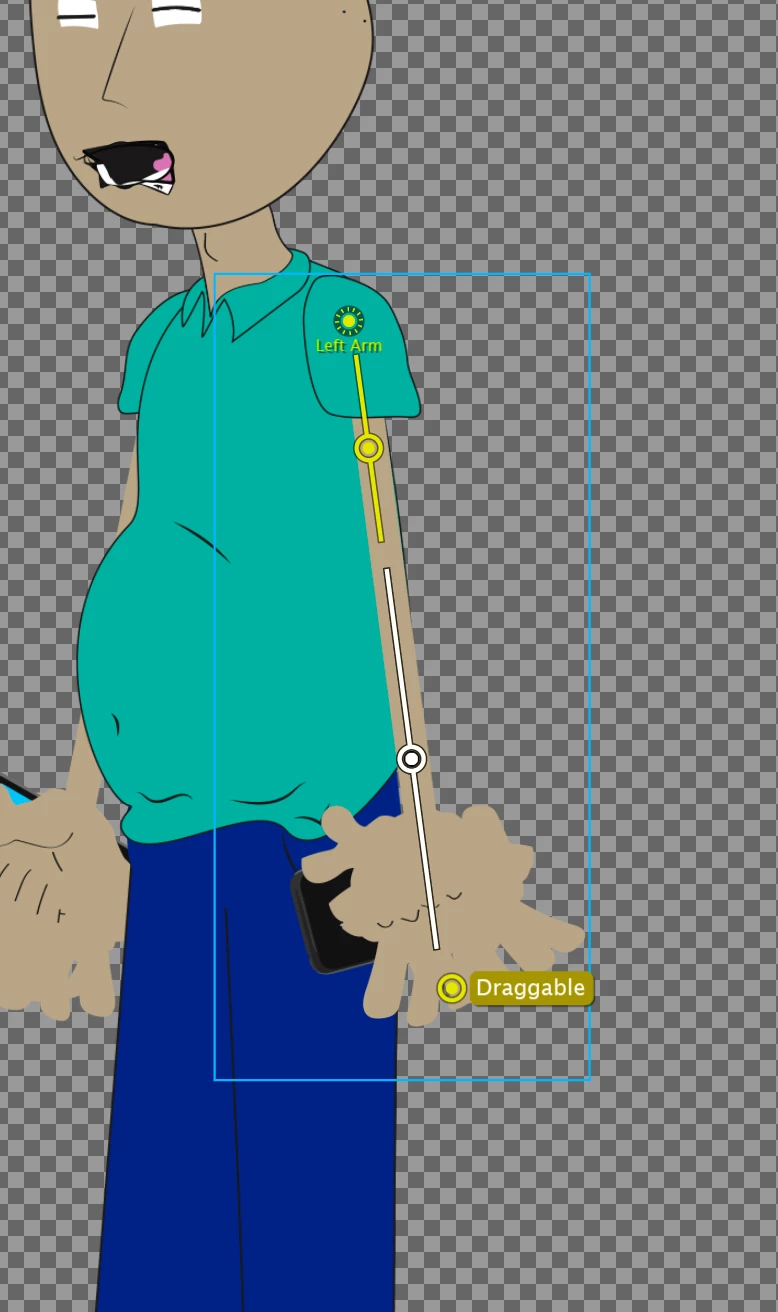
The slow move thing happens when the parts are trying to ease back into position sometimes. I'd try this type of rigging for the arm, which will keep the forearm and hand straight. Usually draggables are best as single handles at the extreme edge of what you want to drag.

And yes, independence can get tricky. My general feeling is to always start without independence and only add it in if absolutely necessary. We recommend not to add independence to the head and body groups. If a particular pose isn't working as is, then maybe it's worth recreating it as a triggered part swap.

So for example, if sitting with these current legs doesn't feel like it's working, you could have a "legs" group with standing and sitting groups inside it (all non-independent probably), and have it so standing is the default and sitting shows up when you press S or something. If the animation was fast enough, you could probably get away with posing the draggable legs in standing and swapping to the sitting position at the end. I haven't seen too many examples of people doing this yet with CH though, so you're charting some new territory!

5 replies

oksamurai
oksamuraiCorrect answer
Legend
August 22, 2017

The slow move thing happens when the parts are trying to ease back into position sometimes. I'd try this type of rigging for the arm, which will keep the forearm and hand straight. Usually draggables are best as single handles at the extreme edge of what you want to drag.

And yes, independence can get tricky. My general feeling is to always start without independence and only add it in if absolutely necessary. We recommend not to add independence to the head and body groups. If a particular pose isn't working as is, then maybe it's worth recreating it as a triggered part swap.

So for example, if sitting with these current legs doesn't feel like it's working, you could have a "legs" group with standing and sitting groups inside it (all non-independent probably), and have it so standing is the default and sitting shows up when you press S or something. If the animation was fast enough, you could probably get away with posing the draggable legs in standing and swapping to the sitting position at the end. I haven't seen too many examples of people doing this yet with CH though, so you're charting some new territory!

Participating Frequently
August 22, 2017

Thanks very much for taking the time to look into that. I appreciate the awesome advise and screenshot. For anyone dealing with similar characters, something you did with my rig was to simplify the bone structure and joints. I have definitely noticed that simplicity in rigging works best for artwork like this. I am going to try out some of this and try your swapping advise. If it works out, I will post the result! Thank you so much!