Platty Puss
Inspiring
December 29, 2020
Question

Keyboard Eyegaze now working

  • December 29, 2020
  • 1 reply
  • 528 views

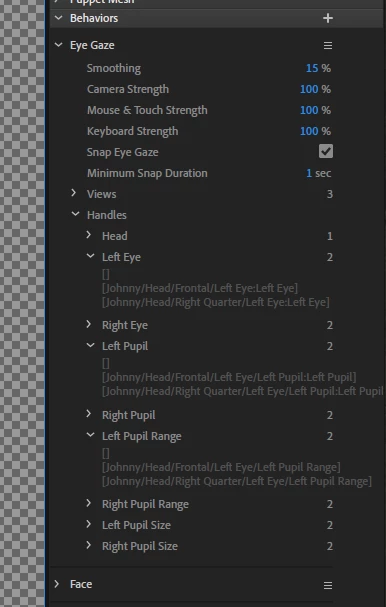
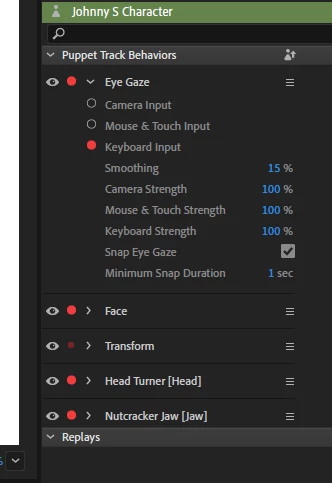
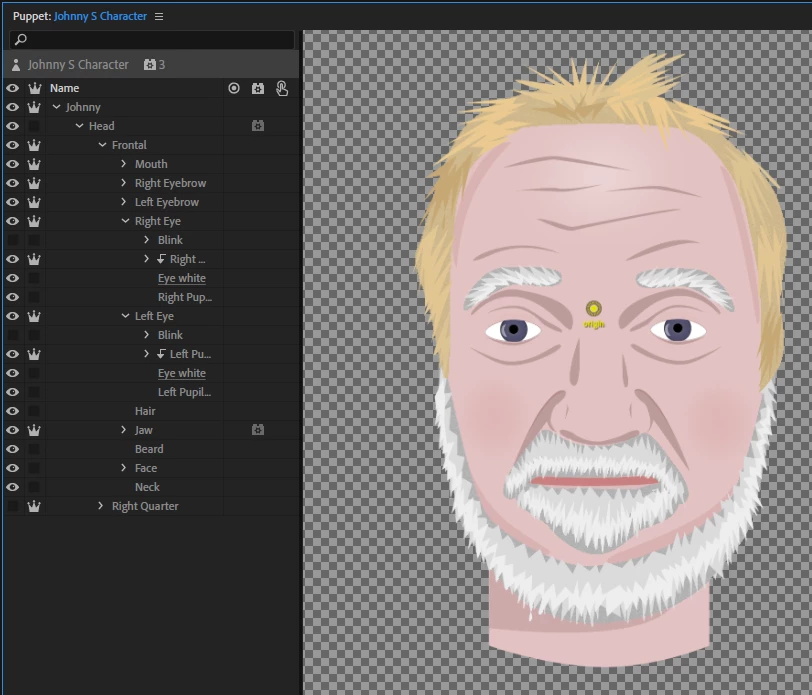
I have developed numerous puppets, but this one has me baffled. I have spent numerous hours comparing my working puppets to this one and I just can not get the eye gaze to work. Assistance is appreciated. Attached are some screen shots which I hope will help.


Thanks, Platty 
This topic has been closed for replies.

1 reply

alank99101739
Legend
December 29, 2020

Here is a first guess or thing to try - not sure if it will fix it. If you look at the behavior bindings, see how it ends with .../Left Eye/Left Pupil:Left Pupil (there is a colon there) but the pupil range does not? That means it bound to a handle in the layer, not the layer itself. Photoshop might introduce the extra layer (not sure!), but in illustrator that is usually bad. You want ch to move the layer, not the handle in the layer. So if there is a handle on those layers, try to delete them so it binds to the layer name instead (ends in .../Left Eye/Left Pupil).


I also test using the mouse as well - it allows small movements (eg turn off eye snap). I often do that with the yellow mesh on in the scene window. I watch to see if the mesh moves at all - does it twitch etc. Sometimes if gives a hint.


I assume the layers tagged as pupil range is larger than the pupil size tagged layer? Something to check for as well (check the yellow outline)

Platty Puss
Inspiring
December 29, 2020

Thank you Alan, I will give it a try in the morning. Have a great New Year.

Another "thank you" on behalf of us newbees for all the assistance you have rendered.


Be well fellow puppeteers - Platty