Participant
May 1, 2017
Answered

Left and Right profile not affected by walk cycle

  • May 1, 2017
  • 6 replies
  • 1627 views

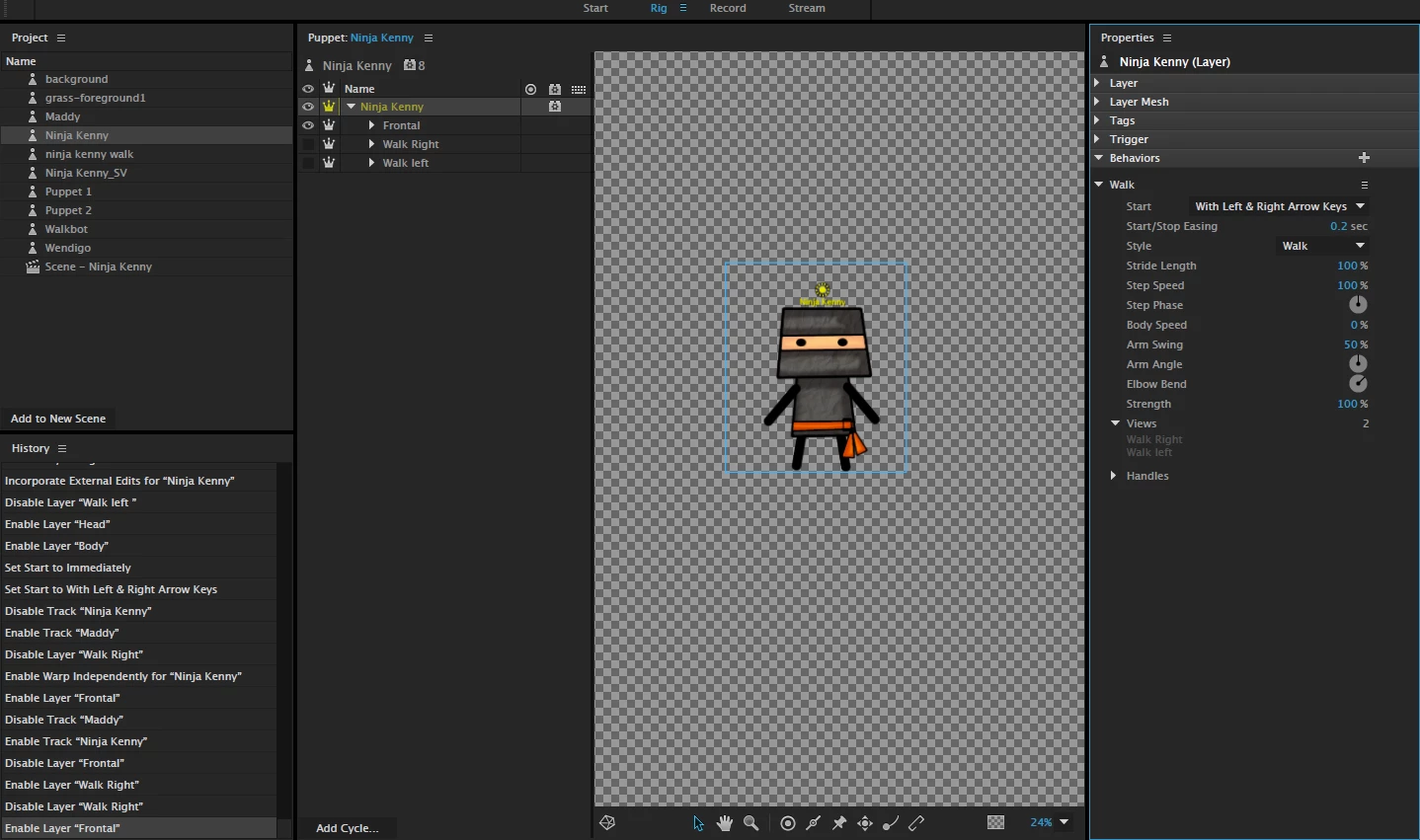
Maybe I'm missing something but for some reason i can't seem to get the walk left and walk right to work with my puppet. even after  tagging each profile accordingly.

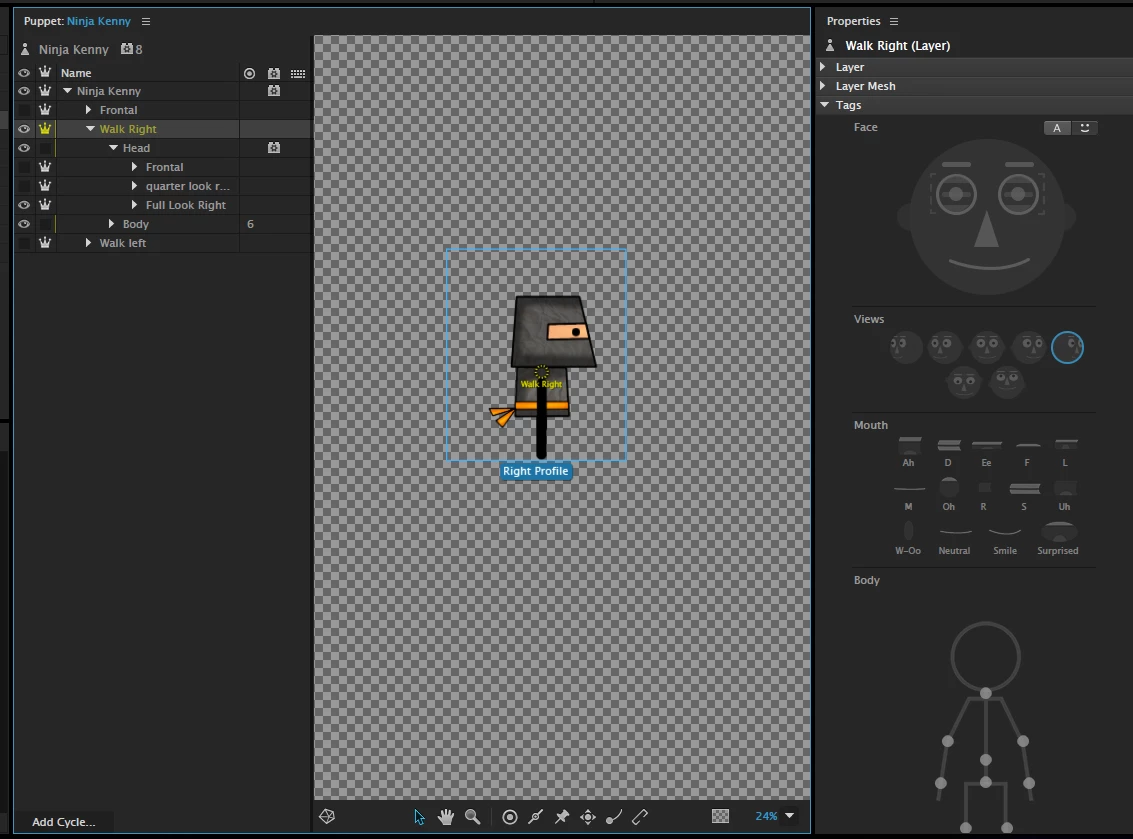
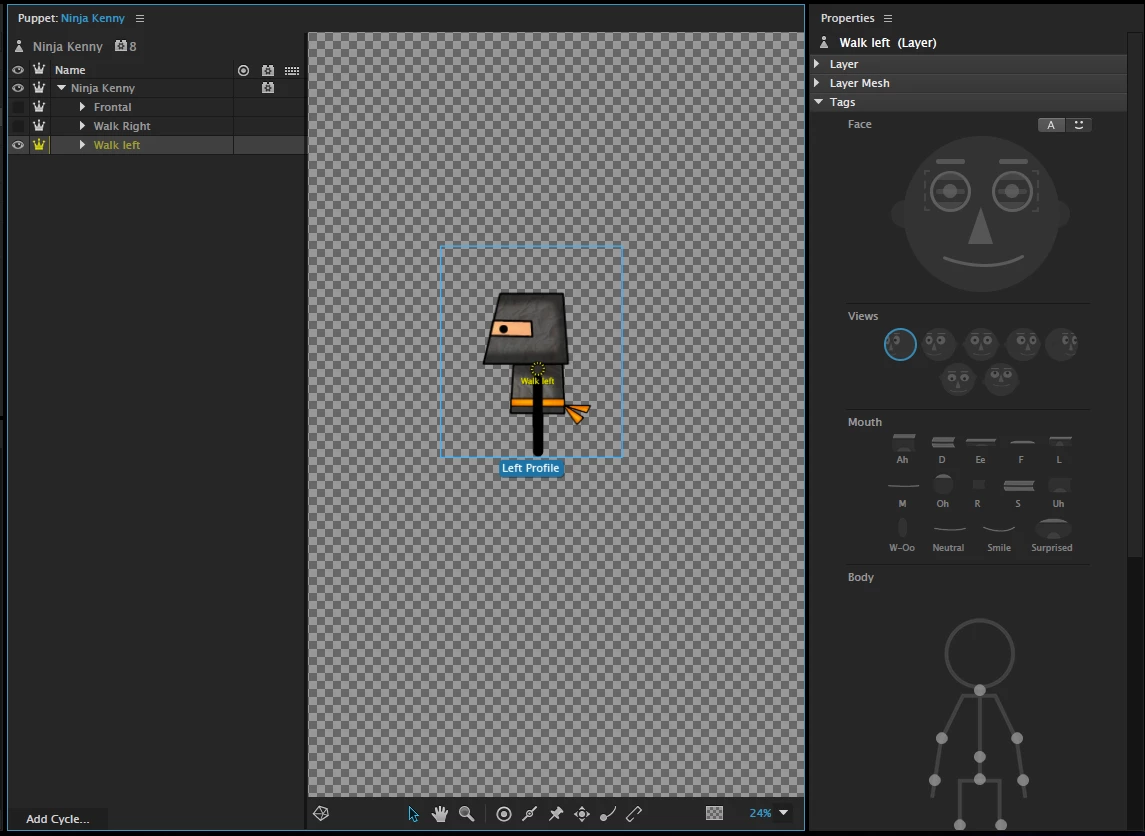
I have three profile on my puppet. Frontal/Walk right/walk left. The walk right profile works well (solo) but whenever i tag the other profiles it doesn't seem to work. Note, i tried as much as possible to use the "maddy" test puppet as a guide for this but. no luck for me. I even read another user having trouble with same issue. Still no luck for me

.

Im not sure if those screen shots will be able to help identify  anything I'm missing.

Note: If you need a copy of the puppet file, just shoot me an email @ Mcinnisst@gmail.com and ill send over a copy to take a look on whats going on in the structure. Thanks in advance

Message was edited by: Steven Mcinnis

This topic is closed to new replies. Start a new post to keep the conversation going.
Correct answer Torin Inc

This is my reply to a suggestion from oksamurai on how to fix my walking issues I had as well:

When the first versions of CA were in use, the head turner behavior was included. So, as per the many tutorials available for CA, most people built their puppets with two main upper-level layers- the body and head.

The head was setup with the following layers: "FRONTAL" or "FRONT", "RIGHT PROFILE", "RIGHT QUARTER", "LEFT PROFILE", LEFT QUARTER". This allows the head turner behavior to read, and tag, each head separately:

PUPPET NAME

-BODY

     -LEFT ARM

     -RIGHT ARM

     -TORSO

     -LEFT LEG

     -RIGHT LEG

-HEAD

     -FRONT

     -RIGHT PROFILE

     -RIGHT QUARTER

     -LEFT PROFILE

     -LEFT QUARTER

The problem is this- the new version of CA (version 6) looks for the same labels ("FRONTAL" or "FRONT", "RIGHT PROFILE", and "LEFT PROFILE"), and it does not differentiate whether they are for a HEAD label or for a FULL BODY label.

Solution- we now need to create a new puppet with three FULL BODY profiles ("FRONTAL" or "FRONT", "RIGHT PROFILE", and "LEFT PROFILE", and within these profiles we need to further create layer for the body and for the head, and inside the head we need to add the head turner layers ("FRONTAL" or "FRONT", "RIGHT PROFILE", "RIGHT QUARTER", "LEFT PROFILE", LEFT QUARTER"):

PUPPET NAME

-FRONTAL

    -BODY

     -LEFT ARM

     -RIGHT ARM

     -TORSO

     -LEFT LEG

     -RIGHT LEG

    -HEAD

     -FRONT

     -RIGHT PROFILE

     -RIGHT QUARTER

     -LEFT PROFILE

     -LEFT QUARTER

-RIGHT PROFILE

   -BODY

     -LEFT ARM

     -RIGHT ARM

     -TORSO

     -LEFT LEG

     -RIGHT LEG

    -HEAD

     -FRONT

     -RIGHT PROFILE

     -RIGHT QUARTER

     -LEFT PROFILE

     -LEFT QUARTER

LEFT PROFILE

    -BODY

     -LEFT ARM

     -RIGHT ARM

     -TORSO

     -LEFT LEG

     -RIGHT LEG

    -HEAD

     -FRONT

     -RIGHT PROFILE

     -RIGHT QUARTER

     -LEFT PROFILE

     -LEFT QUARTER

Of course, this gives us three times the work, but the results are 100% worth it. The ability to walk, left and right, or to face forward, is incredible. Add the head turner ability to each of those walking parameters and it becomes even more amazing.


6 replies

oksamurai
Legend
May 3, 2017

Hmmm yeah, judging from your screenshots it should work. I see you tagged the views properly. I'll send you a followup email, thanks.

Torin Inc
Torin IncCorrect answer
Inspiring
May 3, 2017

This is my reply to a suggestion from oksamurai on how to fix my walking issues I had as well:

When the first versions of CA were in use, the head turner behavior was included. So, as per the many tutorials available for CA, most people built their puppets with two main upper-level layers- the body and head.

The head was setup with the following layers: "FRONTAL" or "FRONT", "RIGHT PROFILE", "RIGHT QUARTER", "LEFT PROFILE", LEFT QUARTER". This allows the head turner behavior to read, and tag, each head separately:

PUPPET NAME

-BODY

     -LEFT ARM

     -RIGHT ARM

     -TORSO

     -LEFT LEG

     -RIGHT LEG

-HEAD

     -FRONT

     -RIGHT PROFILE

     -RIGHT QUARTER

     -LEFT PROFILE

     -LEFT QUARTER

The problem is this- the new version of CA (version 6) looks for the same labels ("FRONTAL" or "FRONT", "RIGHT PROFILE", and "LEFT PROFILE"), and it does not differentiate whether they are for a HEAD label or for a FULL BODY label.

Solution- we now need to create a new puppet with three FULL BODY profiles ("FRONTAL" or "FRONT", "RIGHT PROFILE", and "LEFT PROFILE", and within these profiles we need to further create layer for the body and for the head, and inside the head we need to add the head turner layers ("FRONTAL" or "FRONT", "RIGHT PROFILE", "RIGHT QUARTER", "LEFT PROFILE", LEFT QUARTER"):

PUPPET NAME

-FRONTAL

    -BODY

     -LEFT ARM

     -RIGHT ARM

     -TORSO

     -LEFT LEG

     -RIGHT LEG

    -HEAD

     -FRONT

     -RIGHT PROFILE

     -RIGHT QUARTER

     -LEFT PROFILE

     -LEFT QUARTER

-RIGHT PROFILE

   -BODY

     -LEFT ARM

     -RIGHT ARM

     -TORSO

     -LEFT LEG

     -RIGHT LEG

    -HEAD

     -FRONT

     -RIGHT PROFILE

     -RIGHT QUARTER

     -LEFT PROFILE

     -LEFT QUARTER

LEFT PROFILE

    -BODY

     -LEFT ARM

     -RIGHT ARM

     -TORSO

     -LEFT LEG

     -RIGHT LEG

    -HEAD

     -FRONT

     -RIGHT PROFILE

     -RIGHT QUARTER

     -LEFT PROFILE

     -LEFT QUARTER

Of course, this gives us three times the work, but the results are 100% worth it. The ability to walk, left and right, or to face forward, is incredible. Add the head turner ability to each of those walking parameters and it becomes even more amazing.

stevenm29314942
Participant
May 3, 2017

Thank you very much for taking the time to respond, i really appreciate the help. I will definitely follow your recommendations and hopefully everything works out. Thank you

CoSA_DaveS
Participating Frequently
May 4, 2017

One thing to check: make sure the Walk behavior is applied at the root level or top group level (not once for each view) -- the single behavior will look for the different views and move the puppet as a whole when using the arrow keys. Note that both Left Profile and Right Profile views will need at least some body-tagged handles before Walk makes the arrow keys hide & show views with the arrow keys. If Walk doesn't see two views like that, instead of hiding/showing different views it just walks the single view forwards & backwards with the arrows, like the Walkbot example puppet.

Torin Inc
Inspiring
May 2, 2017

I was having similar issues- rename your layers from "walk right" to "right profile" and from "walk left" to "left profile". These are the necessary names for CA to tag the profiles for which ones are use to walk.

Torin Inc
Inspiring
May 2, 2017

And leave "frontal" alone- that layer is labeled correctly.