


Participating Frequently
January 10, 2023
Question

libgit2 error -4

  • January 10, 2023
  • 1 reply
  • 324 views

Hi all,


First let me thank you all in advance for taking the time to read this and help me.


I've just installed Character Animator and as soon as I open it can click on "Use Pro" or even click on one of the starter puppets I get this error message:
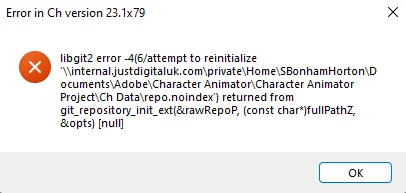


I work from home and remote connect to my work network via VPN and the location seems to be pointing at a network location. I've gone through settings to see if I can change something to point it at my local drive in case that is the issue but I've had no luck.


I've searched the forum also for others having similar problems but nothing has helped with this particular issue so far.


Any help would be greatly appreciated.

This topic has been closed for replies.

1 reply

SamB5055Author
Participating Frequently
January 11, 2023

Is there a way I can tell Character Animator not to make it's files in the Documents folder?


The way our network is setup, our default "Documents" folder is on our server, so if I can get it to point at a local folder, I'm thinking this might solve the problem. Any thoughts?

TheOriginalGC
Community Expert
Community Expert
January 11, 2023

I think you're on the right track as CH does not like to work with the cloud. All I can suggest is to copy the project to a local folder and then start CH by holding down the shift-key to get it to start without loading the last project. Then you can get the local project to work from. Let me know if it works.

SamB5055Author
Participating Frequently
January 11, 2023

Thank you for your reply. I just gave this a go and now I'm getting this error instead (happens when trying to load a project that was from a starter kit and just in Pro mode)