November 11, 2016
Question

Max is not playing ball!

  • November 11, 2016
  • 5 replies
  • 1860 views

I'm still working with my one eyed monster, in an attempt to understand how each component of Ch works, but the monster don't want to play ball!

So, I decide to go back to one of the first tutorials and follow it, step by step. The tutorial is, Building A Puppet From Scratch.

I kept testing it in Ch, to ensure it was doing as it should, but it didn't, it started doing the same strange results that I've been getting all morning!

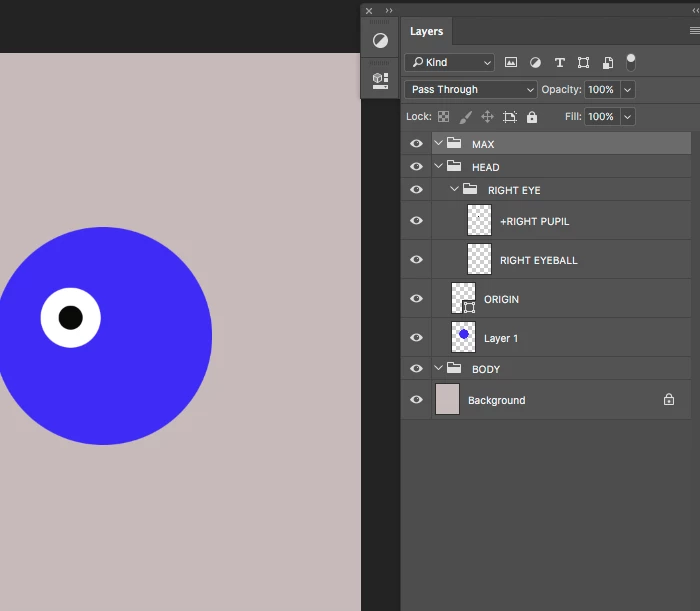
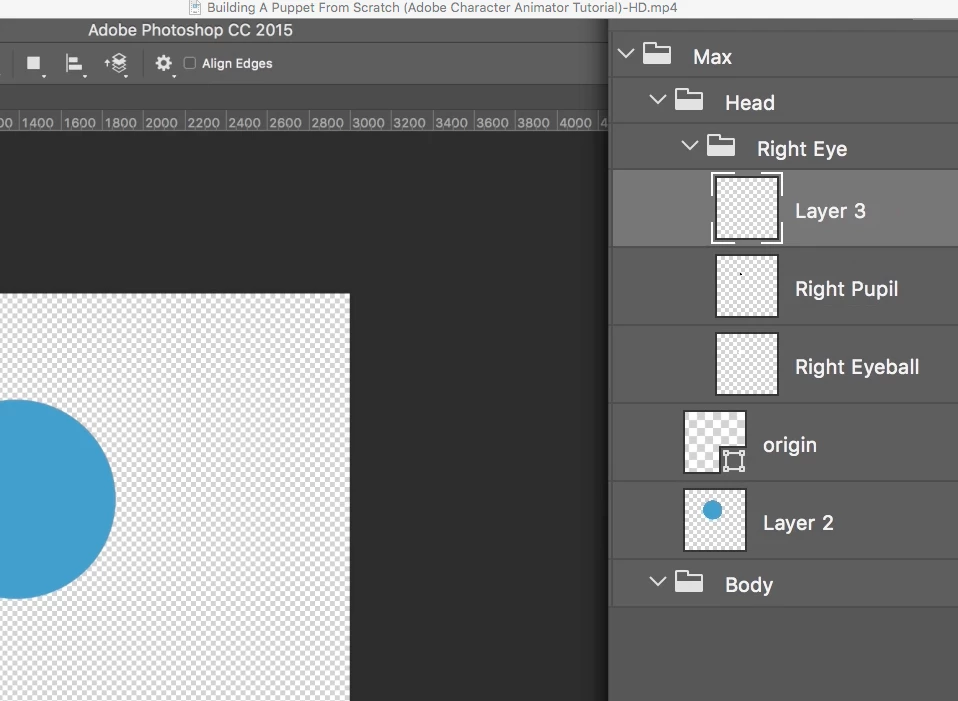
Here is a snapshot of both my Ps layout and one of the Tutorial;
But this is what I'm getting

I tried changing setting and I can not get it to run as it should!?

Anyone help.... please?

    This topic is closed to new replies. Start a new post to keep the conversation going.

    5 replies

    oksamurai
    Legend
    November 11, 2016

    Several things look different from the video:

    1. Call the top level +Max (add a plus).

    2. Drag the Head and Body into +Max, currently they're outside.

    3. Delete the background layer.

    November 11, 2016

    Hi...

    I've been trying all sorts of combinations... but keep getting the same thing... the eye is interacting with the movement of my eyeball!

    I tried adding + and making the RP and RE warp Independent... but that has worked either!?

    I want to get this simple animation working so I can understand the basic of Ch, before I move on and start adding more... if that makes sense!?

    oksamurai
    Legend
    November 11, 2016

    The reason that is happening is because you don't have a right blink layer in there. You either need that or set Face > Eyelid strength to 0%.