



Question
MIDI channel numbers with Character Animator
You can assign a MIDI event to triggers in one of two ways.
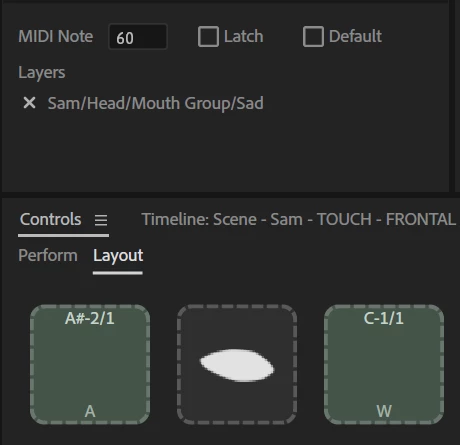
- You can go into rig mode, set the Controls panel to "layout" mode, click on a trigger button then press the MIDI key on the keyboard etc. (See the squares at the bottom on the image - "A" (angry) is set to note A#2 (aka B-flat) in the second octave. The "/1" means MIDI channel 1.
- In the trigger panel there is also a "MIDI Note" text box. This is the underlying MIDI note number. But I don't see the channel number.Can you edit it using the "MIDI Note" checkbox? I tried 72/3 but it failed.
 AdChoices