
Participant
December 26, 2020
Answered

Mouth disappeared and not working

  • December 26, 2020
  • 3 replies
  • 1380 views

Hi, I am a beginner in adobe and character animator. 

I want to make a video using this app, but I am facing a problem that the mouth disappeared and is not lip-syncing. 

In the rigging issues sections, it says that the layers are not being used by any behavior, so I tried selecting the mouthpiece and adding behavior to it, but it still did not work. 

Please... can someone help me solve this problem? 
This topic has been closed for replies.
Correct answer k_oshiro

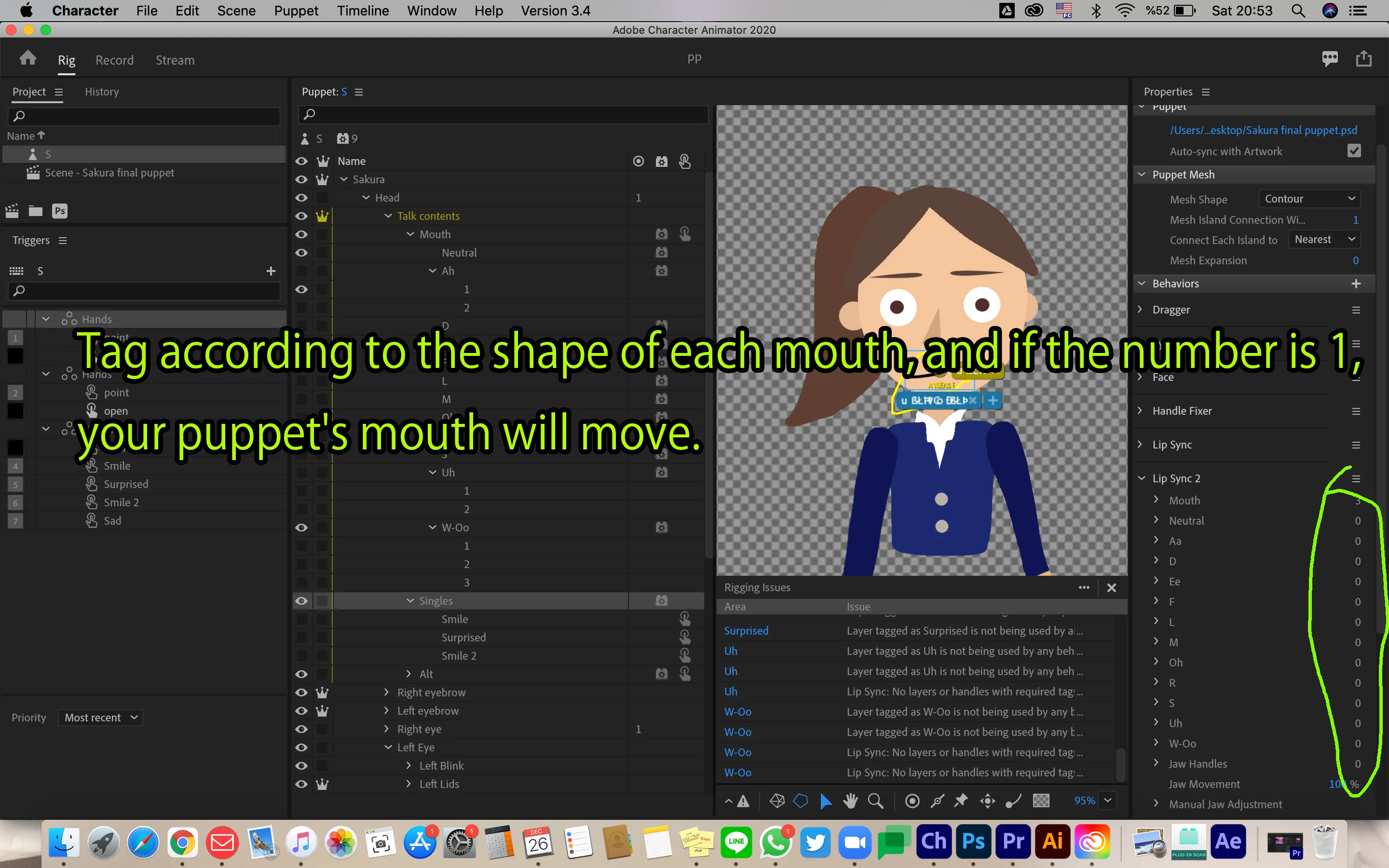
Perhaps the number in this part is 0
It seems that it is not tagged correctly.
Tag according to the shape of each mouth, and if the number is 1, your puppet's mouth will move.

3 replies

k_oshiro
Community Expert
Community Expert
December 27, 2020

I downloaded the puppet.
Thank you.

I observed your puppet.

The Tag of the left and right eye was opposite.
I also grouped them so that they blinked correctly.

And I made various corrections. I hope you can see the puppet that I modified.
I don't know what caused the mouth to become transparent, but it seems to be working correctly now.
I hope you find it useful.
Thank you.

https://www.dropbox.com/s/gcxgelyu7pjh62a/edit_SunraPuppet.puppet?dl=0


k_oshiro(AdobeCommunityExpert)
Sunra0412Author
Participant
December 27, 2020

Yes!!! It works perfectly now!!

Thank you so much for helping me, and I wish you a happy new year 🙂

k_oshiro
Community Expert
Community Expert
December 27, 2020

Thank you for your reply.
Is it possible to upload your puppet to Dropbox etc.?

If I can take a closer look, I can give more appropriate advice.
The puppet is exported by selecting

File → Export → Puppet.
Please give it a try.

Thank you.

k_oshiro(AdobeCommunityExpert)
Sunra0412Author
Participant
December 27, 2020

Thank you so much for your help!!!!!!!!!!!!!

https://drive.google.com/file/d/1Zi4ZgJNfMWKoqPTfbIwd5bsABE8_Odf2/view?usp=sharing 

I hope this google drive will work..?

Also, do you have any idea why only one eye blinks and the mouths got so transparent??

k_oshiro
Community Expert
k_oshiroCommunity ExpertCorrect answer
Community Expert
December 27, 2020

Perhaps the number in this part is 0
It seems that it is not tagged correctly.
Tag according to the shape of each mouth, and if the number is 1, your puppet's mouth will move.

k_oshiro(AdobeCommunityExpert)
Sunra0412Author
Participant
December 27, 2020

Thank you, I managed to match the number of mouths with the lip sync section, so it now moves, but the rigging issues section still didn't get fixed, and even though the mouths move, the neutral lips don't go away..........

How do you tag it correctly..?