

wasy350
Inspiring
April 27, 2018
Answered

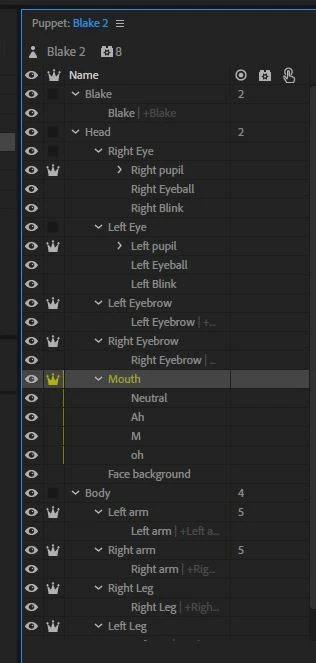
Mouth not going through visem sounds only the lip sync mouth layer

  • April 27, 2018
  • 8 replies
  • 1332 views

Hi, mouth not working properly - it only lip syncs the neutral layer when I increase mouth value. Help! Not cycling through other mouth sounds.
    This topic is closed to new replies. Start a new post to keep the conversation going.
    Correct answer alank99101739

    Also I want to drag the entire character(puppet) however the arms also have dragging behavior. My question to you is can I drag entire puppet if there are others body parts which have dragging behavior? Can there be sub(specific arm, leg etc) and overall dragging(entire puppet)? 


    I am pretty sure all staggers are relative to the scene. So it you drag the body, do that first and then drag the hands. It is a bit painful. (I would like relative drag gets too - makes recording easier - maybe we should create a feature request. Add a new dragger behavior and set a property to make relative to parent layer...)

    i use position x and y recordings instead. Less convenient but it works. Hey, maybe we should get a twitch channel or something... or YouTube... to do little demos

    8 replies

    alank99101739
    Legend
    April 27, 2018

    Could you expand a bit please? (The screenshot is great though.) What does “increase the mouth value” mean? Are you talking about a property of the Face behavior? Are the other mouth positions appearing, but not in sync With the voice track? Is this curing an exported video or while editing? Could you share the generated vizemes in the timeline which are not causing mouth positions to appear?  When you mention “not cycling through other mouth sounds”, are you talking about cycle layers, or just that the other mouth positions are never displayed?

    The basic pupet structure seems okay, although I normally hide all the mouth positions except neutral. Have you checked the tags for each of the mouth layers? Did it get them all right?

    Also you only have a subset of the vizemes included - so many of the mouth positions will fall back to Neutral. There are more you have to define to make all the mouth positions visible.

    In the timeline view after you have created a take, you can right click on take in the timeline to manually add you own vizeemes to a take. This can be a useful way to create each vizeme to see if it works. Almost like saying the alphabet! ;-)

    My *guess* is you have not created image layers for all the vizeemes, so only some are working. You need to create all of them (Even if some are direct copies of other ones). Neutral is the default it falls back to if all else fails.

    wasy350
    wasy350Author
    Inspiring
    April 28, 2018

    Hi Alan, none of the mouth vizeemes are working - only way I can get any mouth movement is with turning up face behavior properties and then it only effects the neutral layer.

    I created the same layer pattern and sounds(vizeemes) with another character and it works fine.

    HELP!!!!!

    wasy350
    wasy350Author
    Inspiring
    April 28, 2018

    Also I want to drag the entire character(puppet) however the arms also have dragging behavior. My question to you is can I drag entire puppet if there are others body parts which have dragging behavior? Can there be sub(specific arm, leg etc) and overall dragging(entire puppet)?

