
MichaelStephens
Legend
June 29, 2017
Answered

Mouth "Oh" shape comes in as multiple objects

  • June 29, 2017
  • 2 replies
  • 474 views

I've created a puppet that imports into Character Animator almost completely correctly, but the "Oh" shape for the mouth comes in as nested objects. Most all of the mouths I've set up using multiple vector objects, but this is the only mouth that doesn't come in as a single object. The image below shows the group structure for the Oh and the R shapes.
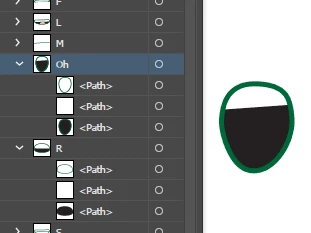
Yet it comes into Character Animator as shown below where the middle of the shapes . Note that the R shape imported just fine.
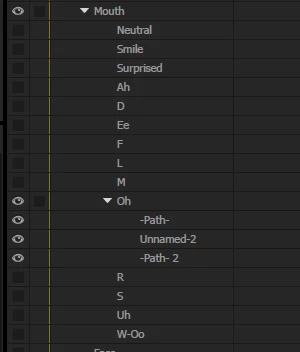
I'm not seeing that it's causing any problems, but I can't seem to figure out what's different about this mouth than the others.

    This topic has been closed for replies.
    Correct answer Jeff Almasol

    Although the "Oh" group has paths called "<Path>", they are really not unnamed -- for whatever reason they are named "<Path>". If you delete the text, then press Enter, although it still shows "<Path>", it's now unnamed. That should then allow the adjacent unnamed paths in the group to be combined into one layer in the Puppet panel.

    Unsure what in Illustrator caused those "<Path>"-named paths, though.

    2 replies

    MichaelStephens
    Legend
    June 30, 2017

    I've sent you a PM with the Dropbox link to the file.

    Jeff Almasol
    Adobe Employee
    Adobe Employee
    June 30, 2017

    Got it. At first I thought it was because the bottom path in the "Oh" group had a stroke, but removing it (like in "R") didn't seem to make a difference. We'll look into it more. Thanks.

    Jeff Almasol
    Adobe Employee
    Jeff AlmasolCorrect answer
    Adobe Employee
    June 30, 2017

    Although the "Oh" group has paths called "<Path>", they are really not unnamed -- for whatever reason they are named "<Path>". If you delete the text, then press Enter, although it still shows "<Path>", it's now unnamed. That should then allow the adjacent unnamed paths in the group to be combined into one layer in the Puppet panel.

    Unsure what in Illustrator caused those "<Path>"-named paths, though.

    Jeff Almasol
    Adobe Employee
    Adobe Employee
    June 29, 2017

    Can you share a link to the file (via Dropbox, Google Drive, etc.) for us to diagnose?