


Participant
May 20, 2018
Question

Moving Layers

  • May 20, 2018
  • 2 replies
  • 369 views

I am currently struggling to move my layers around in character animator as they seem to be fixed. I have a feeling it has something to do with the layers, Left Arm and Right Arm, are marked with a yellow vertical line next to the Warp Independently boxes.
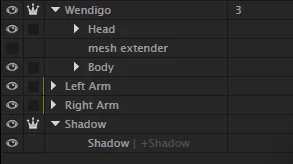
I was wondering if there is a way to change this and be able to move both Left Arm and Right Arm into the body layer.

Thanks

This topic is closed to new replies. Start a new post to keep the conversation going.

2 replies

DanTull
Adobe Employee
Adobe Employee
November 12, 2018

The layers hierarchy in the Puppet panel does not support the full range of layer/group re-arrangement. It is generally best to do significant restructuring in the artwork application (Photoshop or Illustrator).

DT

alank99101739
Legend
November 12, 2018

Also even if you could do it CH you should do it in the artwork file as it may be lost next time you change the artwork file.

Project Wookie, Episode 25: Arms for Independence - YouTube  Shows how I took a flat Photoshop file and introduced layers if any help (skip through it - it’s pretty long). Its things like right clicking on a layer and “create group from layers” that I found helpful to create the necessary levels of hierarchy. (In Illustratator you just use “Create Sublayer” and drag things no top of the layer you want to move it into.)