



christineavatar
Legend
March 28, 2019
Question

My puppet disappeared!

  • March 28, 2019
  • 15 replies
  • 4092 views

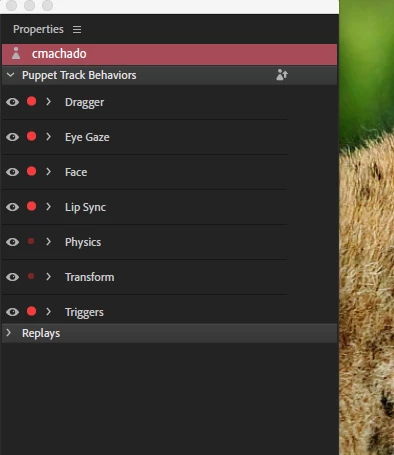
There is no puppet appearing in the scene. All of a sudden the area is just blank. It shows the puppet in the Timeline. I've added it a second time and both show up in the timeline but none show up in the scene. The one inexplicable thing is when I tap on the Scene portion the Properties panel changes to having a red background behind the puppet name and all the puppet tracking behaviors close. Anybody know what I'm talking about?
Christine

    This topic is closed to new replies. Start a new post to keep the conversation going.

    15 replies

    christineavatar
    Legend
    March 29, 2019

    How does one see what is going on while you are recording?

    oksamurai
    Legend
    March 29, 2019

    In the past, you used to see all your cycle layers show up in Record/Stream mode too. And that meant a ton of extra text and dots that most people didn't need to touch. So now we hide them by default, but you can always show them again in Rig mode by clicking the three lined menu icon that appears to the right of the behavior listed on the right.

    If you want to DM me your File > Export > Puppet to take a closer look, go for it. Just click on my name and send me a shared cloud link from creative cloud, dropbox, google drive, etc.

    christineavatar
    Legend
    March 29, 2019

    I have forwarded the Puppet via DropBox using the email oksamurai@adobe.com mailto:oksamurai@adobe.com I hope that works.

    christineavatar
    Legend
    March 29, 2019

    If it doesn't show up in Record mode how does one control the work?

    christineavatar
    Legend
    March 29, 2019

    Well, that being the case how do I contact him?

    Seriously, there seems to be a flaw in the program. Character Animator still look like:

    What is causing this? How do I get rid of this?

    oksamurai
    Legend
    March 29, 2019

    Cycle layers doesn't show up in record mode. So it's possible you're not seeing it because you're there, or it was added to a specific group/layer?

    alank99101739
    Legend
    March 29, 2019

    oksamurai​ knows best!

    christineavatar
    Legend
    March 29, 2019

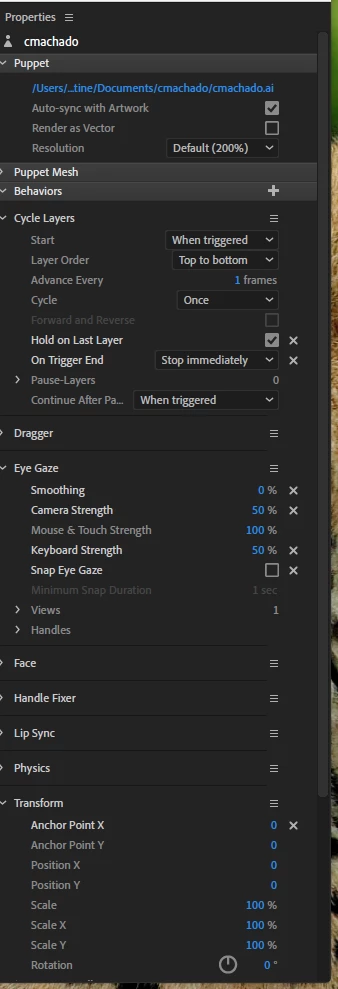
    Thank you for your feedback. Okay Samurai (Dave) who teaches Character Animator through Adobe said that if you don't put "Stop Immediately" the mouth could be saying something else on Trigger End and foul up the Lip Sync.

    I just tried to set up a Cycle Layers to work on this and I didn't have to change anything - when I added the behavior to my puppet it disappeared. Just setting up the Cycle Layers option caused the disappearance.

    alank99101739
    Legend
    March 29, 2019

    Ah, cycle layers is probably the issue then. Sorry I did not pick that up from your initial Question. You included the screenshot of the settings you are using.

    I don’t have any experience with cycle layers and mouths, but have encountered the artwork disappearing when the cycle ends before. It was a matter of trying different combinations of settings - e.g. it might have been using reverse On Trigger End instead of “Stop Immediately” - something like that.

    christineavatar
    Legend
    March 29, 2019

    I have tried 'moving' the puppet around by changing the x and y but no sign of her. I have deleted the cycle layers (that was the last thing I had added) and the puppet showed up again but the 'red line' aspect is still active.

    alank99101739
    Legend
    March 29, 2019

    Also a screenshot of the timeline panel might be helpful. E.g. looks like you have background artwork - just want to make sure you have the puppet in front of the background artwork etc.

    alank99101739
    Legend
    March 29, 2019

    I don’t recognize the red background - no idea on that one.

    What I am curious about for the puppet is whether it is in the right place, but not visible; or is it off the edge of the screen so you cannot see it.

    If you zoom out in the scene window you might be able to tell if its just off the edge of the screen.

    Try turning on the mesh icon in the scene window. It might show something up even If the rest of the puppet is not visible.