
Participant
December 13, 2018
Question

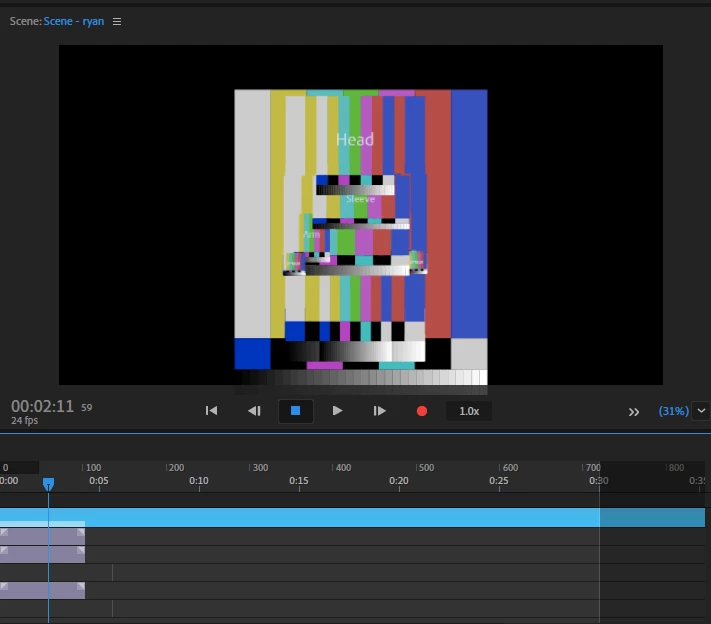
My puppet is very glitchy and is extremely distorted

  • December 13, 2018
  • 2 replies
  • 334 views

I worked for a long time to create a character and got her to wave. I saved the file to my desktop and opened it later only for the puppet to be very glitchy and not even look like a puppet anymore. I have restarted the app, my computer, and adobe creative cloud but I can not get my puppet back.
    This topic has been closed for replies.

    2 replies

    alank99101739
    Legend
    December 13, 2018

    Ha! I was hoping you would not ask that! I don’t have access to my computer for another 8 hours or so. Try single clicking on a puppet in the project panel or in the timeline panel. Don’t double click, just a single click. It should show the path name at the top.

    Ummm, try here: Relink or Replace a puppet’s artwork. Scroll down the page until you find that heading. No screenshot, but has instructions:

    When a puppet is selected in the Project or opened in the Puppet panel, the Puppet section of the Properties panel shows the path for the source artwork and the tooltip shows the full path. If the artwork file cannot be found, the file name appears in yellow, with the tooltip prefix with Missing.

    To relink or replace the source artwork, click the file name in the Properties panel, then select the artwork file to use.

    alank99101739
    Legend
    December 13, 2018

    In the bottom right corner, click the >> to see some extra buttons, in particular there is a refresh button if two arrows in a circle. Try clicking that. If that does not work, hold down ALT and click that.

    it looks like ch missed a change, or the artwork file moved etc.

    in the puppet properties, you can see the puppet file name at the top. If you moved the artwork file, click on the link to find the file in the new location.

    Participant
    December 13, 2018

    How do I get to puppet properties?