

Participating Frequently
December 29, 2019
Answered

My puppets head morphs when i move

  • December 29, 2019
  • 5 replies
  • 662 views

pretty self-explanatory problem. I would like my head to not morph around the 2 points it seems to be morphing around. on the frontal view, they show up on my fox's right cheek and left eye.
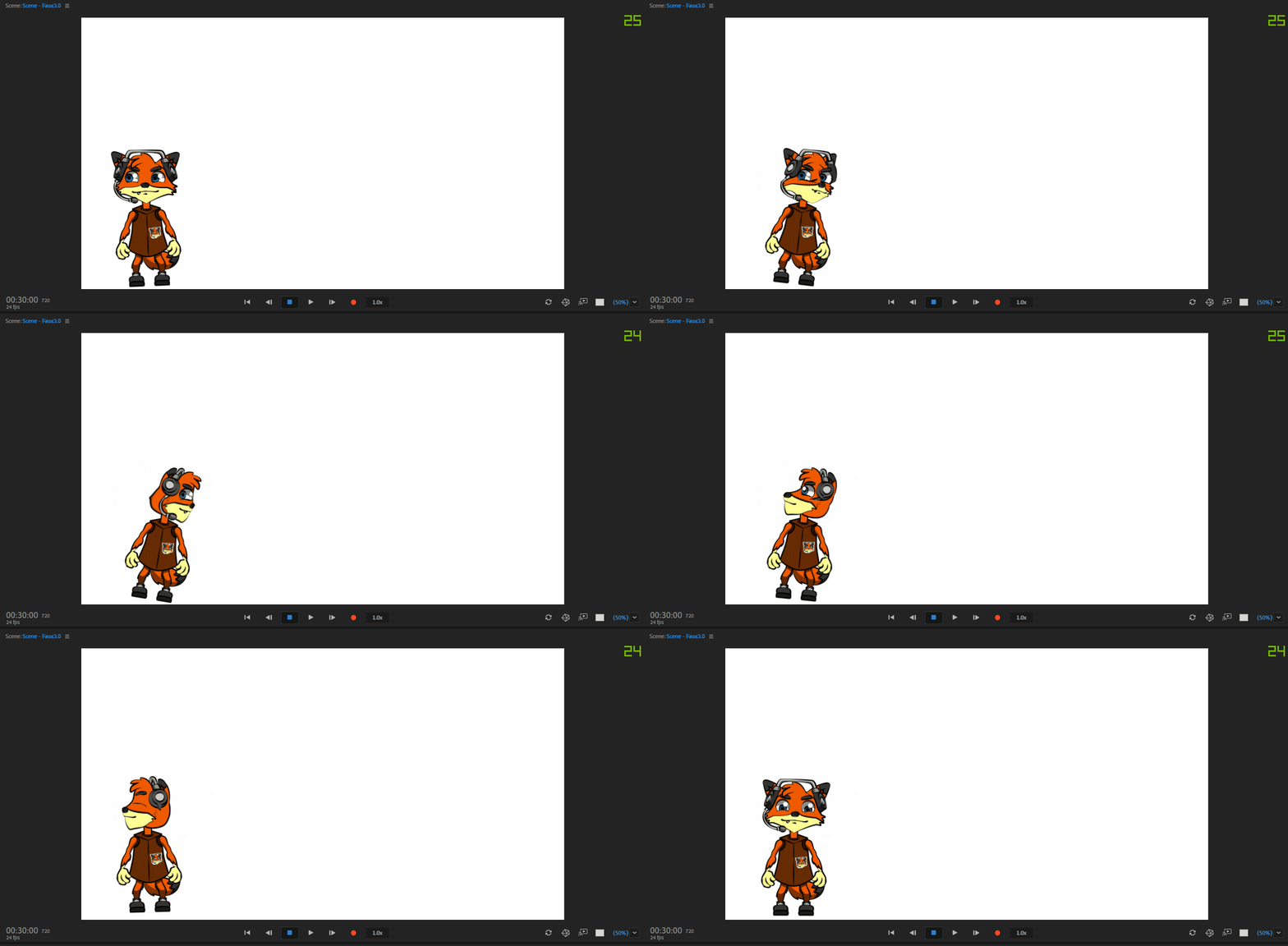
 

This topic is closed to new replies. Start a new post to keep the conversation going.
Correct answer alank99101739

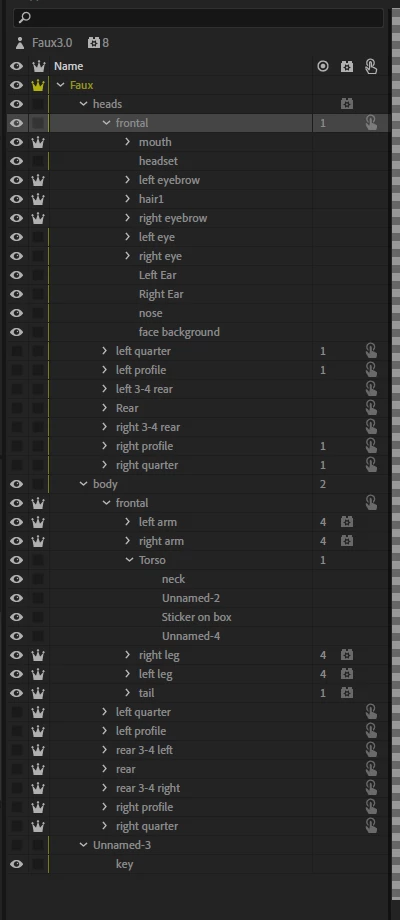
If you turn the yellow mesh on at the bottom of the scene window and zoom in on that area of the face, you can usually locate the point on the face that is stuck (not moving). I would then go through all the layers looking for a stray handle on the head. Check the tags on all layers and handles. It is normally caused by a handle (including origin handles for layers) having a tag where something else has taken control. Only one behavior can control each handle etc, so it can get stuck if a tag is at the wrong point. (I cannot explain it 100% well as I don't fully understand it, but stray our double tagged points are the usual cause.) I start deleting things then check and undo, and repeat until i track it down. But the mesh can help locate the area on the face the actual point is which saves a bit of time.

5 replies

ChPuppetsAuthor
Participating Frequently
December 29, 2019

for anyone having a similar problem, the "head" tag should go on your master head folder, not each head individually. all is well now.

ChPuppetsAuthor
Participating Frequently
December 29, 2019

thanks a lot! not sure why but the software was auto pinning a pupil along with the auto-tag. The yellow mesh really helped me narrow it down quickly!!

ChPuppetsAuthor
Participating Frequently
December 29, 2019

update: it seems to happen when i tag all the heads with the "face" tag.

alank99101739
Legend
December 29, 2019

The other useful diagnostic tool is to look at the behaviors and there are views and handles sections you can click to expand. Eg the Face behavior. It should show what layers the behaviors have taken control of. Some behaviors only take the first layer they find and might need a behavior added per head profile. (Sorry, getting a bit rusty, I have not rigged a new puppet for months now and I rarely use the head turner myself.) Or if you find two behaviors trying to control the same layer that can cause problems too.


Try removing the face tag and see what happens. I cannot remember what that tag does to be honest. Otherwise try removing the root face behavior and adding it to each head profile. I usually just fiddle around with things like that until it comes good.

alank99101739
alank99101739Correct answer
Legend
December 29, 2019

If you turn the yellow mesh on at the bottom of the scene window and zoom in on that area of the face, you can usually locate the point on the face that is stuck (not moving). I would then go through all the layers looking for a stray handle on the head. Check the tags on all layers and handles. It is normally caused by a handle (including origin handles for layers) having a tag where something else has taken control. Only one behavior can control each handle etc, so it can get stuck if a tag is at the wrong point. (I cannot explain it 100% well as I don't fully understand it, but stray our double tagged points are the usual cause.) I start deleting things then check and undo, and repeat until i track it down. But the mesh can help locate the area on the face the actual point is which saves a bit of time.

