alishako
Participant
July 2, 2019
Answered

Need Help with Body & Head Movements.

  • July 2, 2019
  • 4 replies
  • 647 views

Hello, I'm fairly new to adobe character creator, I can't figure out how to make the head and body move around smoothly. At the moment the top of the head seems to be stuck while the bottom of the head and body moving too much that it's warping the shape. I used the Barbarasaurus puppet from adobe as the template for my puppet.


link to my puppet here

Hope someone can help me thanks

This topic is closed to new replies. Start a new post to keep the conversation going.
Correct answer alank99101739

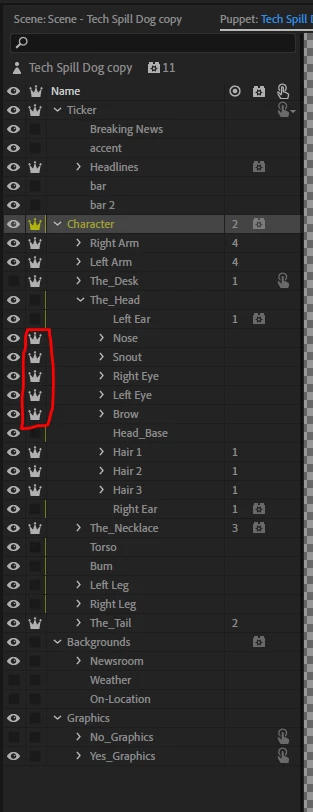
Okay, I tried the puppet. I put independence on for the following layers (see the red highlight). Then it seems to work pretty well for me.

By making them independent they attach to the parent head mesh and follow it - but do not control the position of the parent mesh. When not independent, you have two behaviors trying to control the same mesh and only one wins. That is all I did and it seems to work reasonably well now.

4 replies

alank99101739
alank99101739Correct answer
Legend
July 3, 2019

Okay, I tried the puppet. I put independence on for the following layers (see the red highlight). Then it seems to work pretty well for me.

By making them independent they attach to the parent head mesh and follow it - but do not control the position of the parent mesh. When not independent, you have two behaviors trying to control the same mesh and only one wins. That is all I did and it seems to work reasonably well now.

alishako
alishakoAuthor
Participant
July 3, 2019

thank you so much!!! that did the trick. thanks for explaining what the independent means too that was super helpful.

alank99101739
Legend
July 2, 2019

I forgot to add, sometimes its a matter of making s layer independent rather than deleting a tag. eh making the eyes our mouth independent sometimes help.

alank99101739
Legend
July 2, 2019

I will try to have a look later, but if you want to hunt it down yourself it is usually a wrong tag somewhere. I try deleting tags one by one to find it. If you turn the mesh view on in the scene window (a little pentagon at the bottom of the panel full of triangles) it will show a yellow mesh of triangles. If you move the puppet with this on you can usually see which part of the puppet is locked down, which gives a hint of which tag it is.