Inspiring
March 20, 2023
Answered

Need to have separate triggers for each hand for puppet "Hunter"

  • March 20, 2023
  • 1 reply
  • 419 views

I am trying to create a scene using the Hunter puppet. 

However, the Hunter puppet does not have separate triggers for each hand. Rather, both hands always and only do the same gesture at the same time.

Are there any instructions anywhere that explain how to separate the triggers for control of each hand?

Thank you.

This topic has been closed for replies.
Correct answer TheOriginalGC

Okay, here we go. First of all, go to your triggers panel, highlight the hands triggers and press delete to remove the current triggers.
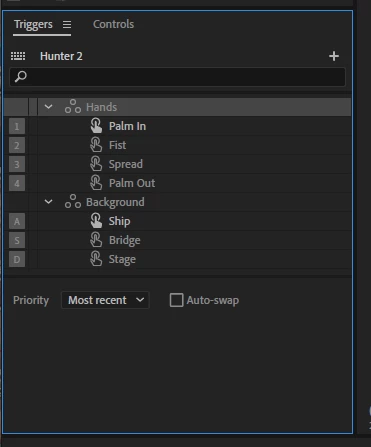
Now go to the rig mode (if you're not there already) and pick an arm to find the hand set - this is the group of hand layers inside the hand group. Make sure you grab the group, not the individual hands.
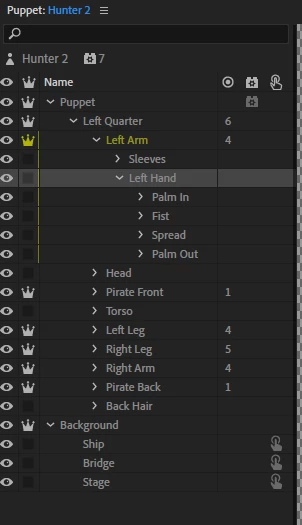
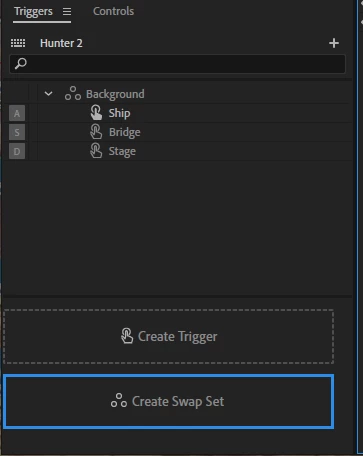
Drag this group over to the trigger panel and over the "Create Swap Set" button to create a swap set. (The button appears when you're dragging over the panel)
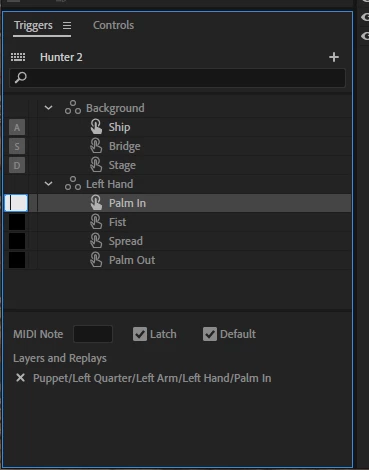
Once that's done, you'll find that you've created a new swap set for that group of hands. All that's left to do is to assign keyboard triggers to each hand in the set. "Latch" means that the hand will stay in place until you press that key again (or press the key for another hand). Without Latch, the trigger only lasts as long as the key is pressed. "Default" means this is the default hand in the set that appears without any prompting.
I hope this helps!


1 reply

TheOriginalGC
Community Expert
Community Expert
March 21, 2023

You can delete the triggers on the hands by highlighting the swap set and pressing delete. You can then create a new swap set by dragging the hand sets into the trigger window and assign new keys to them. I've tried this without incident.

Inspiring
March 22, 2023

Thank you for the reply. To demonstrate what a novice I am, I have two questions:

[1] What is a "swap set"? You mean the various trigger options for hands in the Trigger panel?

[2] Where do I find the "hand sets" to drag into the trigger window?

TheOriginalGC
Community Expert
Community Expert
March 23, 2023

Give me some time to make some pictures. This is kind of complicated. But what's going on is that CH is "swapping" layers so that only one image in a set is visible at a time. The trick is to Remove the current swap set for Hunter (using pairs of hands) and replace it with individual swap sets for each hand. More after I make my pictures.

