


Participant
February 18, 2023
Question

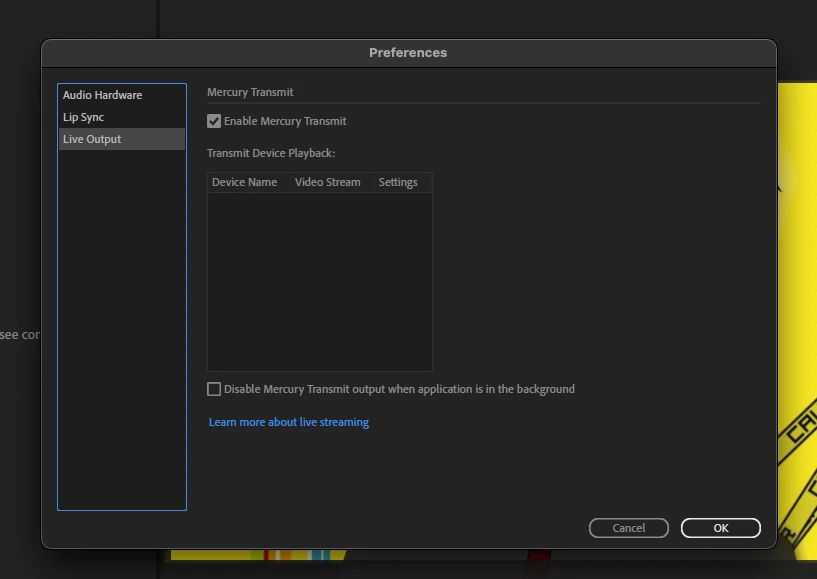
Newtek NDI plugin not available in Character Animator

  • February 18, 2023
  • 3 replies
  • 603 views

I'm finding this problem posted and fixed a few years ago, but nothing recent and all those instances involved Win 10.


I'm running a Mac Mini 11.6.1

I have tried all the solutions I can find on here.  Have uninstalled and reinstalled:

- Character Animator

- All the NewTek apps that come in the package

- Premier

- After Effects


Nothing I do can populate options the devices pane.

What am I missing??

Thanks in adance,

Alan
This topic has been closed for replies.

3 replies

Participant
February 23, 2023

Ok, problem solved!

NewTek was sending me v4 of the tools, not v5.  

The more up-to-date tools can be found here:

https://gist.github.com/tmanternach/0e0935c6308778f9594903af7d85621b

Known Participant
February 21, 2023

I've come across this issue before. What works for some reason is downloading Premiere or Aftereffects before installing NDI Tools. I dont know why but without those download NDI wouldnt install the plugin you need. I've seen other post on here saying the same. Good luck!

Known Participant
February 21, 2023

I'm sorry, I should have read your post better. I see you've tried this already.


TheOriginalGC
Community Expert
Community Expert
February 20, 2023

I'm afraid I have no experience with Mac. You should be seeing something in that box, which is mystifying. Here's what I would do: Open the NDI app and select the first icon, "Webcam Input." That will create the Webcam App on your task bar and allow you to select Character Animator for your remote connection. From there, you would select NDI for the camera on whatever streaming app you are using. I'm sorry I couldn't be of more assistance.

Participant
February 20, 2023

Heya.  Thanks for wading in, despite it being unfamilliar!  

So, the NDI package came with 4 applications (see below) and a set of plugins, and I installed all of them.  The tutorial I was watching said to use the NDI Video Monitor, but I've had them all running at one point or another.

I've poked around all of them, but none of them seem to have any kind of "Webcam Input" type option that you're reffering to.

Thoughts?


TheOriginalGC
Community Expert
Community Expert
February 20, 2023

That is curious. The icon for virtual input looks most familiar to me. Give it a try.