


November 9, 2016
Question

No Tag for Right Eye!?

  • November 9, 2016
  • 4 replies
  • 1496 views

I've noticed a few things when creating your character.

1. When you are in Ps... you have to, Save before the changes show up in Ch.  Cmd+S

2. I  can't change the Layer Names in Ch... you have to go back to Ps..... I take this is because it is a psd file?

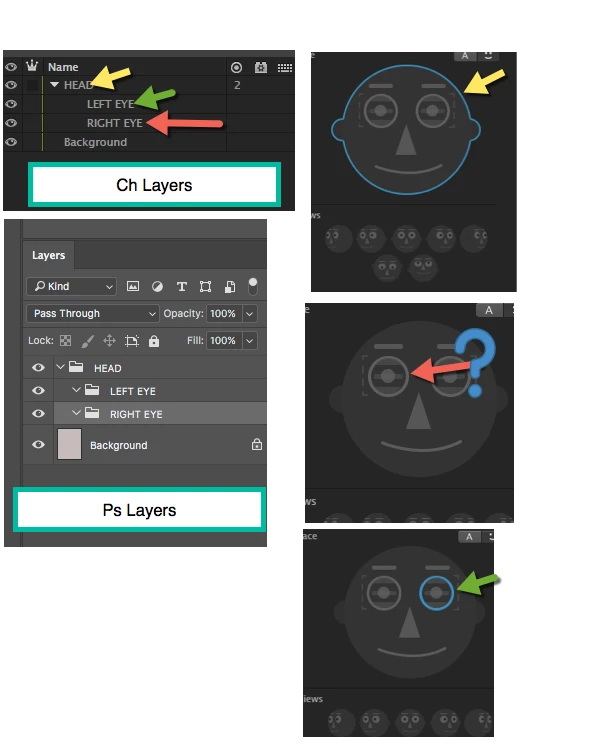
3. Having Named the Groups in Ps the sames as the Tag Names in Ch... when the file is open in Ch the Groups are automatically linked and ready to animate.

This seems to be  true for the Head and Left Eye, but the Right Eye did not automatically link. I'm not sure if this is a slight error, or something I'm missing?

To correct this is easy enough, It is a simple matter of clicking on the Right Eye in the Tags Panel of Ch.
    This topic is closed to new replies. Start a new post to keep the conversation going.

    4 replies

    oksamurai
    Legend
    November 9, 2016

    1. Yes, this is how all dynamic linking works across Adobe apps. You need to save.

    2. Press return/enter over a layer name in CH to rename.

    3. Your Right & Left eye groups are blank. If there's no artwork inside there, there's nothing to tag.

    November 9, 2016

    Thanks yet again!

    1. I thought it was automatic! but I suppose cmd+S not a major task!?

    2. Never thought I trying return!

    3. When I selected the Left Eye in Ch, the Tag showed up.. When I selected the Right Eye... it didn't? Both folders were the same... copies, just renamed? No major problem...

    oksamurai
    Legend
    November 9, 2016

    No save in CH is necessary, but it is in Photoshop.

    Not sure about why one tagged and one didn't, that didn't happen for me when I tried to recreate it. Strange.