



Karen_Little
Inspiring
March 24, 2026
Answered

One element in my left eye stack shows with low opacity. Everything else is OK

  • March 24, 2026
  • 1 reply
  • 22 views

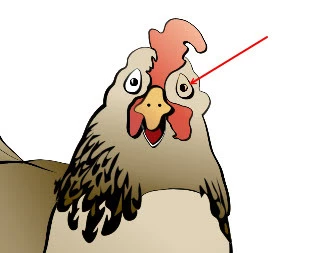
Yesterday, all the elements on my puppet worked. Today, one element, the left eyeball, only shows up with low opacity.

I did the following troubleshooting: I made the eyeball a different color. Same thing happened. I moved the layer outside of the left eye section, and the opacity was normal. In photoshop, this layer is “normal.” 

Left and right eye are set up identically and the right eye is OK. I deleted the offending layer in photoshop, created a new one, and the same thing happened. I also tried not using a folder for that eyeball art, and just tagged the art as the eyeball. Same thing.

I also rebooted my computer.

Does anyone have any insight about this problem? 
 

    Correct answer Karen_Little

    Thanks . . . something was corrupted in Photoshop. I deleted the offending layer and gave the replacement a similar but not exact same name, and the problem resolved itself.

    1 reply

    k_oshiro
    Community Expert
    Community Expert
    March 27, 2026

    In the character animation editor, select the left eye layer and check the opacity value of that layer in the properties panel on the right.

    Alternatively, is the blending mode set to Normal? Is it not set to Screen or Multiply?

    Please check. Thank you.

    k_oshiro(AdobeCommunityExpert)
    Karen_Little
    Karen_LittleAuthorCorrect answer
    Inspiring
    March 29, 2026

    Thanks . . . something was corrupted in Photoshop. I deleted the offending layer and gave the replacement a similar but not exact same name, and the problem resolved itself.