


Inspiring
January 18, 2023
Question

Only one pupil works with the Eye Gaze behaviour.

  • January 18, 2023
  • 5 replies
  • 1115 views

Eye gaze works perfectly well on my characters Right Eye, but doesn't work at all on the Left Eye.


My layer hierarchy, tags, and crown layers for both eyes are exactly the same for both eyes. Both eyeballs are tagged as "Left/Right Pupil Range", both pupils tagged as "Left/Right Pupil" The eyeballs are bigger than the pupil layers as well.


Unfortunately I can't share my project file or a screenshot of the puppet as this is client work, but here's my layer hierarchy.
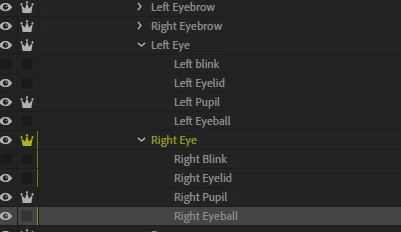
Thanks for any help!

This topic has been closed for replies.

5 replies

Inspiring
January 23, 2023

I fixed the issue!

I had my layer Hierarchy as follows: +Frontal > Head > +Frontal > Head art layers. This would have been fine if I had other head views but I just had the Front view, so i changed the layer hierarchy back to the standard: +Frontal > Head > Head art layers and retagged my eye layers.


Inspiring
February 3, 2023

Update: This did initially fix my problem but returning to the file a bit later i found the same eye gaze problem had come back. I hadn't changed anything else so now im still looking for a solution!

ElectroPuppet
Inspiring
February 5, 2023

Too many independent layers can create conflicts. That was why I suggested you try turning the independence off on your top eye layer. Also, having the frontal layer above the head would confuse the software.


Your Hierarchy should have the +Frontal beneath the head layer;
Head
+Frontal
Then each eye should be;
         Right Eye
            Right Blink
           +Right Pupil
etc.
Hope that helps. (Best idea is to look at an existing puppet and copy the structure if you are new to puppet building. Can be frustating at first but stick with it!)


ElectroPuppet
Inspiring
January 18, 2023

Have you tried turning independence OFF on the parent eye layer and just having the pupil independent? 

Inspiring
January 23, 2023

Thanks, just tried this, no luck unfortunately!

Inspiring
January 18, 2023

Can you share a screenshot of your face tags? Maybe something is off there.

Inspiring
January 23, 2023

Hey, sorry for the late reply I wasn't working on this project for a few days.


Where can I find all my face tags for one screenshot? Or multiple screenshots of each part?

Inspiring
January 23, 2023

No worries. Glad to hear you fixed the issue. I meant to take a screenshot of this area:


Inspiring
January 18, 2023

Can't edit my original post, but for more context i've also set up the Left and Right Profile poses for my Character in the exact same way, the Eye gaze works on the left and right eyes of both profile views perfectly. I'm really confused!

TheOriginalGC
Community Expert
Community Expert
January 18, 2023

Probably unrelated to your problem, but "Blink" is capitalized on the right eye, but not the left. Are you getting any Rigging Issues on the puppet?

Inspiring
January 18, 2023

Hi, thanks for you reply. I capiltalised the "Blink", but the blink was working perfectly fine before and after the change, the eye gaze problem remains.