


Participant
July 27, 2024
Answered

pick up and move character

  • July 27, 2024
  • 1 reply
  • 562 views

Hi, does anyone know how I can make it so when i click on my character in record mode and drag with my mouse he will follow my mouse movements and his physics will interact with them? I want to move the entire character, I dont want any distortions to the character.

This topic has been closed for replies.
Correct answer oksamurai

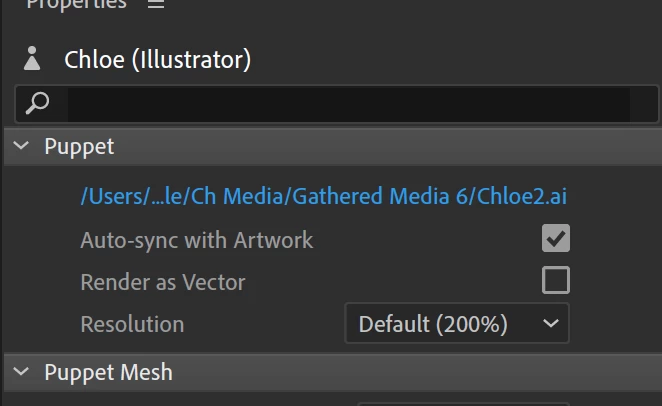
Thank you! I am having another issue now, my artwork in illustrator looks high res but as soon as i import it to character animator it becomes pixelated. please help


In rig mode, select your puppet in the project panel and look in the upper right. You can change to always render as vector or up the resolution to 400% of the original. Also make sure your scene is at 100% and character is scaled at 100% - anything higher is going to have artifacting.


1 reply

Participant
July 27, 2024

@oksamurai Hi would you be able to help with this? Thank you

oksamurai
Legend
July 29, 2024

Usually this is done by adding a draggable handle to the Head group. You can try this with Chloe from the homepage example puppets - if you add draggable to her head group, you can drag her all over the scene.

Participant
July 29, 2024

Thank you! I am having another issue now, my artwork in illustrator looks high res but as soon as i import it to character animator it becomes pixelated. please help