
henage
Participant
July 11, 2017
Answered

Pinning feet not working

  • July 11, 2017
  • 2 replies
  • 2241 views

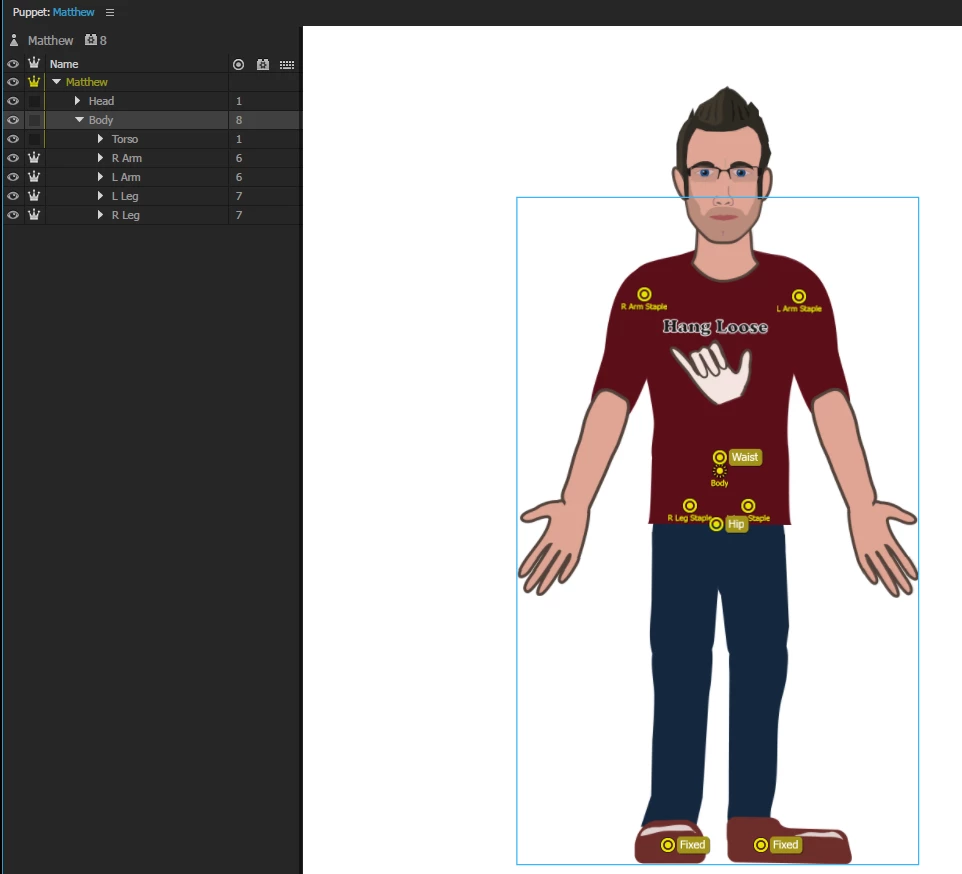
My first puppet I got the pin tool to work as expected.  My second puppet seems to be ignoring the pins and the feet of the puppet lift off the ground when the head tilts.  I can't seem to figure out why this is the case.  I am wondering if I have encountered a bug, or if I am doing something wrong.
    This topic has been closed for replies.
    Correct answer CoSA_DaveS

    Pinning (i.e. Fixed handles) pins the handle relative to the origin handle of its group (the one with the dashed circle around it). If that origin handle itself is being moved (e.g. with a Draggable or Head handle, or a containing group's origin), it will bring the Fixed handles along with it. The fix is usually to untag the origin, and instead tag a regular handle. Or, place the fixed handles in a parent group instead (but still on the same mesh).

    If that's not the problem here (hard to tell with just the screenshot above), and you're willing to share the puppet file (File > Export > Puppet) we can take a closer look.

    2 replies

    Participating Frequently
    July 16, 2018

    So I was having the same trouble, then I just happened to look under Behaviors and saw "Handle Fixer". So I thought, "Wonder if this does anything?". FIXED.

    Might want to put this in the FAQ or something.

    CoSA_DaveS
    Adobe Employee
    Adobe Employee
    July 16, 2018

    Good point. The Handle Fixer is applied by default to all imported artwork, but if you create a new empty puppet and build it up that way, or have manually removed Handle Fixer, indeed you'll want to re-apply it to the root of your puppet if you have any Fixed handles.

    CoSA_DaveS
    Adobe Employee
    CoSA_DaveSCorrect answer
    Adobe Employee
    July 11, 2017

    Pinning (i.e. Fixed handles) pins the handle relative to the origin handle of its group (the one with the dashed circle around it). If that origin handle itself is being moved (e.g. with a Draggable or Head handle, or a containing group's origin), it will bring the Fixed handles along with it. The fix is usually to untag the origin, and instead tag a regular handle. Or, place the fixed handles in a parent group instead (but still on the same mesh).

    If that's not the problem here (hard to tell with just the screenshot above), and you're willing to share the puppet file (File > Export > Puppet) we can take a closer look.

    henage
    henageAuthor
    Participant
    July 11, 2017

    Thanks for the quick reply.  My origin tag on the head layer was a little low, by moving it up higher it keeps the feet more still.  Knowing that the fixed handles are relative to the origin helped.  Thanks!