samh19821728
Known Participant
May 1, 2018
Answered

Pre recorded voice recordings in Character Animator CC 2018

  • May 1, 2018
  • 6 replies
  • 1208 views

Hello,

I have pre made a recording of a song to include in my character animator project. I have computed the lip sync of the puppet, based on the voices it heard on the song. I played the song over and realised that there was a ringing sound in the background of the song recording, is there a way to get rid of this, so I can only hear the song, and no background/ringing sounds?


This topic is closed to new replies. Start a new post to keep the conversation going.
Correct answer KJerryK

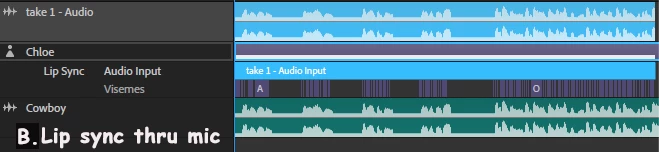
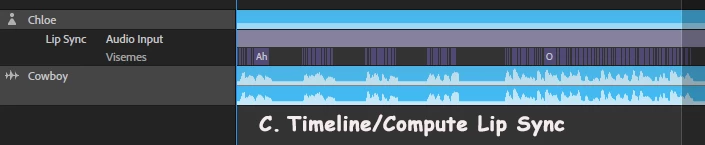
It's an interesting problem. Here are three screen caps of a timeline with lip sync, done three different ways. Does your timeline look like any of these? If the feedback was not on the original pre-recorded clip -- in A you can delete the audio clip and then insert your original pre-recorded clip; in B you can delete either audio clip. If C, then the feedback is on your original clip, and there is not much that can be done except re-record and start over.

6 replies

KJerryK
Legend
May 1, 2018

Is the ringing on the original song, or is it feedback that occurred after recording the lip sync?

samh19821728
Known Participant
May 4, 2018

Feedback after recording the lip sync

KJerryK
KJerryKCorrect answer
Legend
May 4, 2018

It's an interesting problem. Here are three screen caps of a timeline with lip sync, done three different ways. Does your timeline look like any of these? If the feedback was not on the original pre-recorded clip -- in A you can delete the audio clip and then insert your original pre-recorded clip; in B you can delete either audio clip. If C, then the feedback is on your original clip, and there is not much that can be done except re-record and start over.