
Participant
January 27, 2019
Answered

Problem with blinks showing up in transitions between states

  • January 27, 2019
  • 3 replies
  • 1111 views

Hi, I have a very simple puppet with two states that substitute each other depending on a key being held, which triggers a transition animation between them. Both forms of the character have mouth and blinking eyes.

Everything works fine except for one thing: While the transition is playing, the random blinking of the next form is already active, so it can show up before the transition is complete. Here's a picture to illustrate what I mean:
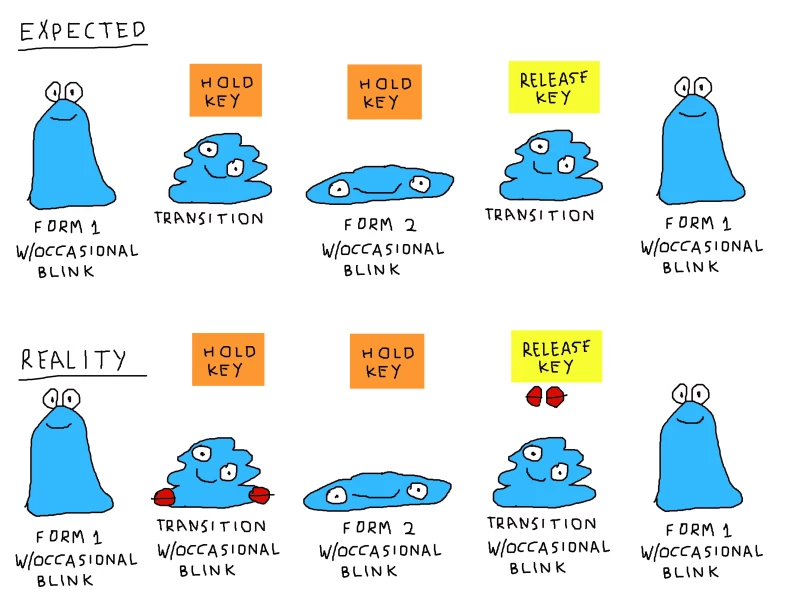
How can I deactivate blinks, lip sync and anything else that's not the transition animation, while between the different states?

Thank you.

    This topic has been closed for replies.
    Correct answer alank99101739

    Hmm. I am a little concerned about autoblink doing both eyes in sync, so not sure moving the auto-blink behavior is the right path.

    Instead, how blink works is it hides its siblings. So try creating an “8” layer for the cycle layers and putting blink inside it next to the normal eyes. That is, the blink layer is inside the last cycle layer. The idea is to make it so all the other 1 to 7 layers are not siblings to “blink” so it never hides them.

    Or if eyes/7 is the last layer of your cycle, move the current artwork under eyes/7 one more layer down so you have eyes/7/normal, then move blink under 7 as well so you have eyes/7/blink. The blink layer will then only hide eyes/7/normal during a blink and never the eyes/1 to eyes/6 layers.

    3 replies

    alank99101739
    Legend
    January 30, 2019

    There may be a better way to structure it. I think the problem you reported was because the blink layer was a sibling of the cycle layers, so it would take over even during cycling. So any structure that makes sense is worth trying. As long as you understand hiw blink works, you can think about the puppet hierarchy from there.

    alank99101739
    alank99101739Correct answer
    Legend
    January 28, 2019

    Hmm. I am a little concerned about autoblink doing both eyes in sync, so not sure moving the auto-blink behavior is the right path.

    Instead, how blink works is it hides its siblings. So try creating an “8” layer for the cycle layers and putting blink inside it next to the normal eyes. That is, the blink layer is inside the last cycle layer. The idea is to make it so all the other 1 to 7 layers are not siblings to “blink” so it never hides them.

    Or if eyes/7 is the last layer of your cycle, move the current artwork under eyes/7 one more layer down so you have eyes/7/normal, then move blink under 7 as well so you have eyes/7/blink. The blink layer will then only hide eyes/7/normal during a blink and never the eyes/1 to eyes/6 layers.

    Participant
    January 29, 2019

    I got a bit confused by what you meant with the first answer, since I don't think you can put the "blink" folder inside a layer, so I went with the second one.

    I added a new folder named "7" in Photoshop and put the "7" layer and the "blink" folder, then assigned the Auto Blink to the "7" folder, tagged it as the Left Eye (since both are in the same drawing) and it works as intended! Thanks for the tip! (Now I wonder how could this be done when working with the usual two separate eyes)

    It feels kind of a hackish thing to do for something so simple, though... In my opinion, it would be so much more intuitive if it was possible to just trigger an animated transition between group substitutions (which would hide both the initial and target group while playing). Is it really not possible to do currently?

    alank99101739
    Legend
    January 27, 2019

    How is the transformation done? I would think about the puppet hierarchy. Can you move the auto blink behavior lower in the tree so only the final layer gets the events? I am surprised blinks are affecting cycle layers for example. But understanding the rigging heirachy would help

    Participant
    January 28, 2019

    The "eyes" group has the transition frames and a "blink" group inside. The Auto Blink is assigned to "eyes", as seen here.

    How can I move the Auto Blink to just the final frame of the transition?