


Participant
Mar 11, 2019 11:31 AM UTC
Answered

Project won't open - libgit2 error -3(9/Object not found – no match for id

Hey there,

When I try to open my Character Animator project, I get the following Error message:

libgit2 error -3(9/Object not found – no match for id (ff7429548d977fd5216cb30c4dbccf7045ba81f) returned from git_tag_lookup(&tag.p, repoP→mRawRepoP, &tagOid)
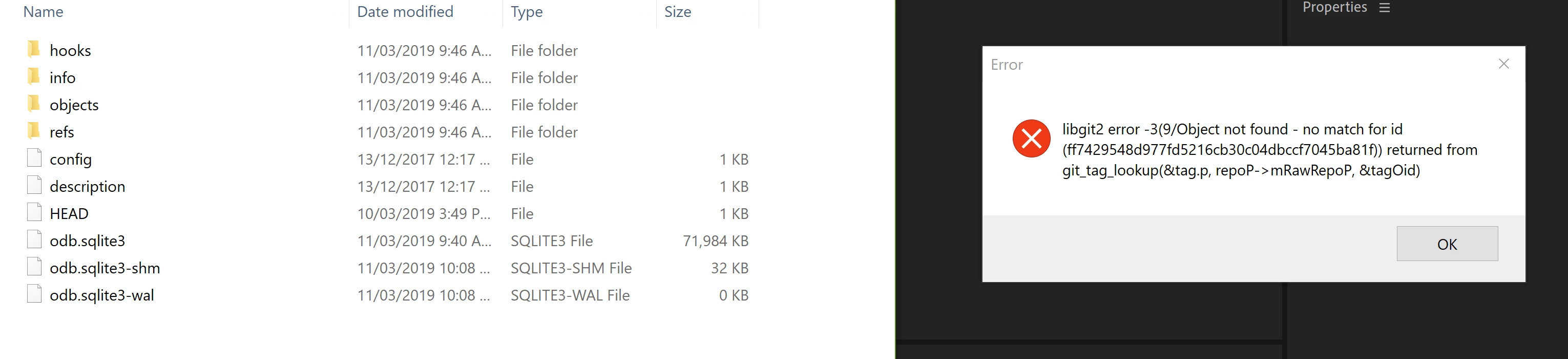
I'm running Character Animator CC 2019 on Windows.
Below I've attached a screenshot of the error message and of my Ch Data\repo.noindex folder.
Any ideas on what this error message means? Or how I can fix it?
I've been silly enough not to backup my project. I have exported the recordings I've done so far, but it would still be nice to recover the project to avoid needing to re-rig puppets for future recordings.

I closed Character Animator cleanly the last time I used it - it did not crash.

UPDATE:

After searching through the forums, I thought I'd add some additional info. I have my project and all assets saved in my Creative Cloud folder, and syncing is on. I've just noticed that the Adobe Creative Cloud App is not showing that Character Animator is installed. Nor does it show Adobe Illustrator, Premiere Pro, Photoshop, After Effects or Audition are installed. It only shows Media Encoder and Lightroom. Following the steps on the following page has not resolved this issue - https://helpx.adobe.com/uk/creative-cloud/kb/apps-panel-reflect-creative-cloud.html

Apps panel doesn't show installed Adobe Creative Cloud apps

I will continue investigating.

This topic is closed to new replies. Start a new post to keep the conversation going.
Sam Cornelis
Sam CornelisCorrect answer
Inspiring
Apr 12, 2019 7:55 AM UTC

Hi,

We had the same error (on mac), in a folder which was on the Creative Cloud.

It seemed that the Creative Cloud had created a conflicted copy. Character Animator was referring to the data in the conflicted copy. So we removed the file with the original name and renamed the conflicted copy. We could then open the Character animator project.

In our case it were the files:

Ch Data\repo.noindex\odb (Conflicted copy from ...).sqlite3 -> this was the good one

Ch Data\repo.noindex\odb.sqlite3 -> this was the bad one

Good luck,

Sam

------------------------------We explain how to do stuffanimation - video - elearning for technical trainings

5 replies

Participant
May 11, 2021 12:47 PM UTC

Similar issue, though the solution mentioned doesn't work. Help please!!


Translate
Inspiring
Jul 22, 2019 6:37 PM UTC

Since Character Animator uses a database project format, file syncing services like Creative Cloud, Dropbox, etc. can interfere with the project by temporarily locking access to the files while it uploads them to the cloud. Because of this, we recommend working with your project locally, then store an archived(zip of the entire project folder) version in the cloud.

I will see if there's anything we can do on our end to make this problem less likely to occur, especially with the Creative Cloud syncing service.

Dan Ramirez

CH QA Engineer

Translate
sylviop
Participant
Mar 27, 2021 11:04 PM UTC

Hi! I have the same problem but my project is saved on an external Hard Drive, not on the Cloud. Any idea about how to solve it? Thx!

Translate
Sam Cornelis
Sam CornelisCorrect answer
Inspiring
Apr 12, 2019 7:55 AM UTC

Hi,

We had the same error (on mac), in a folder which was on the Creative Cloud.

It seemed that the Creative Cloud had created a conflicted copy. Character Animator was referring to the data in the conflicted copy. So we removed the file with the original name and renamed the conflicted copy. We could then open the Character animator project.

In our case it were the files:

Ch Data\repo.noindex\odb (Conflicted copy from ...).sqlite3 -> this was the good one

Ch Data\repo.noindex\odb.sqlite3 -> this was the bad one

Good luck,

Sam

Translate
------------------------------We explain how to do stuffanimation - video - elearning for technical trainings
Tred-Smn01k
Participant
May 5, 2019 7:59 PM UTC

Thank you. This fixed my issue as well. Using Mac with project stored on CC.

Translate