Participating Frequently
Nov 27, 2023 6:14 AM UTC
Answered

pupils don't stay inside eyeball layer - they fly way out of eyeball area

i followed the structure


+Right Pupil

Right Eyeball


--- Does the Right Eyeball layer serve as the mask

*i opened up Chloe

and studied eye structure - she has no clipping masks

it looks like the Right Eyeball layer is the mask for +Right Pupil


------

i included a screenshot of my rig and the eye shape

any tips toward solving this much appreciated.. i tried clipping mask but couldn't get mask to activate  - i followed steps..but video was 4 years old


thanks for the help

Taz
 

This topic is closed to new replies. Start a new post to keep the conversation going.
k_oshiro
k_oshiroCorrect answer
Community Expert
Nov 29, 2023 12:56 AM UTC

Japanese is converted to English using translation software.

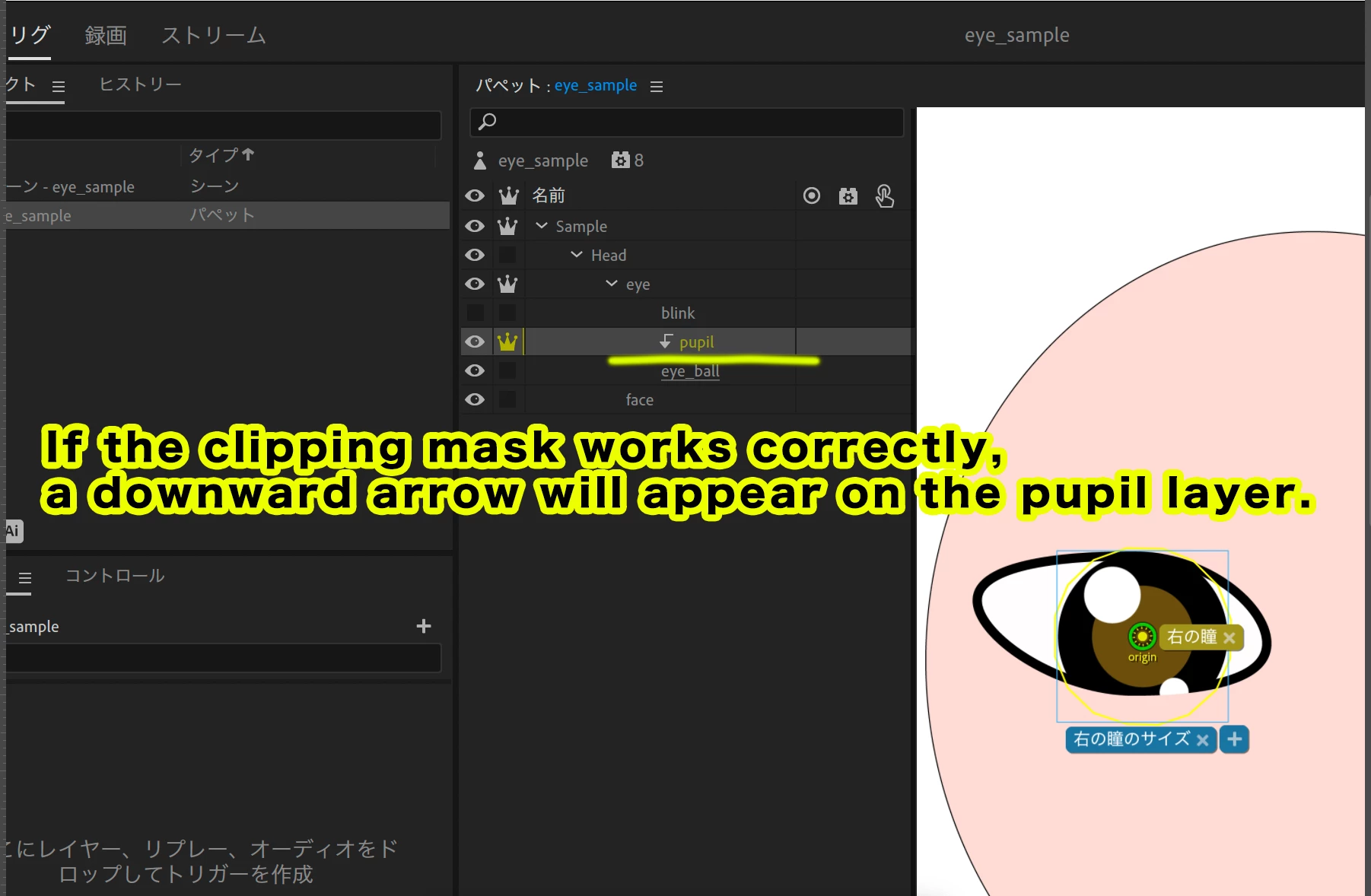
If the clipping mask works correctly, a downward arrow will appear on the pupil layer.

Your screenshot does not show the downward arrow.
I think the clipping mask is not working.

Try applying the clipping mask by referring to the sample video.
It is in Japanese.
Thanks.

k_oshiro(AdobeCommunityExpert)

11 replies

k_oshiro
Community Expert
k_oshiroCommunity ExpertCorrect answer
Community Expert
Nov 29, 2023 12:56 AM UTC

Japanese is converted to English using translation software.

If the clipping mask works correctly, a downward arrow will appear on the pupil layer.

Your screenshot does not show the downward arrow.
I think the clipping mask is not working.

Try applying the clipping mask by referring to the sample video.
It is in Japanese.
Thanks.

Translate
k_oshiro(AdobeCommunityExpert)
Participating Frequently
Nov 29, 2023 1:47 AM UTC

thx u k_oshiro i'll will try.... 

Translate
k_oshiro
Community Expert
Community Expert
Nov 28, 2023 2:13 PM UTC
Sometimes the clipping mask is grayed out and cannot be selected. In this case, you may be able to select the clipping mask by selecting a different layer and then selecting the pupil layer again. Please try it.
 
Translate
k_oshiro(AdobeCommunityExpert)
Participating Frequently
Nov 28, 2023 10:50 PM UTC

i don't get these clip masks.... can u look at the screen shots i posted

i believe its just rigged wrong


thank k_oshiro and thank u TheOriginalGC

Translate
TheOriginalGC
Community Expert
Community Expert
Nov 27, 2023 3:24 PM UTC

Could we see the rigging for the pupils? That might help to diagnose your problem.

Translate
Participating Frequently
Nov 27, 2023 9:10 PM UTC

i attatched a screen shot - do you need anything else? let me know thank u

Translate
TheOriginalGC
Community Expert
Community Expert
Nov 27, 2023 9:23 PM UTC

I'm not seeing anything new.

Translate