Participant
December 10, 2020
Answered

Pupils jump to the center to blink?

  • December 10, 2020
  • 2 replies
  • 307 views

Hi everyone! I used a blank puppet to replace it with all my graphics. For my first trial it worked fine, but I have now made the eyes smaller and noticed that their blink state is not following the eye gaze.


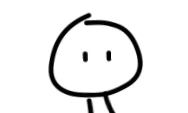
My Illustrator pupet is very simple. I'm actually just using the pupils as eyes with a blank eyeball. Think stickman dot eyes. So my blink is just the pupils narrowing - is it normal for the pupil to jump to the center when blinking since it would hardly ever be noticed? How could I navigate (around) this issue?

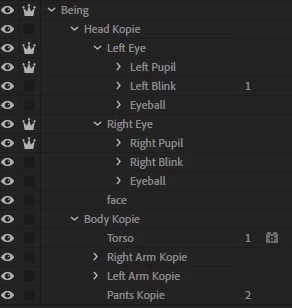
For referance:
 

This topic has been closed for replies.
Correct answer alank99101739

The blink layer replaces its siblings (pupil and eyeballs). So if you want the blink to follow eye gaze.... try making the independent pupil layer a group with two children - the pupils artwork renamed so it does not contain the word pupil) and the blink layer. That way hopefully the blink layer is part of the pupil, so moves with it, and it just replaces the y\pupil artwork in place

2 replies

Participant
December 11, 2020

Yesss! Thank you so much!!! Seems so simple, but this sure tripped me up, haha

alank99101739
alank99101739Correct answer
Legend
December 10, 2020

The blink layer replaces its siblings (pupil and eyeballs). So if you want the blink to follow eye gaze.... try making the independent pupil layer a group with two children - the pupils artwork renamed so it does not contain the word pupil) and the blink layer. That way hopefully the blink layer is part of the pupil, so moves with it, and it just replaces the y\pupil artwork in place