


juliahinez
Known Participant
July 5, 2017
Question

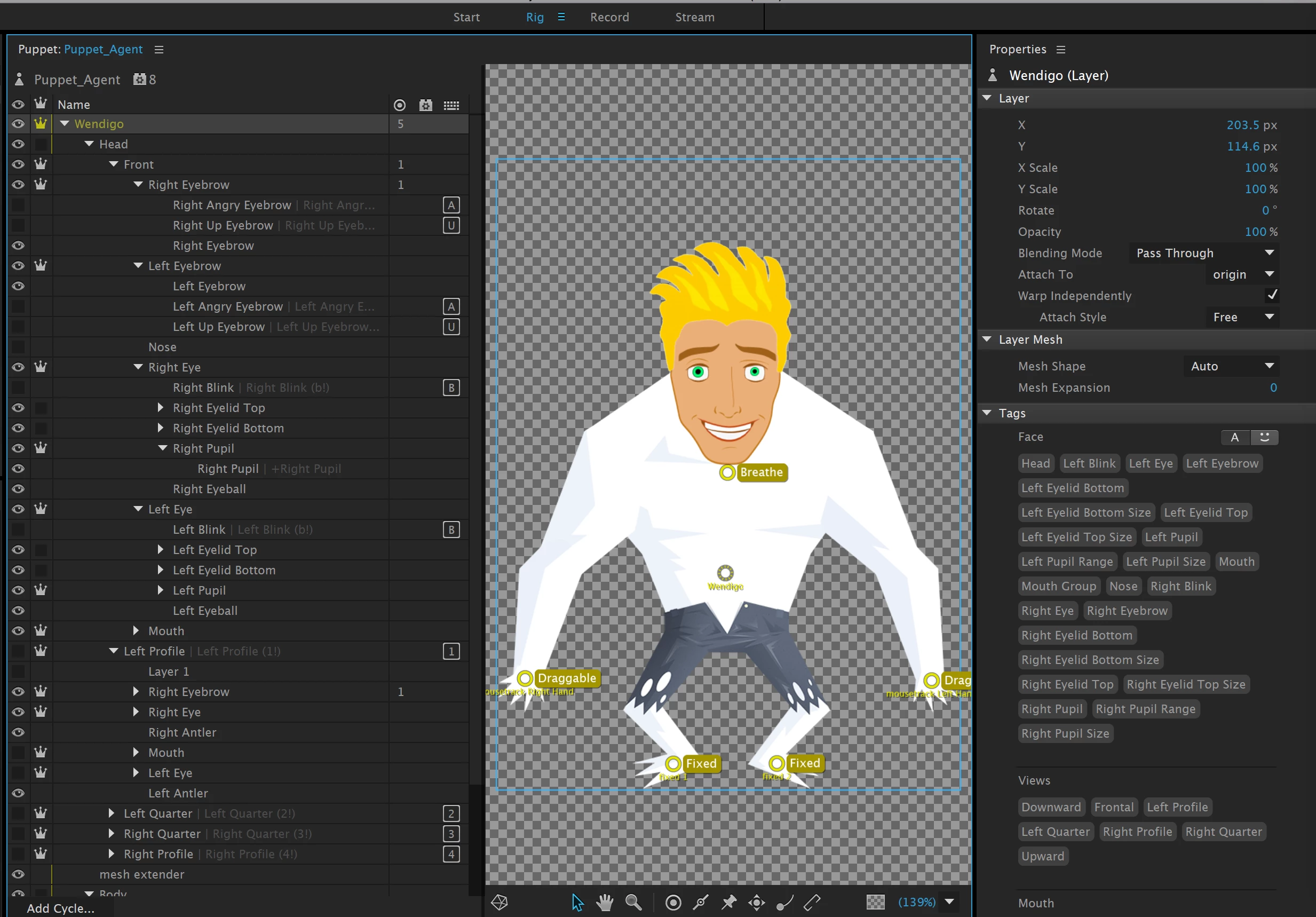
Pupils won't move; I have only one "Head"

  • July 5, 2017
  • 1 reply
  • 2082 views

Hello, I am setting up a character using the Wendigo puppet; (this isn't the final but it's pretty funny)

Everything works EXCEPT the PUPILS DON'T MOVE!

They do move on the Wendigo puppet I'm working from; so my guess is that it's obvious to an expert but I'm really stuck.

Here's a screenshot; thank you!
This topic is closed to new replies. Start a new post to keep the conversation going.

1 reply

Jeff Almasol
Adobe Employee
Adobe Employee
July 8, 2017

If you select the Right Pupil group, does it have the Right Pupil handle tag and Right Pupil Size layer tag applied? Also, if you select the Right Eyeball layer, does it have the Right Pupil Range layer tag applied? (similar for the Left-side versions of those.)

Also, in the Eye Gaze behavior, is the Camera Strength set to 100%?

If those seem to be set properly, feel free to share a .puppet file of your character with us to diagnose. Just select the puppet in the Project panel, choose File > Export > Puppet to save the .puppet file somewhere, then post (or direct message) a shared link to the file via Dropbox, Google Drive, etc.

Thanks.