


Puppet head floats up at very end of scene
I am using The Professional puppet to create a five short training videos. I have exported the puppet from the first video, and re-used the same puppet with the same rigging in all five videos.
In four of the videos, the puppet's head looks normal. In the fifth video, his head looks normal for 98% of the video. See normal head/neck position below.
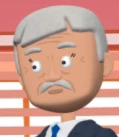
During the last few seconds at the end of the fifth training video, yellow text appears that tells the viewers to pause the video and complete the activity. During those seconds, the puppet's head floats way up.
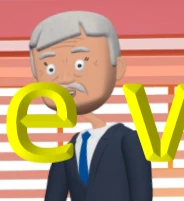
This behavior does not happen anywhere else in this video, or in any of the other videos.
Rigging: Head is NOT independent (or it wouldn't stay attached to the body), and the head/neck handle is just below the chin. He has a head/neck handle for both the "Left Quarter" as well as for the "Head," and the handles are in the same place.
I have tried making the head/neck handle "Fixed," and it didn't change anything. I have also re-recorded the head movement (camera input), and it always does the same thing. I have tried extending the puppet's track to well beyond the scene's duration, and it didn't help.
Does anyone know how I can stop the head from floating upwards during the last 3 seconds?
Thank you!
 AdChoices