Inspiring
May 12, 2019
Answered

Puppet is broken, mesh crashes during movement

  • May 12, 2019
  • 3 replies
  • 913 views

Hi.

I was drawing the new appearance for my puppet, tuning triggers and finally got this Puppet is broken in CH - YouTube

Any thoughts? That's really annoying to lose all day for such a thing.

Is there any video about common problems with this app on Youtube?

This topic has been closed for replies.
Correct answer alank99101739

I used a highly technical approach of deleting stuff while it kept failing until tracking down the problem. I found one issue, which might be a repeat of others. So sharing that quickly in case it helps you move forwards.

Here is a screen shot after deleting the body, various profiles etc. I turned the mesh on in the scene playback window. You can see when I move the head around, it warps strangely?

Default pose (Left Quarter profile)
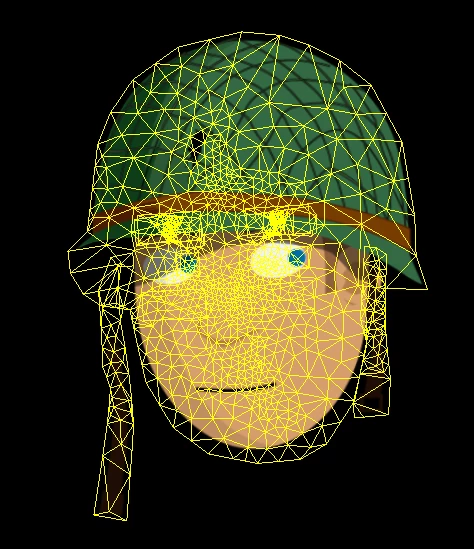
Moved head. See how near eye it has distorted?
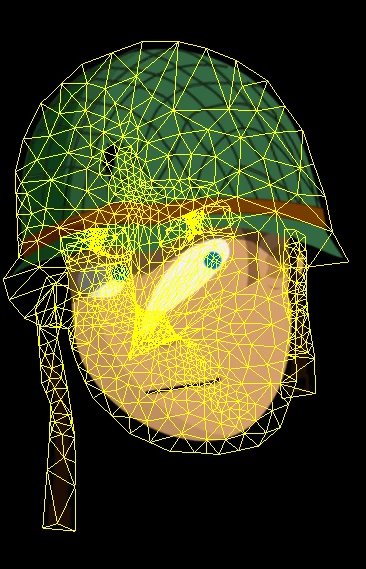
That helped to locate one problem. You have the Head tag on both the Head layer and the Left Quartile layer. Removing the tag from the Left Quartile layer fixed this problem. I think because both where tagged, that one point was being moved twice as far as everything else, causing warping.

I can try and look more later tonight after work etc, but thought I would share using the mesh during playback to spot the source of distortion, then you can look at things like these extra or wrong tags on layers near the sources of distortions.

3 replies

alank99101739
alank99101739Correct answer
Legend
May 13, 2019

I used a highly technical approach of deleting stuff while it kept failing until tracking down the problem. I found one issue, which might be a repeat of others. So sharing that quickly in case it helps you move forwards.

Here is a screen shot after deleting the body, various profiles etc. I turned the mesh on in the scene playback window. You can see when I move the head around, it warps strangely?

Default pose (Left Quarter profile)

Moved head. See how near eye it has distorted?

That helped to locate one problem. You have the Head tag on both the Head layer and the Left Quartile layer. Removing the tag from the Left Quartile layer fixed this problem. I think because both where tagged, that one point was being moved twice as far as everything else, causing warping.

I can try and look more later tonight after work etc, but thought I would share using the mesh during playback to spot the source of distortion, then you can look at things like these extra or wrong tags on layers near the sources of distortions.

OM26RAuthor
Inspiring
May 13, 2019

Thanks a lot, I will see it right now. But how should I delete that tags correct - clicking on them and pressing delete button or select whole layer, like Frontal and unselecting the head tag in specific settings window? Or both options are good enough?

alank99101739
Legend
May 13, 2019

Both should work. I just clicked the little cross next to the tag name which I circled in red.

The most common causes of distortion I have come across are:

  • Tagged stuff being taken over by a behavior, so it does not move with the rest of the puppet (stuck things)
  • Extra tags (like your case)
  • Hidden layers - still in artwork, so still a part of the mesh (you will see it in the yellow meshes), but not visible on the screen so you forget about it.

I was deleting things wondering if the third case was causing you problems, as there are lots of hidden layers in your artwork which were still a part of the mesh. But the first problem I found was the double tagging of Head, not the hidden artwork.

Oh, your profiles were not all tagged correctly by the way in the download file. Many profiles were missing tags. I assume you had been experimenting and testing. But tags are a very common cause of problems - and not always clear why. That is why the mesh in the playback scene (not rigging) is so useful. It shows you real time where the distortion is coming from.

alank99101739
Legend
May 13, 2019

I am downloading now and will try to have a quick look to see if I can repeat your problem. What I often do is turn the mesh on to see if I can spot the point in the artwork that is getting "stuck" - then see what handles are at that point.

OM26RAuthor
Inspiring
May 13, 2019

Thanks.

It worked, as you see all that structure, for example, Frontal view, Head is not independent, Frontal is independent and all layers inside Frontal are not independent too except that who should move independently (like eyebrows, hairs, straps).

I did with that structure nothing, only added faceshadow, scars, head hair and back hair (last two they're in Background group), repeated that with all head turns and boom - it's broken.

Today I was trying to make some layers independent some not and so on, sometimes I was close to fixing but still had issues near the right eyebrow. And I saw nothing suspicious with the mesh too.

OM26RAuthor
Inspiring
May 12, 2019

UPD

I've tried to just import the new art from "broken" AI file to one "working" and relink - still the mesh breaks. If I relink again the old one AI file - it works fine, I really can't understand WTF is going on... I didn't add any new structures, only added the paths into existing groups.

Here is zip file https://drive.google.com/open?id=1DDpneCLWfzSMRsAxOd0wLpbb3FMcv_ig

OM26RAuthor
Inspiring
May 13, 2019

Can somebody help to understand why it distorts? I've spent 2nd day to undestand it, still I have the problems