


November 10, 2016
Question

Quick Reset Required!

  • November 10, 2016
  • 1 reply
  • 2534 views

While I'm learning Ch, I'm constantly making a adjustments to what effect it has, but the problem with this is, I soon forget where I was in the first place?

1. The Undo cmd+Z and Redo shift+cmd+Z is very useful, but sometimes I would just like to be able to Reset and start again! Is there a Reset option?

2. I would like to turn off the options/settings, so I can see, from scratch, what each does in turn. Is there a Blank Canvas of Settings? Hope that makes sense!?
    This topic has been closed for replies.

    1 reply

    November 10, 2016

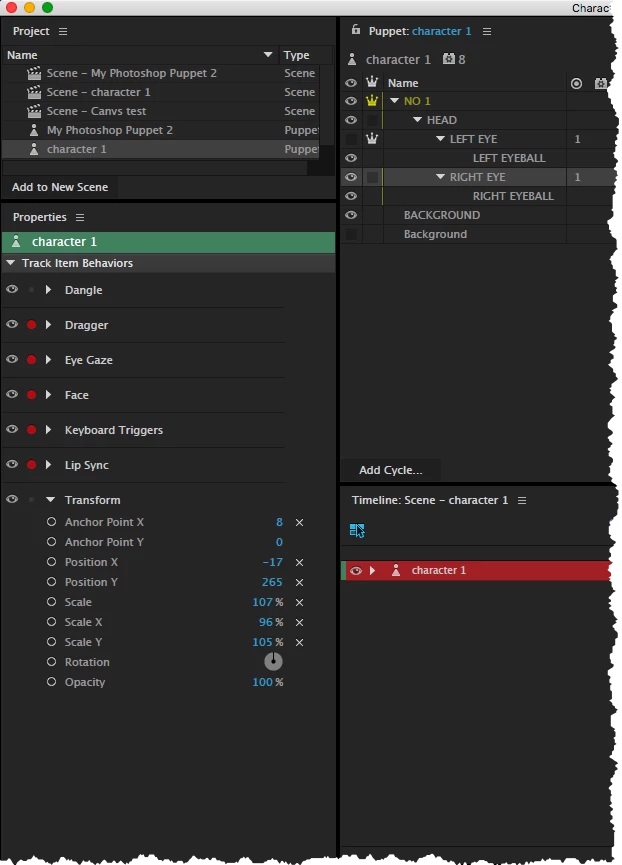
    I notice that when I click on the Scene... I can make adjustments and I get a X... If I click on this, it resets to default setting. Great!

    However, when I click Puppet, I seem to get the same settings, but when I make adjustments.. no X? You have to double click and then enter 0, press Return/Enter to reset?

    oksamurai
    Legend
    November 10, 2016

    1. Best option for a reset is in the history window. Window > History. Just highlight the first thing in the list and you'll rewind to the start.

    2. In the puppet panel some properties (track item behaviors) have a little menu icon next to them - you can remove or hide them in the scene from there.

    3. The puppet values are a foundation, the defaults for your puppet. Yes, there is no X - you determine the defaults for what works best with your art. Once you're in a scene, that X means "restore to default" - whatever you've set originally in the puppet panel.

    November 10, 2016

    Hi Again!

    The History Panel.... In Ps I paint and use History a lot.. never gave this a though in Ch... amazing!

    I've just checked this out... Selected it from Windows.... Wow.. it goes way back to when I first started using and not just the latest session! I've pulled the History Panel away from the Main WorkSpace and have it as a floating Window.. this will be very useful!

    I'm still not 100% sure why there are two Properties.. Panels that seem to be showing the same thing, although one is slightly different. However, it may become a bit clearer when I get further into Ch!? I'm still working on a head and one eye! Slow... I know!

    Thanks again for your invaluable help!