


Participating Frequently
January 9, 2018
Answered

Rigging arms helps please
  • January 9, 2018
  • 3 replies
  • 560 views

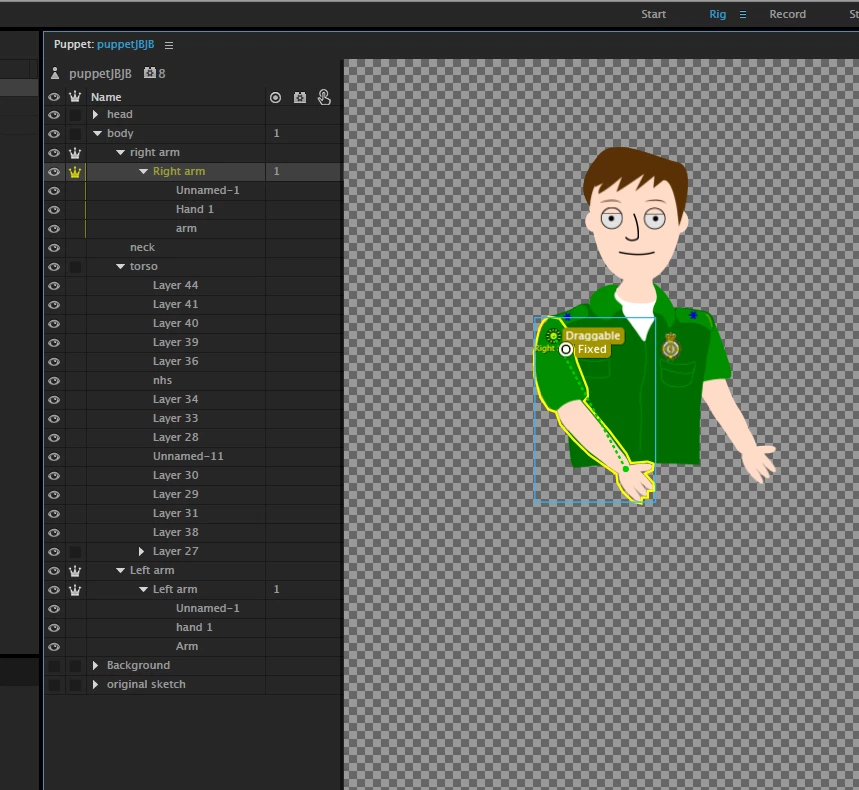
This is driving me mad, the left arm which sits slightly behind my character works fine and hinges from the shoulder. The right arm which is the top layer will not attach to the shoulder no matter what i do. I'm sure its something simple but ive literally spent all afternoon trying different things. The online tutorials mostly show an older version so doesn't completely apply to my problem. I really would be grateful for any assistance, regards, John.

    This topic is closed to new replies. Start a new post to keep the conversation going.
    Correct answer TDFAP

    Hi John, by "attach to the shoulder" are you referring to CH auto tagging the origin point (usually the shoulder) and lighting up green to indicate an attachment?

    If this is an older puppet that is being used by an upgraded version of CH, you may need to go to your properties panel (with your right arm group selected) and set "attach to" to "auto" does that help?

    Newer puppets shouldn't need this fix, but I've noticed they occasionally do, if you are editing your puppet as you rig it.

    -AP

    3 replies

    TDFAP
    TDFAPCorrect answer
    Inspiring
    January 9, 2018

    Hi John, by "attach to the shoulder" are you referring to CH auto tagging the origin point (usually the shoulder) and lighting up green to indicate an attachment?

    If this is an older puppet that is being used by an upgraded version of CH, you may need to go to your properties panel (with your right arm group selected) and set "attach to" to "auto" does that help?

    Newer puppets shouldn't need this fix, but I've noticed they occasionally do, if you are editing your puppet as you rig it.

    -AP

    Participating Frequently
    January 10, 2018

    Thank you so much - all working now, regards, john.

    KJerryK
    Legend
    January 9, 2018

    My first reaction is to try this

    1. Remove "Fixed " handle

    2. Untag Right draggable

    3. Place draggable handle near wrist