


Participating Frequently
April 23, 2017
Question

Seams showing

  • April 23, 2017
  • 4 replies
  • 1031 views

Hello, I was wondering if anyone else had this issue.
I am doing rigging test for my character, I have an animation for the arm, and for some reason, there is a soft black outline around the piece that is animated.
I tried fixing by adding blue mass behind the arm but it changes nothing.
Here is a picture that shows what I mean
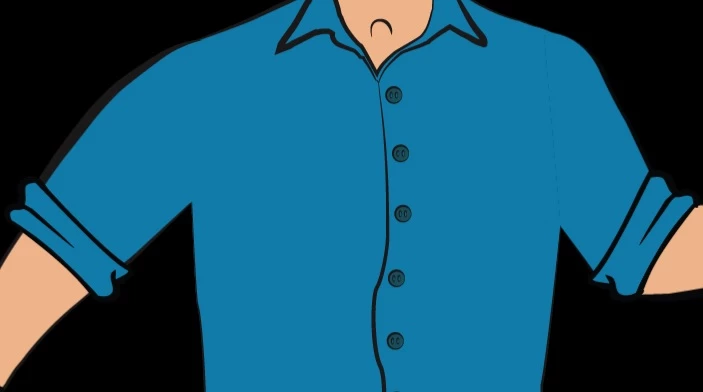
Here is the puppet in illustrator, the lines should not be there. Plus the piece is larger than where it seems to cut, it's almost as if it was transparent in CH
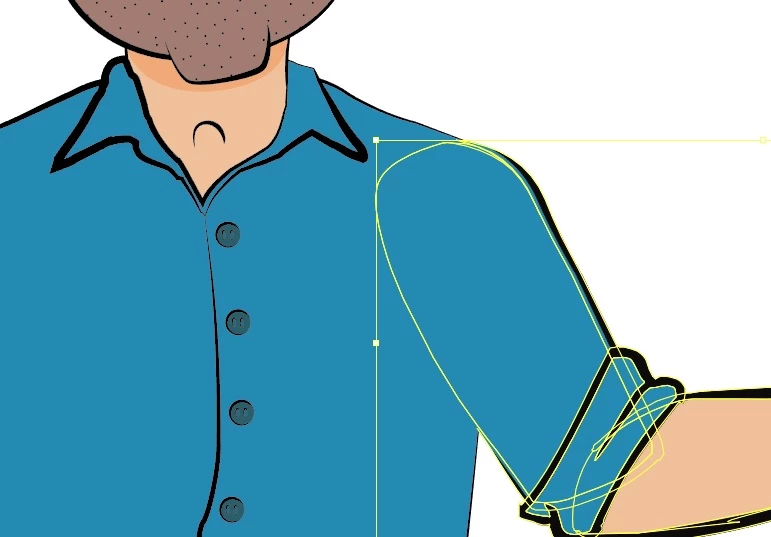
Thanks in advance

    This topic is closed to new replies. Start a new post to keep the conversation going.

    4 replies

    Participating Frequently
    April 27, 2017

    Sorry for the delay. It seems I was able to resolve it. Turns out I had accidentally cut my upper arm into more than on part. A quick pathfinder merge solved the issue. Still a little odd but I'm guessing it was because of the slight movement in the piece.  Thanks for responding.

    Jeff Almasol
    Adobe Employee
    Adobe Employee
    April 27, 2017

    The seam is due to the adjacent edges of paths being near pixel boundaries. If you switch AI to use Pixel Preview mode, you should be able to see fractional alpha edges. They don't sum together, they screen (e.g., 50% over 50% is 75%, not 100%). Creating some overlap or merging as you did is the solution here.

    BTW, After Effects has a special Alpha Add blending mode for this, as described here: https://www.provideocoalition.com/after-effects-hidden-gems-weekly-alpha-add-mode/

    Jeff Almasol
    Adobe Employee
    Adobe Employee
    April 27, 2017

    If you're still encountering the issue, could you send a shared link to the artwork file so that we can diagnose the issue? Thanks.

    Jeff Almasol
    Adobe Employee
    Adobe Employee
    April 25, 2017

    That does seem unexpected. Is that in the Puppet panel, Scene panel, or both?

    The torso layer is appearing below the arm layer in the Puppet panel?

    If you'd like to share a link to the artwork file (via Dropbox, Google Drive, etc.), via direct message or here, I can investigate what might be going on.

    Thanks.