


Roosuomi
Participant
February 19, 2019
Question

Selecting the head / body (pic inclued)

  • February 19, 2019
  • 1 reply
  • 259 views

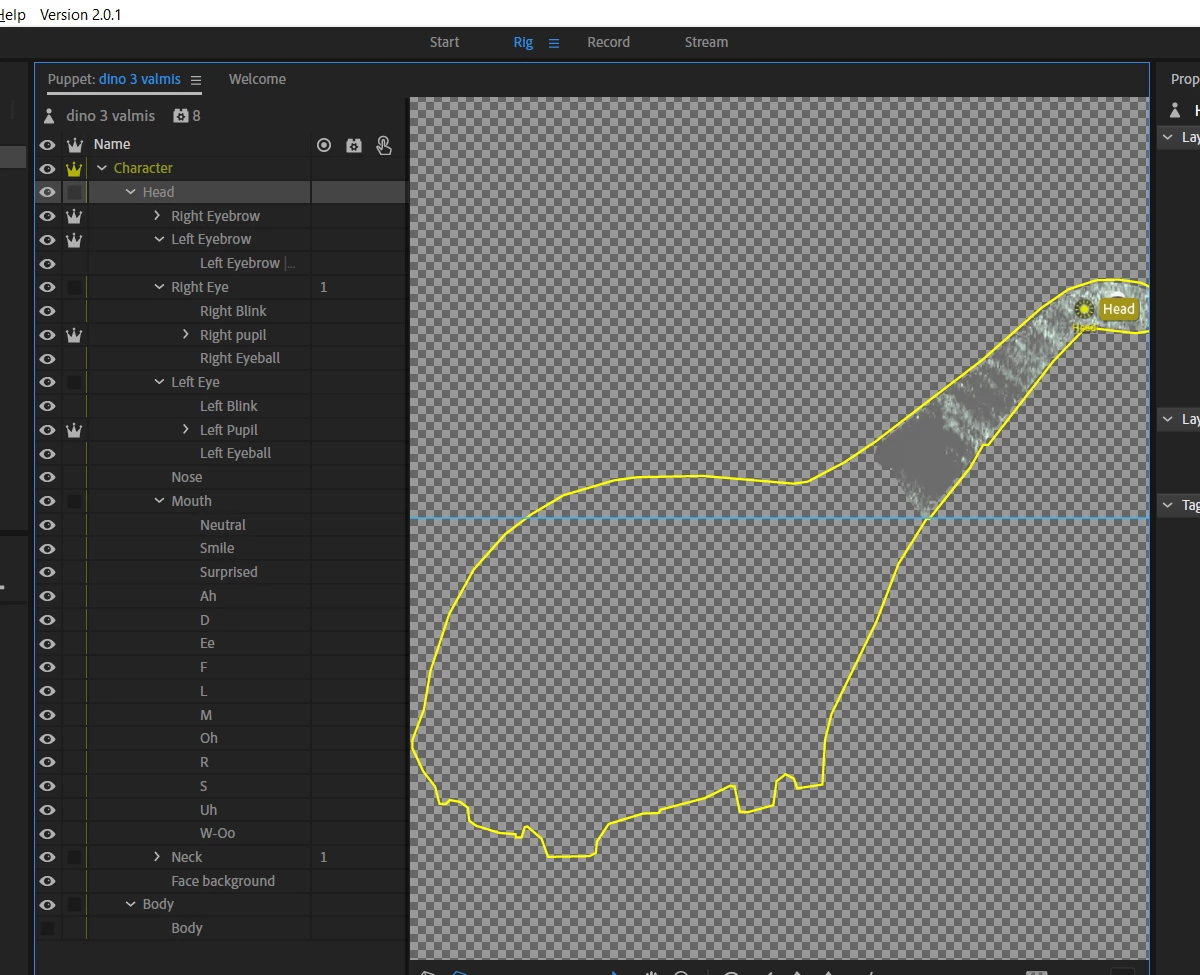
I am trying to create a dino. the head is very small but it's in the own head folder. the body is in the body folder. But what ever I do and how I import these elements to the character animator it thinks that the whole dino is head. How come? Its marked as yellow the whole dino. How I can adjust the yellow to apply only in the head part? I took the body part invicible in the picture so you understand that its in the own body folder. Why it thinks the whole dino is head? And how to tell the program it's not.
    This topic has been closed for replies.

    1 reply

    DanTull
    Adobe Employee
    Adobe Employee
    February 20, 2019

    The outline includes all the parts of the puppet which are on the same mesh and move/warp together. This may be ok, depending on how you want the puppet to move, but if it isn't, you can change it by toggling the crown icon for the group (like the eyebrows and pupils which are currently marked as warp independent so they move separately which is generally what you want). Note that if you make the parts independent, you may have to adjust how they are attached to each other so they don't pull apart in ways that you do not want.

    Dan Tull