jimmyw3876728
Inspiring
February 10, 2019
Question

Separate body movement in CC

  • February 10, 2019
  • 4 replies
  • 719 views

I am working on this for a few hours, I cant keep the body and legs from moving away from the body. I deleted the project and stared again, but still cant keep its all together. I will get this lad to walk very soon, thanks again


This topic is closed to new replies. Start a new post to keep the conversation going.

4 replies

alank99101739
Legend
February 18, 2019

There are two approaches for legs - make them independent to the body, like you have done, or make them part of the body (no independence).

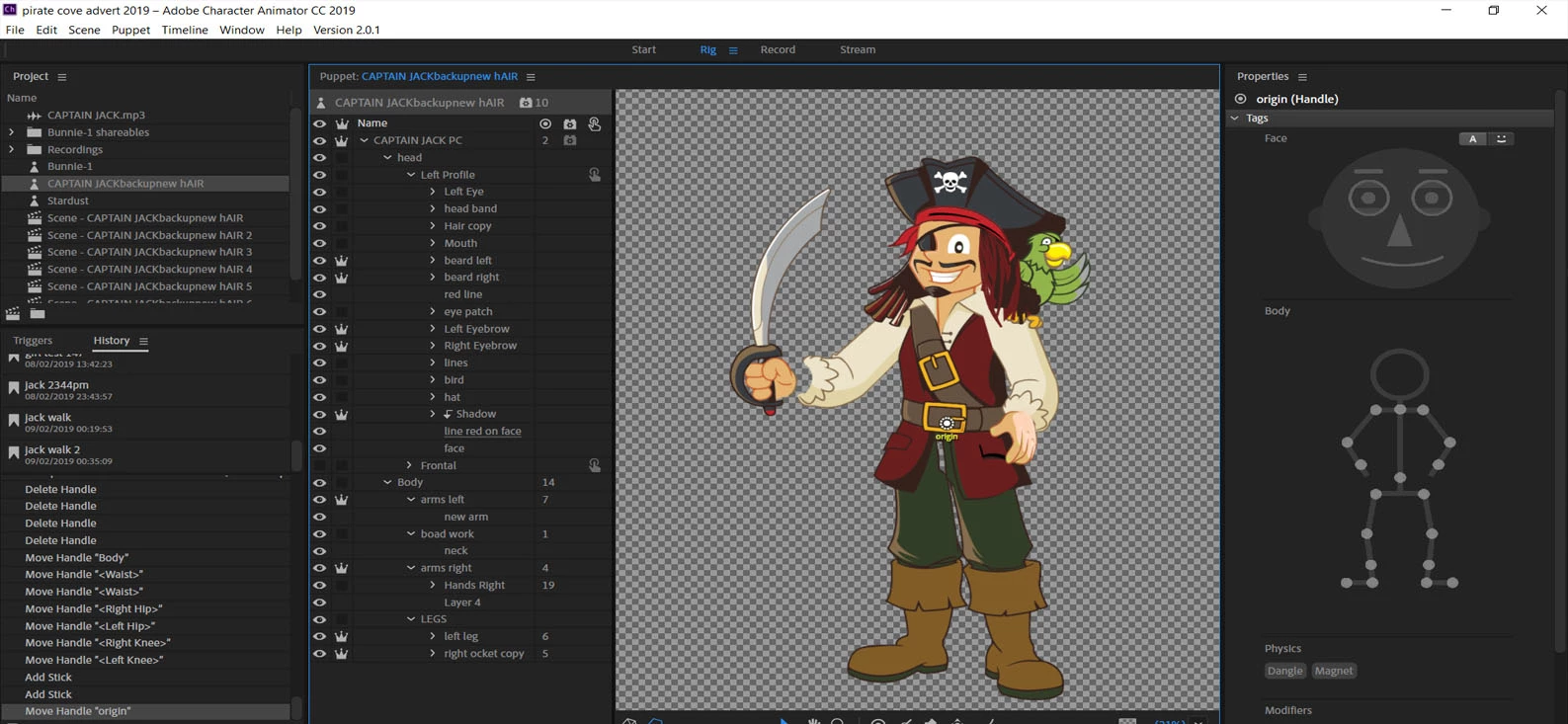
You have chosen to make the legs independent. In that case, I would recordommend setting the “Attach To” to “Auto” and then drag the origin handle for the leg so it overlaps the body and turns green. In the screen shot it is not green, but the Attach To value is not Auto.

With the legs being independent, you will not be able to use pins etc to lock down the position of the legs to control the body - you will have to pin down the body and then use draggers or similar to control the leg positions. I personally don’t use independence on legs very often just so I can put pins on the feet to control the body location. (The feet then don’t move, but the body sways around.)

Question - do you play to use the walk behavior? The walk behavior locks things down a lot more. It effectively takes over all the draggers in the puppet for you.

jimmyw3876728
Inspiring
February 18, 2019

i cant get him walking at all, did what you said and thanks for your info, if a cartoon does not walk, what would the main prob be would you think?

I also have two heads, head one all the parts work fine, on head two I cant get the eyes and eyebrows from jumping around. I had a look at Emilys tips on shareable parts, did this for the eyebrows, but it did not work

So, if I can get him walking, and get his head, then Ill be almost there

Thanks CC team

alank99101739
Legend
February 10, 2019

Arrrr. He be walking da plank soon enough me hearty!

Could you click on say a leg in the rigging view? That should highlight if the leg is correctly attached to the body. Do you want the legs to be independent to the body? More often than not I keep the legs dependent (no crown). Arms are often independent (so the joint works better) but legs I frequently do not do independent.

My guess is the either the parent layer is not auto, or the leg origin is not over the body (so the origin marker goes green so its attached). That is easier to see if you click on a leg and take a screen shot of that rigging (showing the origin etc). Getting the right property panels can help too - to see the “attach to” value.

jimmyw3876728
Inspiring
February 18, 2019

Hello CC World ,
I want to add this lad walking, but his two legs are flying around like he is in space. How can I get him walking. All is moving is his legs flying around..... What are I doing wrong..... 

Thanks