


November 15, 2016
Question

ShortCuts... Add and Share

  • November 15, 2016
  • 13 replies
  • 1949 views

As I'm getting more into Character Animator... the more I'm becoming aware of ShortCut Keys... those little  key combination that can help!

So I thought I would start this post with the single purpose of collecting and sharing any shortcuts that may be useful!

If you know of a ShortCut then please add it to the list...
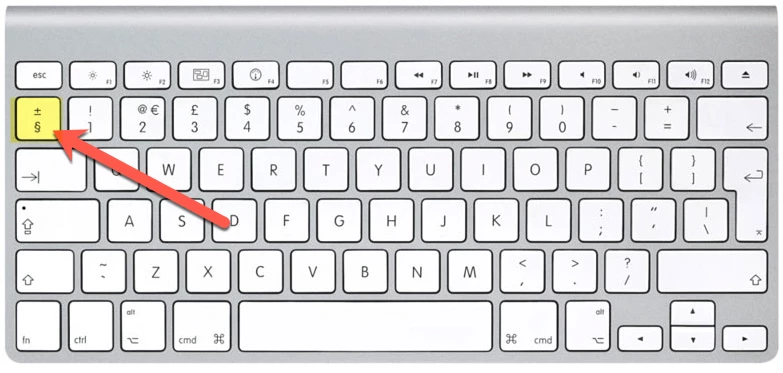
If you select a Panel.. the blue line around the panel shows it is selected... and you press the Plus & Minus key.... the panel will open up full size.

Give it a go and you'll see what I mean.

PS. I'm using a Mac UK configured keyboard, so you may find it is a different key. If it is please add your finding here.

    This topic is closed to new replies. Start a new post to keep the conversation going.

    13 replies

    November 27, 2016

    November 27, 2016
    Switching between programs...

    This is good when you have several apps open at the same time, as it allows you to quickly switch from one to another.

    Mac: cmd+Tab

    Windows Alt+Tab

    If you are in Character Animator.. if you press; cmd+E it will take you to the Original Edited File... in Ps, or Ai.

    November 16, 2016

    Set Rest Pose

    If you are making adjustment, then need to Set the Rest Pose, without going back into the Camera & Microphone Panel....

    Cmd+P

    November 17, 2016

    Puppet       Scene

    cmd+F4     cmd+F2

    When you are viewing the Puppet Panel

    November 18, 2016

    Up and Down.... Left and Right Arrow Keys

    These are a great way for getting around and learning the structure of the Groups and Layers in the Puppet Panel.

    The Up and Down Keys.. do as you would expect.

    The Right Key... this move you down the files and automatically opens Groups.

    The Left Key... this move you up the files and automatically closes Groups

    November 16, 2016

    Import Photoshop or Illustrator file into Character Animator

    ​When you are in Ch...

    Cmd+i

    November 16, 2016

    Moving the image around in the Scene Panel...

    If you are zoomed and then want to move the character to see a close up of different parts, hold the Alt key and then click-and-drag the image...

    alt + click&drag (Scene)

    El Wombat
    Inspiring
    November 15, 2016

    Great thread, thanks for creating this one!

    I found these helpful:

    Change Puppet Layer Order (scene panel): CMD / CTRL + ArrowUP/DOWN

    Show all keyboard triggers and handles:     CMD / CTRL + "/"   (deutsch: cmd + "-")

    November 16, 2016

    November 15, 2016

    Open and Close a Folder

    cmd & Double Click         cmd+W & Double Click

    In the Puppet Panel... if you hold cmd and double click on a Folder... it will open that folder and show all it's contents.

    If you hold cmd+W and double click it will go back to show the previous state.

    November 15, 2016

    Open Photoshop from inside Character Animator

    If you have started inside Character animator and want to go to Photoshop to do a bit more creating...

    Click the Character in the Puppet Panel... then press cmd+E