


Participant
December 4, 2016
Answered

Strange warping and can't attach sticks to arms :(

  • December 4, 2016
  • 3 replies
  • 2064 views

Hi there,

I have a few little issues.

Firstly, my character is warping strangely, especially in the face. I never had this problem before, but I also recently added hair, and in order to make it stay behind the outline of the face, I had to separate the Face Background into separate layers: face background and face outline.

Also I'm having trouble attaching sticks to the arms (it just won't let me). If anyone has had this problem before, please let me know!
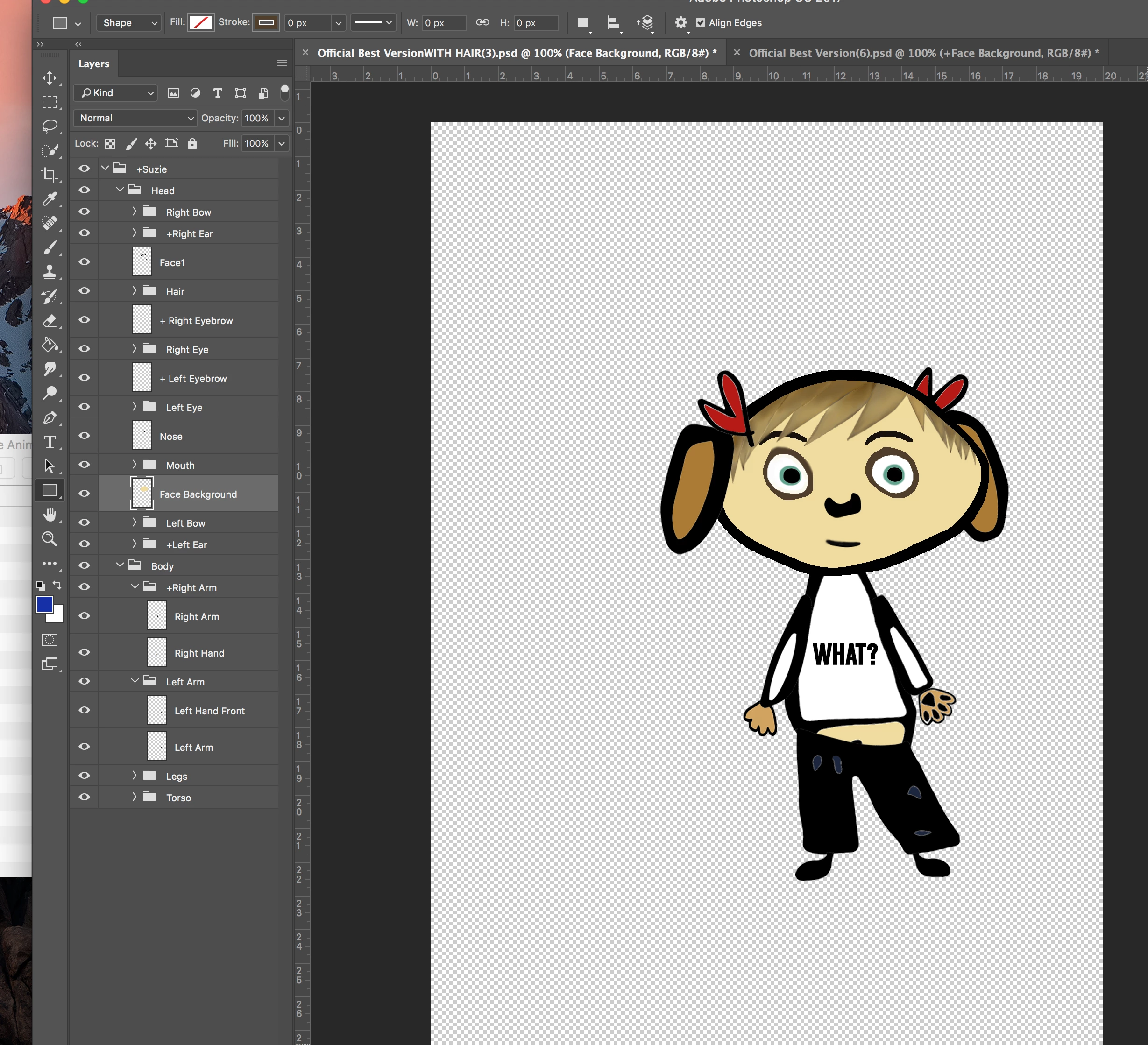
I'm including a screenshot of the psd file, just in case anyone can spot some immediate flaws that jumps out.

    This topic has been closed for replies.
    Correct answer talayawhite

    Just a theory for the no arm-sticks problem:

    Try putting a layer in the root of the Body group instead of having it only be sub groups.

    Body

    -> Empty Layer

    -> +Right Arm (group)

    ---> Right Arm

    ---> Right Hand

    -> +Left Arm

    ---> ........

    I was having issues with getting sticks to attach to limbs, and it kept saying "Select a puppet with artwork" or something like that, so this is what worked for me in Illustrator.

    Ungrouped, unnamed artwork layers sometimes don't show up or show up but can't be edited in the puppet editor, so make sure to name all your layers - since that was the next syntactical issue I encountered when trying to macgyver limbs.

    3 replies

    oksamurai
    Legend
    December 7, 2016

    Saw your DM - sending you a fixed version now.

    Known Participant
    January 24, 2024

    Hi everyone. I'm new to character Animator and I'm loving it but I have this issue I can't seem to work out.

    The puppet looks fine BUT when I open my actual jaw wide the characters face warps really weird plus there are some subtle warping going on as I talk. I can't seem to figure out what I am doing wrong.

    Please help. Attached are screen shots

    talayawhiteCorrect answer
    Inspiring
    December 6, 2016

    Just a theory for the no arm-sticks problem:

    Try putting a layer in the root of the Body group instead of having it only be sub groups.

    Body

    -> Empty Layer

    -> +Right Arm (group)

    ---> Right Arm

    ---> Right Hand

    -> +Left Arm

    ---> ........

    I was having issues with getting sticks to attach to limbs, and it kept saying "Select a puppet with artwork" or something like that, so this is what worked for me in Illustrator.

    Ungrouped, unnamed artwork layers sometimes don't show up or show up but can't be edited in the puppet editor, so make sure to name all your layers - since that was the next syntactical issue I encountered when trying to macgyver limbs.

    December 6, 2016

    I've found that moving Groups and/or Layers in Character Animator has a different impact on the associated mesh and I think this is to do with handle that is associated with the Group. If you move the Group... then everything seems fine... no weird and distorted movements of the puppet, but if you move a Layer within a group, this changes the relationship between the Group it's in and the Layer... this does seem to cause strange warping affects.

    I think the Team will be able to explain this much better. That's of course if I'm not talking out the top of my head!

    I would suggest, re-position everything in the Original Document... be that Ps, or Ai and just use Ch for the animation. Hope that makes sense!?

    oksamurai
    Legend
    December 5, 2016

    Nothing jumps out immediately but have you tried making in contour to see if that helps? See 7:36 into this video:

    If not can you export the .puppet file and share it with me to take a closer look?

    skschmidtAuthor
    Participant
    December 5, 2016

    Thanks for your quick reply! I've done the contouring and it generally works for me, except the objects that warp independently always seem to be contoured separately (They don't appear as part of the character contour when I click on her name, but they do if I click on those layers, e.g. Ears).

    I don't have a .puppet file at work with me, but I do have the animator project file and the .psd file on drive. https://drive.google.com/drive/u/1/folders/0B_-4LfrcUTkZYmI4TE1BaTQ5TFE

    Let me know if this is enough, or if it's easier for me to just upload the .puppet file later!

    Thanks again for your help:)

    oksamurai
    Legend
    December 5, 2016

    Unfortunately that link isn't giving me access. Is it possible to change the permissions to be more open? Thanks!