Participant
July 16, 2025
Answered

Swap set not working

  • July 16, 2025
  • 2 replies
  • 224 views

Hello,

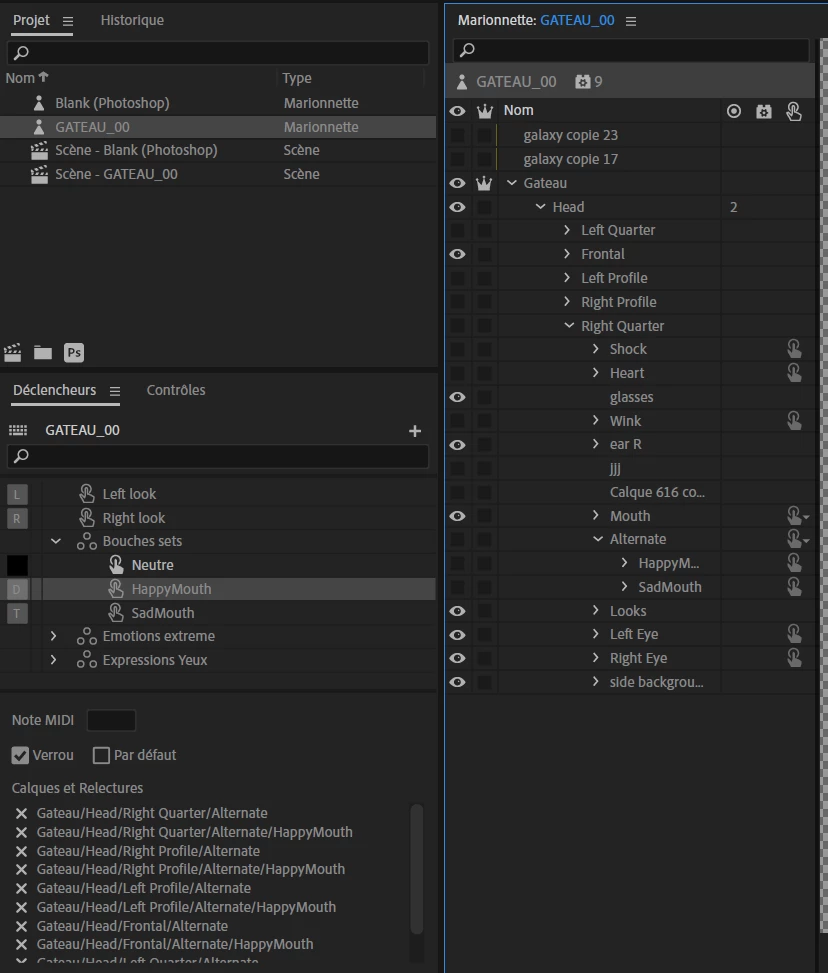
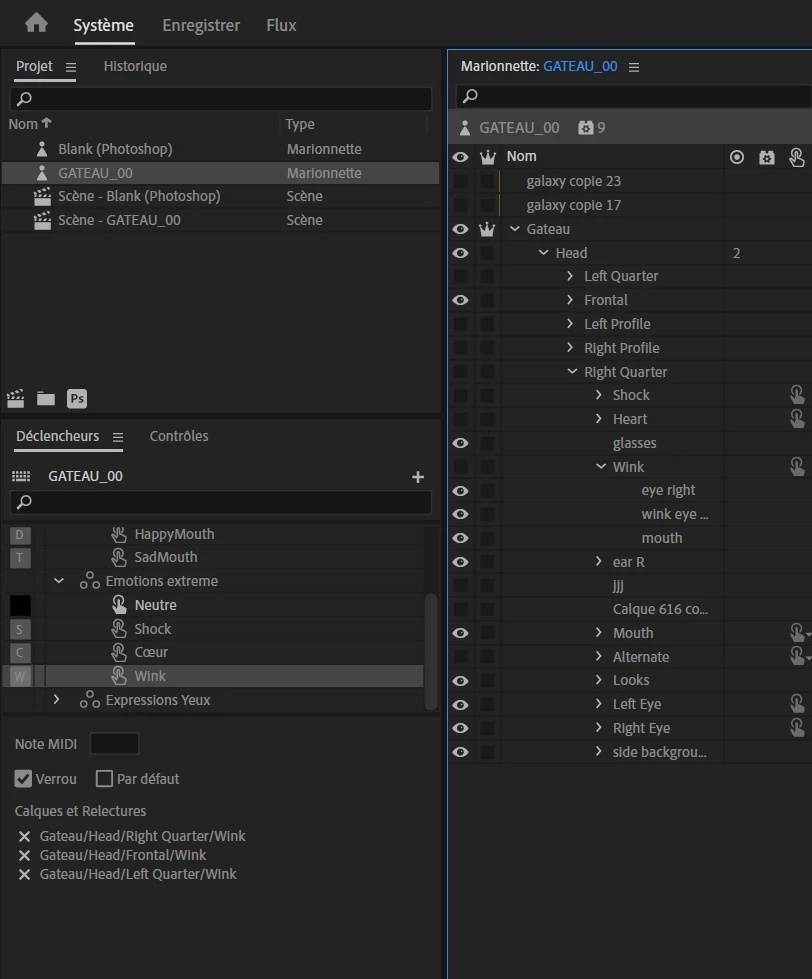
I'm doing a project and I created a Swap set happy and sad, the sad one doesn't work at all, there is just no mouth, and for the happy one, only the profiles work well. The other ones could work but it's either hidden by the neutral mouth or the neutral happy is just blank.

I know it's a common issue, but even with the answers from other posts, I still can't seem to fix it.

If someone could help with this, that would be appreciated.

It's not my personal project, so I can't share much, but here are some screenshots. (my software is in French sorry and some words are automatically translated by CA)
Correct answer alexia_4373

A blank shape usually means that something isn't there for the program to display. If you take a close look at the timeline, you may see where the blank is happening and which viseme it is trying to display at that moment.


It's quite alright to not have the mouth marked independent. That simply tells the program whether or not to move the connected mesh when the mouth moves.


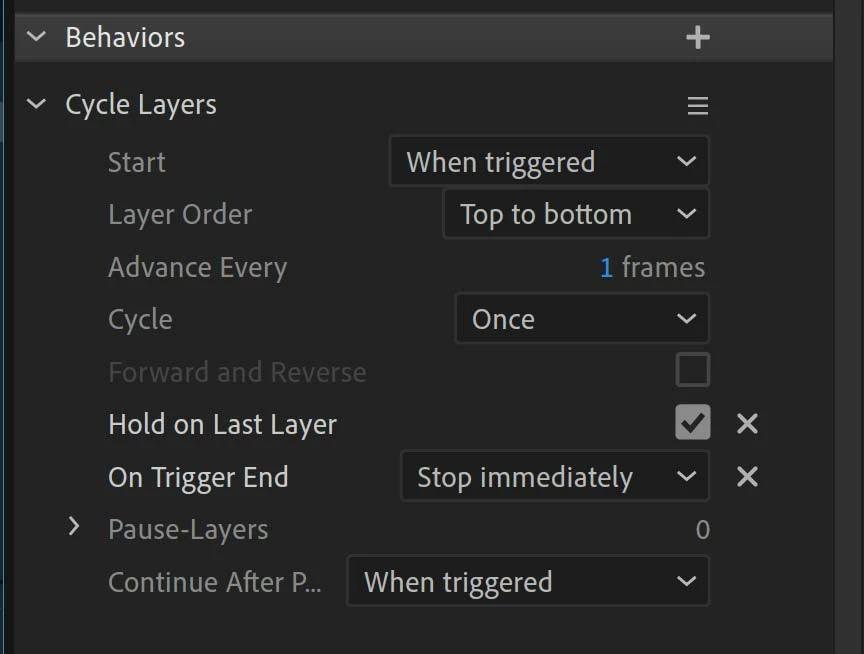
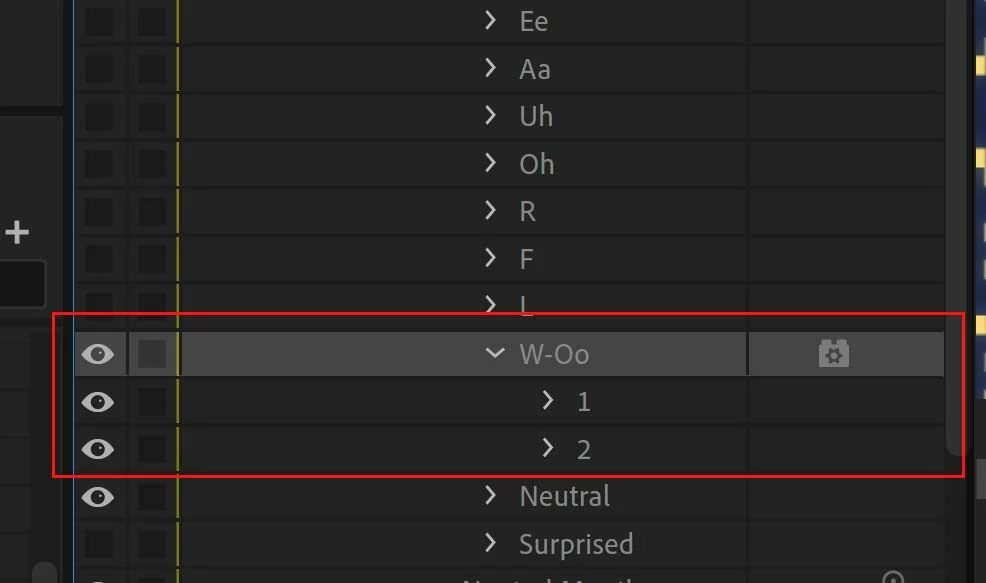
One more thing I noticed in your hierarchy. Some of the visemes appear to have more than one shape (such as Aa) Are there more than one mouth shape that you want to display there? Normally, the program will display the first shape in the group and ignore the rest. If you need the program to animate the shapes in order, you need to add the Cycle Layers behavior to that viseme. Refer to the eamples below to see how it is done.


Thank you so much ! I just had to unhide my 1 or 2 in groups Aa and W-Oo and Hide the group instead, it couldn't find wich one to take 

Yeah I'll do the Cycle layer next, thanks

Have a nice day !

2 replies

TheOriginalGC
Community Expert
Community Expert
July 16, 2025

Looking at your rigging hierarchy, it looks like your face has three mouth objects. The one mouth (marked as independent) and the other two in a separate folder that is labeled as "Alternate" and is not marked as independent. I do not know what is in the initial Mouth folder, but it looks like that is the object that the program is identifying as the mouth and the rest are simply confusing things. As Kevin has mentioned, all of the layers need to be in a single folder. The way it works is that the program will start with which ever layer set you've chosen for the default mouth and hide the remaining layer sets. The swap set trigger will switch the visible layer set with the hidden layer set you've chosen. Look at the image I have attached. The puppet has three mouth sets inside a ingle folder labeled as "Mouths" (you can go ahead and keep using the label of mouth without the "s", the name of the folder is not important). In this case, there are three mouth layer sets, happy mouth, neutral mouth, and sad mouth, each witrh their own viseme sets. When one of the three sets is triggered, then the program will use the visemes in that set for the puppet's dialog and treat that set as if it were the only set of visemes in "Mouths," ignoring the other two until they become triggered. I hope this clears things up for you.

Participant
July 17, 2025

Hi,

Thank you so much for your answers; they were very helpful! Both of them complemented each other, and you were very fast.
I just have a new issue now, and it's that even if the mouths work, sometimes it's blank for a millisecond, I don't know what it's due to. I put visemes in order and added the L (which I didn't have), but it's still doing that.

Also, putting the crown on "Mouths" makes it move weirdly because of how my puppet is (mouth jaw combined, 3D puppet), so I didn't keep it, but it has the same issue on or off. So I don't think the crown is the problem.

I hope you can find the issue here.

TheOriginalGC
Community Expert
Community Expert
July 17, 2025

A blank shape usually means that something isn't there for the program to display. If you take a close look at the timeline, you may see where the blank is happening and which viseme it is trying to display at that moment.


It's quite alright to not have the mouth marked independent. That simply tells the program whether or not to move the connected mesh when the mouth moves.


One more thing I noticed in your hierarchy. Some of the visemes appear to have more than one shape (such as Aa) Are there more than one mouth shape that you want to display there? Normally, the program will display the first shape in the group and ignore the rest. If you need the program to animate the shapes in order, you need to add the Cycle Layers behavior to that viseme. Refer to the eamples below to see how it is done.

Kevin-Monahan
Community Manager
Community Manager
July 16, 2025

Hi,

It sounds like you're experiencing some common issues with swap sets in Adobe Character Animator. Here are some troubleshooting steps to try:

Check Swap Set Configuration:
◦ Ensure that the swap set for the mouth groups is correctly configured. Each mouth set (Default Mouth, Happy Mouth, Sad Mouth) should be part of the swap set, and the triggers should be assigned correctly.


Verify Trigger Assignments:
◦ Double-check that the triggers for each mouth set are correctly assigned and that there are no conflicts. You can do this by selecting each mouth set and reviewing the trigger assignments in the Triggers panel.


Tagging the Mouths Group:
◦ The "Mouths" group should not have the "Mouth" tag applied if it causes rigging issues. Instead, ensure that each individual mouth set (Default Mouth, Happy Mouth, Sad Mouth) has the appropriate "Mouth Group" tag.


Check for Rigging Issues:
◦ If tagging the "Mouths" group with the "Mouth" tag causes rigging issues, it might indicate a problem with the structure or hierarchy of the puppet. Ensure that the hierarchy is correct and that there are no conflicting tags.


Lip Sync Behavior:
◦ Ensure that the lip sync behavior is applied to the correct mouth set. The lip sync behavior should be able to control the visemes for each mouth set within the swap set.


Playback and Recording:
◦ After recording the triggers, make sure to review the timeline to ensure that the trigger changes are correctly recorded. If the triggers show up on the timeline but do not play back, it might indicate an issue with the playback settings or the puppet's rigging.

I hope these suggestions help you resolve the issue with your swap sets in Adobe Character Animator. If you have any further questions or need additional assistance, feel free to ask!


Thanks,
Kevin


Kevin Monahan - Sr. Community & Engagement Strategist – Pro Video and Audio