here's the link:
https://drive.google.com/file/d/14wmQH2Gvx4T1KkgVqrD4CEgpzMU51IJF/view?usp=sharing
thanks again for your help!
Sorry for the delay, I was traveling for two weeks and only now am I finally clearing out my inbox.
> what's happening is it's going straight to the final layer in the cycle animation
Thanks for uploading the puppet, it looks great!
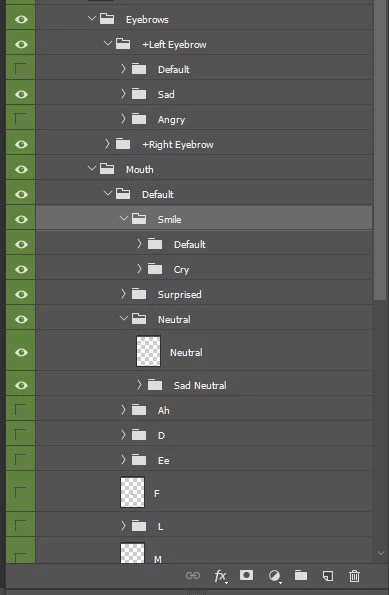
I now understand the problem: inside the Smile group you have both Default and Cry. Since "Default" is set to be triggered by a default trigger in the swap set, it gets triggered right away, even when you're not looking at it. When you later smile, which shows that Smile group, it's already holding on the last frame of Default. If you then hit 2 it switches to Cry. If you hit 2 again to unlatch it (while continuing to smile yourself) you'll see the full Default animation.
I think you could achieve what you want by having two entire copies of the puppet, only differing in the Smile group, but that's a big mess. If you can give up on having the face-tracked smile automatically trigger one of two animations, you can still have access to the expressions via keytrigger with a much simpler grouping arrangement (i.e. as described above).
If Face allowed more than one Smile layer per view, you could tag both Default and Smile groups with Smile, and turn off Default checkbox for that Default group (that way both Smile & Default would be triggered at the same time, so you wouldn't miss the start of the animation), but unfortunately it's limited to one per view.



 AdChoices