cuckets
Participating Frequently
October 25, 2018
Answered

Swap Sets on Mouth

  • October 25, 2018
  • 1 reply
  • 3091 views

hi, I'm having issues trying to swap between different types of mouths.

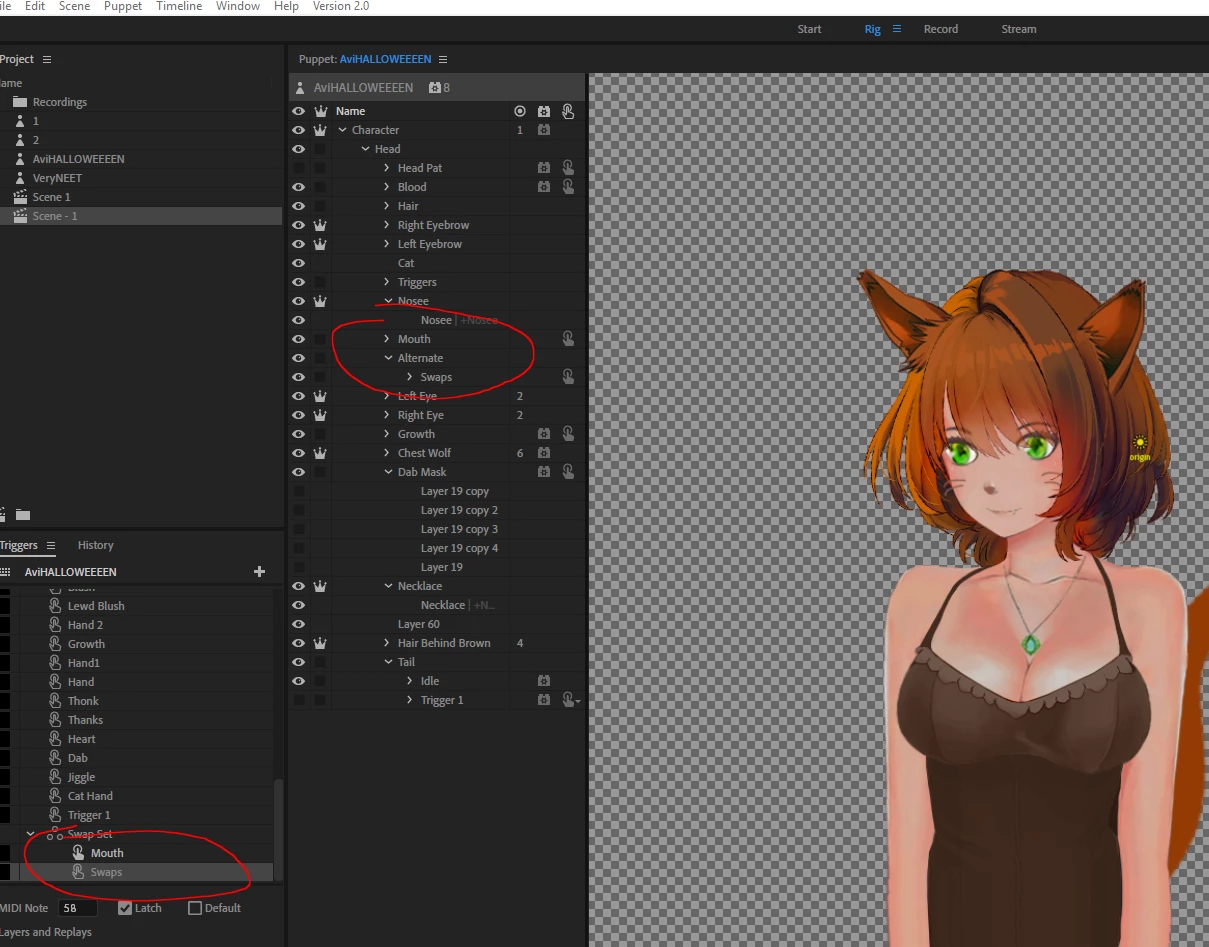
Here's what my nesting currently looks like

and here is a short gif of what happens(the swapped in mouth is just blank and no mouth appears)

Screen capture - bf5027d6a5b87c024219ed46dc3c2d48 - Gyazo

thanks

This topic has been closed for replies.
Correct answer DanTull

In my case since I didn't want to draw a second set of visemes but wanted to clearly tell the difference between the two, I made her mouth sharable, dragged in another instance of it, and turned it upside down (so the tongue looks wrong, but mostly it looks like a "sad" mouth set). I didn't need a second behavior and both sets work. I think the same would have been true if I'd done the duplication and flipping in the PSD instead of via a shareable group in Ch.

DT


As I thought about this more I figured I might as well attach it. This is a pure demonstration, the upside down mouth is purely to illustrate a swap set arrangement for 2 mouth sets that seems to work.

DT

1 reply

DanTull
Adobe Employee
Adobe Employee
October 26, 2018

Weird, your basic setup seems right. I did something analogous with Chloe and it seems to work.

I'm not sure from the picture what is different yet. Are there any other triggers that might be hiding the mouths?

DT

alank99101739
Legend
October 26, 2018

What I personally do (and I tend to just repeat the same thing once I get it to work - there are probably other ways that work equally well) is create a layer “Mouth Group” (which auto tags it with Mouth Group), with a subgroup for “Mouth” containing the standard visemes. I then put the non-standard mouth positions as siblings of Mouth (under Mouth Group). I then create a swap set for Mouth Group where Mouth is the default. So keyboard triggers etc swap out the Mouth and replace it with one of the other mouths (angry, grin, etc). But that is where the angry mouth just has one position (not lots of visemes). (I just like always putting all children for a swapset under one parent for simplicity and consistency.). If I want triggers for “smile” etc (standard visemes) I create a second swapset on the Mouth layer (With Neutral is the default).

However if you want multiple mouths each with visemes (e.g. a happy set of mouth positions and an angry set of mouth positions) you might need to add multiple Face behaviors to connect up to the different mouths. Chole you will notice has behaviors added on both Mouth layers. I think this is the difference.

To check, open up the Face behavior then look under “Handles”, and the last group is “Mouth”. If this has not bound to all the mouths, then I suspect you will need to add multiple behaviors to control each set of visemes.

That’s my guess anyway.

DanTull
Adobe Employee
Adobe Employee
October 26, 2018

In my case since I didn't want to draw a second set of visemes but wanted to clearly tell the difference between the two, I made her mouth sharable, dragged in another instance of it, and turned it upside down (so the tongue looks wrong, but mostly it looks like a "sad" mouth set). I didn't need a second behavior and both sets work. I think the same would have been true if I'd done the duplication and flipping in the PSD instead of via a shareable group in Ch.

DT