


Inspiring
July 20, 2019
Question

This most probably a very simple answer

  • July 20, 2019
  • 2 replies
  • 770 views

The answer to this is most probably very simple but when I draw a character in Illustrator and try and reduce the number of sub-layer the best I can do is as below:
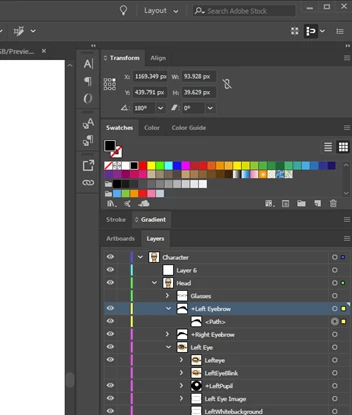
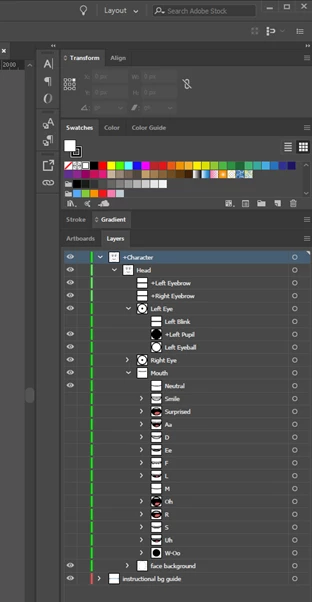
Taking the left eye brow, as an example, I have the main layer and a secondary layer thereafter. But if you look at the 'Blank Face AI' that comes with the Character Animator program program they have each feature of the face to a single layer as shown below. I am sure this is a simple fix to copy but can someone tell how they simplify the Illustrator drawing like this so I can emulate it. Thank you.
    2 replies

    alank99101739
    Legend
    July 21, 2019

    If it is just extra sublayers you can probably ignore it. If you really want to do it you could try the illustrator user guide or forums. Or i can try and do some screenshots. I drag things around frequently, so it is possible, but might need better instructions than a few words.

    I did a google search and found the following which might help. There are probably lots of youtube videos around too if you hunt. How to use layers in Illustrator

    Participant
    March 14, 2025

    This is exactly the question I am endlessly googling.. If you have more than one path in Illustrator to create an eyebrow, for instance, it creates sublayers for every single path. When you pull this in Adobe Character, those layers show up and make it really hard to create triggers, etc. Please tell me @kellyonline33 kellyonline33 if you solved this yet!!

    alank99101739
    Legend
    July 20, 2019

    I am sorry, I might understand the question, but I think you want to reduce the number of layers by eliminating sublayers? I would drag the sublayer up a level (just grab it with mouse and drag it over the layer above). Then delete the layer that now has no children and rename the layer you dragged up higher to correct name.

    There might be a better way, but that is what I do.

    Inspiring
    July 21, 2019

    If you look at the Blank face AI that comes with the Character Animator program each feature is only one layer there are not sub-layers like mine. The eyebrow take two layers as do a number of the other features but each feature of the Blank face, eye brow, eye, pupil just take one layer. Dragging the sub-layers up into the main doesn't work unfortunately and I have tried all the different functions without success.

    Sjaani
    Community Expert
    Community Expert
    July 21, 2019

    Can you explain what is happening when you try to drag the sub-layers out and drop them as their own layer?
    I would have given the same explanation as alank on this one, so it might help to know what's happening when you try to drag them out.